 NexScrm官方博客
The advertiser holds up a screenshot from the backend saying Facebook brought in 3,200 clicks this week; the customer service lead says they only added about 400 people. Neither side can convince the other. This isn't about one side inflating numbers – they are counting two different things.
Let's put the conclusion up front: split links can only tell you how many people clicked the redirect. The actual follower count must be measured on the customer service account side – only when a new number initiates a conversation and produces the first message does it count as one follower. Channel attribution comes from markers attached at the link layer; the quantity is counted at the account layer. Build these two layers separately, then merge them into one report.
Here's the process in the order you would actually do it.
First, Give the Three Numbers Distinct Names
Many teams have messy stats because one word means different things to different people. Before building the table, separate these three:
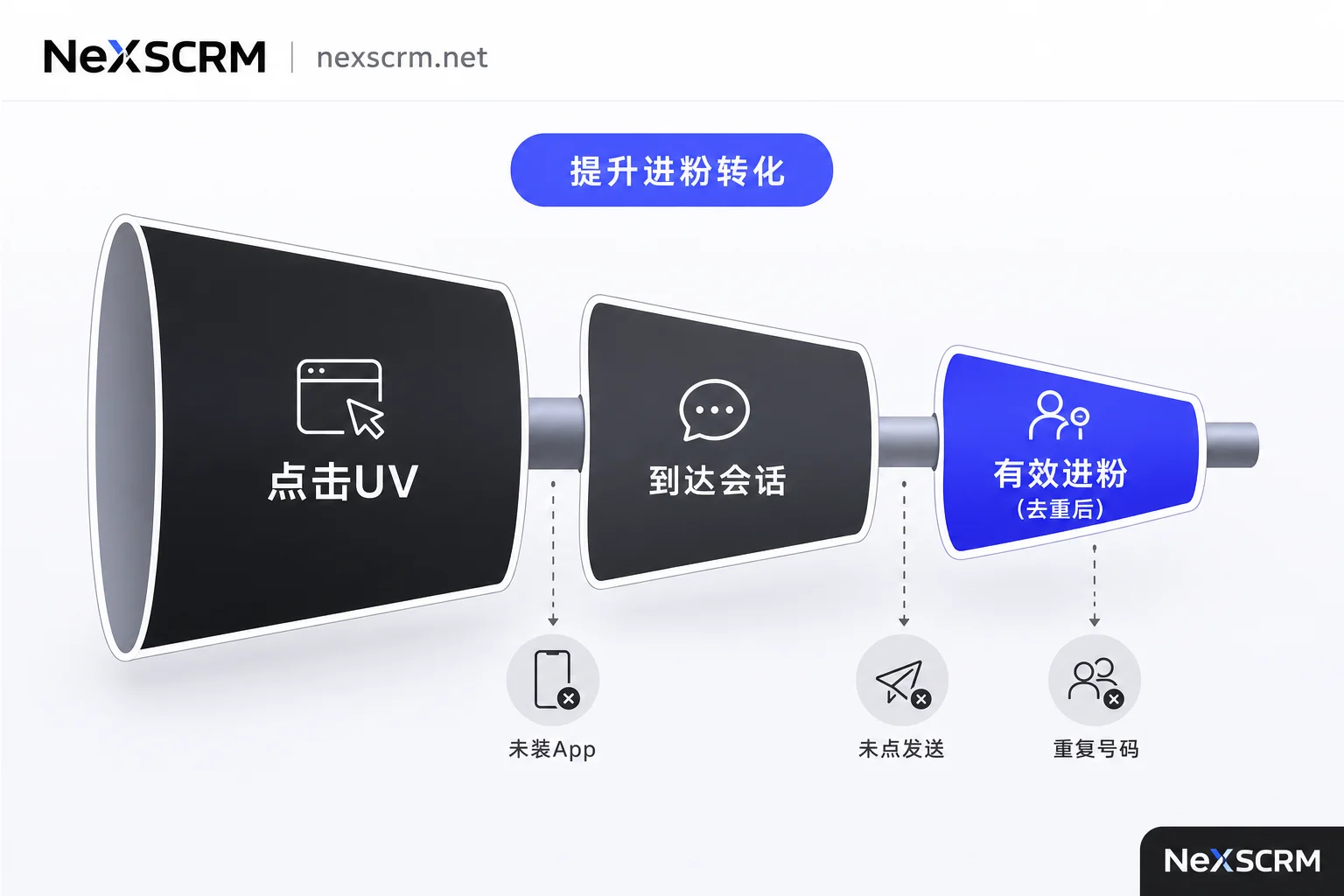
- Click UV: The number of unique visitors who opened the split short link. This is at the redirect layer; the short-link backend has this data.
- Arrival Sessions: The number of people who jumped from the short link to WhatsApp/Telegram/LINE and successfully triggered a conversation window. This layer usually can't be precisely measured; it's an estimate.
- Valid New Followers: The count of numbers that actually generated a first message in your customer service account, were recorded as a new contact, and were deduplicated.
From click to app launch to the user manually hitting send, people drop off at each step: the app isn't installed, the browser blocks the redirect, the page opens but the user doesn't hit send, they open it and leave after a glance. So there's a natural gap between click UV and valid new followers, and that gap varies by channel, region, and creative. Reporting click counts as follower counts is the most common and costly mistake in this tracking.
Put these three columns side by side in one table so the ad team and customer service have a common language. The middle conversion rate is also a useful diagnostic: if a particular creative has high clicks but very low follower gains, it's often a problem with the landing page or the number's status, not the creative itself.
Layer 1: One Channel Equals One Link – Don't Reuse
The principle for creating links is simple: give a separate short link to every source you want to see individually in the report. Not per platform – per ad unit you want to distinguish: Facebook ad group A gets one, TikTok profile bio gets one, an influencer's story gets one, a business card QR code for a trade show gets one. If you reuse links, you can never split them apart later.
The number of short links will quickly grow to dozens or hundreds, so you need a naming convention from day one, like fb-ad-0312-a, tt-bio-jp. The consequence of messy naming isn't immediate, but three months later when you want to review a specific creative, you won't be able to find which link it used.
Each short link binds to a group of customer service accounts, and the system distributes visitors via round-robin or weighting. There are two reasons: a single account getting flooded with strangers in a short time can trigger risk controls, and one customer service rep can't handle a backlog. Weights can be set by agent online time, language, or daily capacity – don't just split evenly.
Layer 2: Make the Channel Marker Come in with the Person
This is the key step of the whole method. After the link sends someone into the IM, you need a signal to tell you which link they came from.
WhatsApp has a native solution. The official Click-to-Chat protocol lets you prefill a text in the conversation link, formatted as https://wa.me/<手机号>?text=<URL编码后的文本>. When the user clicks, the app opens, and that text automatically appears in the input box. If they hit send, that message becomes the first message of the conversation, and thus the channel identifier.
When writing the prefilled text, keep these points in mind:
- The text must be URL-encoded: spaces as
%20, line breaks as%0A. Chinese characters and emojis also need encoding, or some clients may truncate it. - Write content that customers are likely to send as-is. A pure code like
FB01looks odd and might be deleted; a sentence likeHi, I'm interested in your product. (FB01)has a much higher retention rate. - Customers can delete or rewrite the text before sending, so this marker has high coverage but isn't 100%. You need a fallback logic (see next section).
- Write the number in international format, without plus sign, spaces, or hyphens.
Telegram and LINE personal accounts have no equivalent capability. Telegram's deep-link start parameter is for bots; t.me/username on a personal account opens a regular conversation without custom parameters. LINE personal accounts are the same. So to distinguish channels on these platforms, you have to think differently:
- One Channel, One Dedicated Account: Split the account pool by channel – TikTok traffic uses only group A, influencer collaborations use only group B; the number itself is the channel marker. The trade-off is scattered numbers and reduced capacity, suitable when you don't have many channels.
- Front a Controllable Page: Have the short link land on your own intermediary page, record the source there, then redirect to the IM. Correlate on the customer service side by time window and number segment. This attribution is probabilistic – acceptable when volume is high, but don't use it for performance-based settlements when volume is low.
- First-Message Prompt: Show a visible note on the landing page like “Please send the code TT when you enter.” This relies on manual compliance, which isn't high, but works for high-intent customers as a supplement.
If your primary platform is Telegram, how you structure the accounts also affects tracking. The division of labor among channels, groups, and bots determines whether you're counting subscribers or private messages – these two numbers cannot be mixed.
Layer 3: Decide on the Account Side What Counts as "One Follower"
The real counting happens in the dashboard. The rules should be written down and followed uniformly across the team:
- Trigger Condition: A number/UID that wasn't in your contact database before, and produces a first message in one of your accounts, counts as one new follower. If someone only adds a contact without saying anything, or the first message was sent by a customer service rep proactively, handle it according to a team agreement, but it must be consistent.
- Deduplication: The same customer might click both a Facebook link and a TikTok link, or might be distributed to two different customer service accounts. Use international phone number or Telegram UID as the unique key to deduplicate; count the same person only once per day. Attribute the channel to the first touch, or to the last touch per a team rule – either is fine, just document it and don't change halfway.
- Attribution: First, read the channel code in the first message. If there's no code, fall back to associating by account number and time window. If neither works, put it in the “unknown source” bucket. The unknown-source ratio is a health indicator for this tracking – if it's consistently above 30%, it means the prefilled text design is flawed or the redirect page is broken.
There's another easily missed pitfall: when a customer service account gets risk-controlled, goes offline, or hits its daily cap, the routing config should automatically remove it from the pool so you don't keep sending people to a dead number. Simultaneously, the historical channel attribution data for that account must be saved independently – don't let the report have a gap just because the account was disabled, or you'll lose a chunk of historical baseline when you rerun the same creative next month.
In NexSCRM, this layer corresponds to the contact counter and split-link stats in the dashboard: multiple platforms and accounts are aggregated in one interface for sending/receiving, new conversations are counted as new followers on the account side, contact deduplication and customer profiles merge duplicate numbers, and cloud backup of chat history ensures historical attribution is still traceable after account changes or agent departures. To see how to pull this data, check the counter and backup feature description.
Daily Reconciliation Columns
For daily reports, just these columns – anything more and nobody reads it:
| Column | Data Source | Purpose |
|---|---|---|
| Short-link UV | Short-link backend | Check if ads have normal exposure |
| Valid new followers (deduplicated) | Dashboard counter | The only external-facing metric |
| Click-to-follower rate | Divide first two columns | Diagnose the handoff |
| Unknown-source count | Dashboard | Check if the marker pipeline failed |
| Follower distribution by account | Dashboard | Spot offline or overloaded accounts |
When reconciling, look at columns 4 and 5 first. If unknown-source spikes, it's likely a link's prefilled text got corrupted or encoding was missed. If a specific account's follower count suddenly drops to zero, check the account's status before blaming channel quality. After these two self-checks, the first three columns become trustworthy.
Three Boundaries – Don't Cross Them
The tracking scope is only about “how many people came in” – don't extend it to revenue attribution. A customer might take weeks from click to purchase, switch contact persons, or be influenced by other touchpoints. Dividing order revenue directly back to the follower link will likely give wrong conclusions. The channel follower table answers cost per acquisition and handling efficiency; the sales side needs a separate follow-up and stage tracking system. You can view both tables side by side, but don't merge them into one number. For a full breakdown at the evaluation level, refer to how to reconcile private traffic ROI and conversion rates.
Don't use follower count as the only KPI for customer service performance. Follower volume is heavily influenced by ad spend; what agents control is response speed and first-touch conversion. Evaluate these two separately.
Channel quality should be judged by subsequent behavior, not just volume. For the same 200 followers, one channel's people average three messages then go silent; another channel's people have half asking about price. You only see this difference if you attach tags and follow-up statuses. Follower counting solves the “is there,” customer tagging and segmentation solves the “is it worth it.” Only after both steps does this channel table become decision-useful.
Build the links correctly, get the markers in, run the judgment on the account side, and remove duplicates – after these four steps, the advertiser and the customer service lead won't be looking at two numbers doubting each other.



Comments(0)