 NexScrm官方博客
For teams driving traffic to independent stores, building influencer relationships, or doing B2B visual marketing, opening Instagram Direct Messages every day often means encountering inquiries mixed with Spanish, Portuguese, Arabic, or even various slang abbreviations.
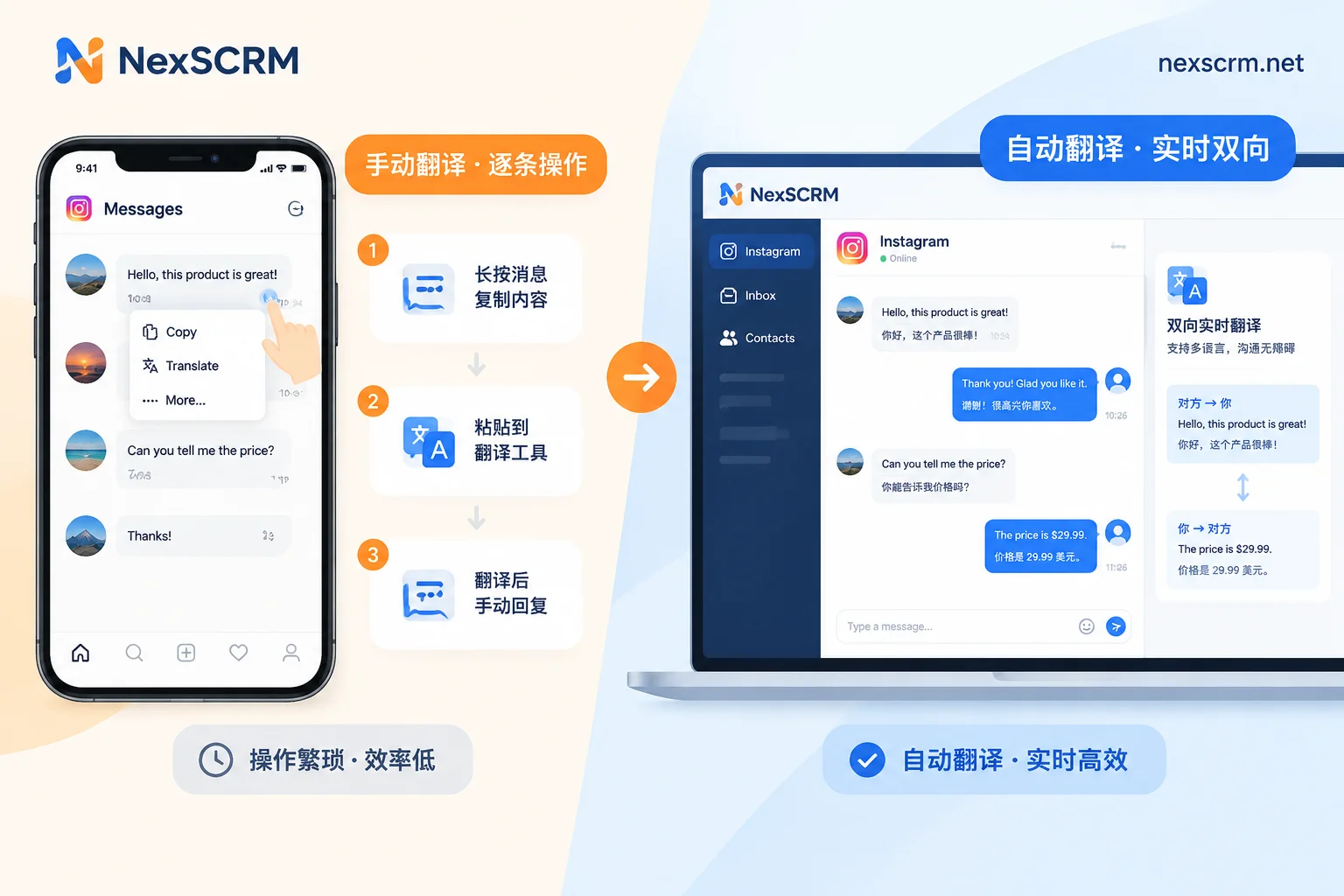
Although Instagram has launched native DM translation (supporting 99 languages), many operators find in practice that some accounts don't have the translate option when long-pressing a message, and official translation only converts incoming messages to Chinese; when replying, you still have to switch out to a translation app.
This article first explains how to enable and troubleshoot Instagram's official native DM translation, then for cross-border teams handling dozens to hundreds of inquiries per day, breaks down how to combine "two-way translation for sending and receiving" with "multi-account reception" on desktop.
1. How to Use Instagram's Official Built-in DM Translation?
Instagram's native DM translation runs in the mobile app (iOS and Android), requires no extra plugins, and the core action is "long-press a single message to trigger":
- Confirm display language settings: Open the Instagram app, go to "Profile" → top-right menu "Settings and privacy" → "Language", and set the app language to your preferred native language (e.g., Simplified Chinese).
- Long-press to translate in DM: Enter the DM chat window, find the foreign-language message from the customer, long-press that message bubble, and tap "Translate" in the pop-up menu.
- View the comparison result: The translated text will appear directly below the original message bubble.
Why Is There No "Translate" Button in Your IG DMs?
If long-pressing a message only shows "Copy, Report, Forward" but no "Translate", it's usually due to one of these four reasons:
- Outdated client version: Native DM translation requires a relatively new app version to call Meta's translation interface.
- Language detection overlap: If the customer's message contains words in the same language as your app's system language, or consists entirely of model numbers and short abbreviations, the system may determine no translation is needed and hide the button.
- Account grayscale and regional restrictions: Some newly registered accounts or business accounts in certain network regions may experience delayed rollout of this feature.
- Unsupported message format: If the customer sends product screenshots, size chart images, or voice messages, Instagram's native translation can only handle plain text bubbles and cannot recognize foreign languages in images or voice.
2. Where Does Official Translation Fall Short for Cross-Border Inquiries?
For individual users who occasionally chat with overseas friends, long-press translation is fully sufficient. But if your Instagram account has a link to your independent store, runs Reels ads, and receives a large volume of customer inquiries daily, relying on the mobile native feature will hit four clear efficiency bottlenecks:
1. Only "One-Way Understanding", Not "Direct Sending in Foreign Languages"
The official feature only translates incoming messages for you to read. When you're ready to reply to a customer "This item is in stock, custom logo available for orders over 50 pieces, air shipping takes 7 days", Instagram's input box does not have a "Chinese auto-translate to foreign language" function. Customer service still has to switch out of the app, translate in a translation tool, copy, switch back to IG, and paste to send.
2. Missing on Desktop Web, Tapping Each Message Slows First Response
Cross-border customer service mostly works at a computer (convenient for checking ERP inventory, verifying price lists, sending high-res product images). But Instagram Web itself does not provide comprehensive in-stream auto-translation for DMs. If you fall back to long-pressing each message on mobile, during peak times when 10 customers are online asking questions simultaneously, just tapping to translate will multiply your first response time several times over.
3. Browser Translation Plugins Easily Break Page Structure
Some sellers install third-party web translation plugins in Chrome to run IG Web. But Instagram's front-end code updates frequently; when DOM nodes change, plugins easily fail. Worse, some plugins force machine-translate the entire page and even mess up drafts in the input box that haven't been sent yet, causing you to send in the wrong language.
4. Multi-Account Matrix and Multi-Platform Switching Is Extremely Tedious
Teams doing matrix traffic often have 5 to 20 Instagram accounts (different verticals, different language markets) and also need to handle customers on WhatsApp, Telegram, or LINE. Repeatedly switching IG accounts on mobile not only makes it easy to miss unread messages, but frequently changing networks across multiple devices can also trigger the platform's abnormal login verification.
3. How Cross-Border Teams Do It: Turn IG DMs into a "Two-Way Auto-Translation Workspace" on Desktop
To enable customer service staff who don't know minor languages to smoothly handle global IG inquiries, the core idea is to put Instagram accounts into a desktop SCRM workspace with built-in translation capabilities. Taking NexSCRM as an example, teams typically follow these four steps:
1. Automatic Two-Way Translation for Sent and Received Messages, Original and Translation Side by Side
In NexSCRM's multilingual real-time translation environment, translation is built directly into the desktop client, no browser plugin needed:
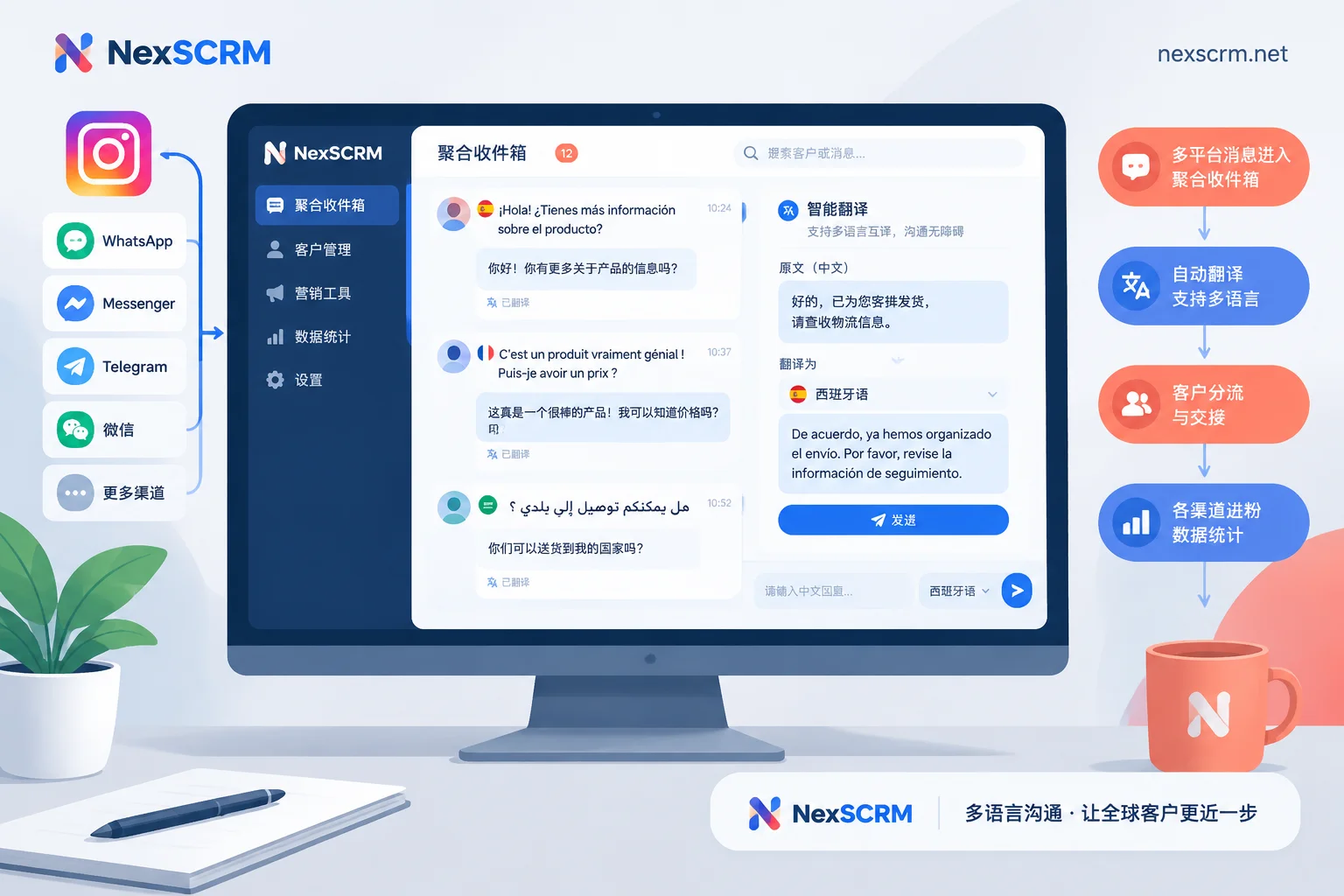
- Automatic detection on receipt: When a customer sends a DM in Spanish, French, or Arabic, the system automatically detects the language and displays the Chinese translation directly below the original message—no manual long-press needed, and both original and translation are preserved for verification.
- Type Chinese to send foreign language directly: Customer service types in Chinese in the input box; before or upon sending, it's automatically translated into the customer's target language and sent.
- Supports image and voice translation: When a customer sends a style screenshot with foreign-language annotations or a foreign-language voice message (supported by version), you can translate directly within the chat window, saving the step of exporting screenshots.
2. Lock Language per Conversation, Switch Translation Routes per Negotiation Stage
The same Instagram owner account might chat with a German wholesaler in the morning and reply to a Brazilian retail customer in the afternoon. To prevent language mix-ups, customer service can set translation language individually per contact (for detailed operation logic, see "How to Avoid Language Mix-Ups When Serving Customers from Multiple Countries on One Account: Lock the Language to the Conversation").
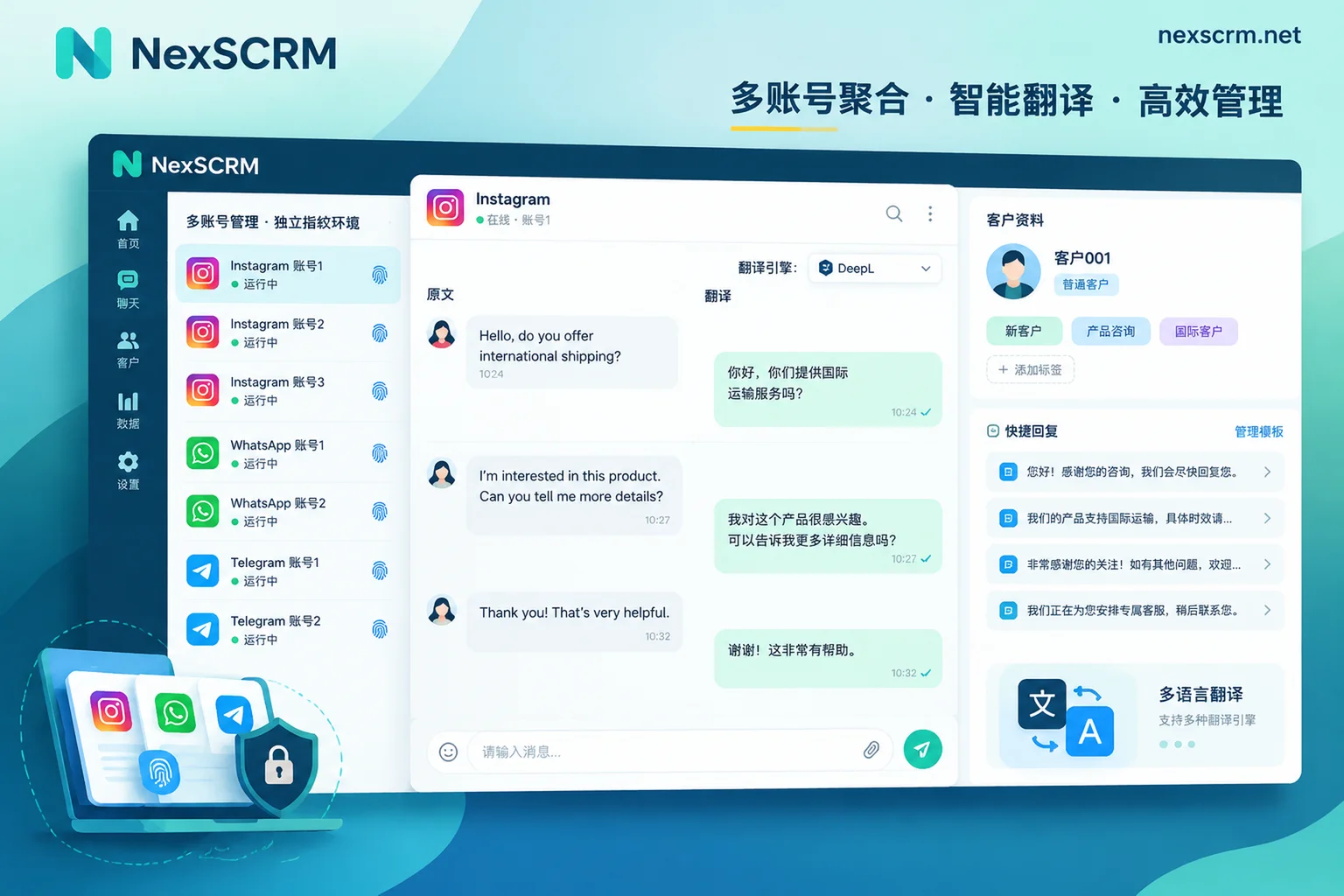
At the same time, NexSCRM supports switching between multiple translation routes: Google, Microsoft, DeepL, and AI large models. For daily greetings and order checks, you can use the standard high-speed route; once the customer starts discussing fabric weight, customization techniques, or return/exchange terms, switch to DeepL or AI large model routes anytime to ensure accurate business expression (for timing of route switching, see "Which Translation Route to Use for Daily Reception vs. Quotation Negotiation: The Switch Point Is When the Customer Starts Quoting Numbers").
3. Aggregate Multiple IG Accounts and Cross-Platform Messages, Isolated Environments to Prevent Association
If the team operates multiple Instagram accounts simultaneously, or guides potential big customers from IG DMs to WhatsApp or Telegram for deeper conversations, you can use the multi-account aggregation workspace for unified handling:
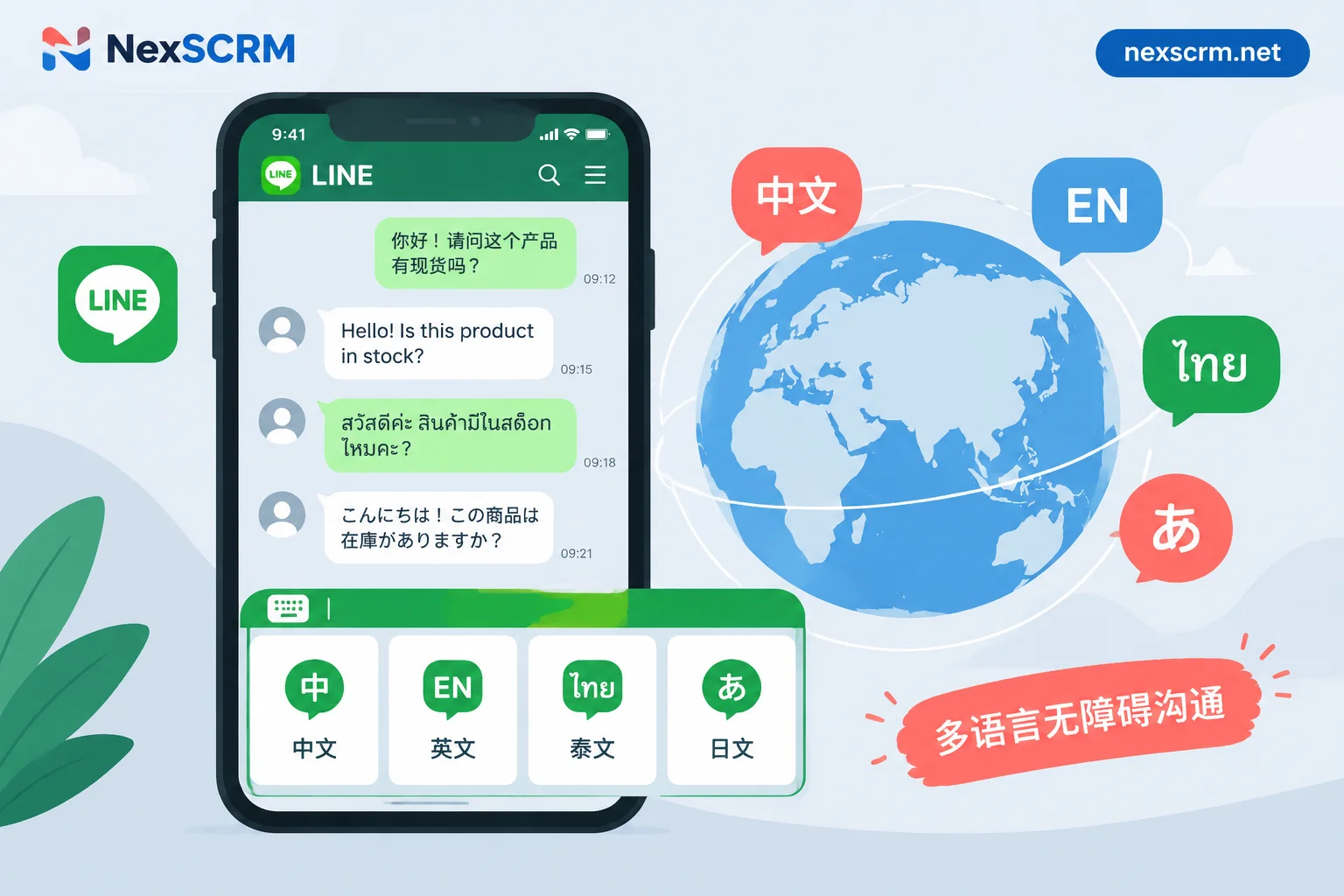
- One-screen aggregated send/receive: One client online simultaneously with multiple accounts on Instagram, WhatsApp, Telegram, LINE, Messenger, TikTok, etc.; unified unread reminders; windows can be freely split or merged.
- Independent fingerprints and session-level proxy IPs: Each Instagram account runs in an independent fingerprint environment, supports binding individual session-level proxy IPs (for configuration details, see "How to Configure Different Proxy IPs for Each Social Account"), and login status is automatically saved—no need to repeatedly scan QR codes or enter verification codes after restarting the software.
4. Use AI Scripts and Customer Profiles to Capture High-Intent Inquiries
After solving "can understand", you also need to solve "can reply fast and follow up closely". By combining AI scripts and auto-replies with the customer operations module:
- Automatic ice-breaking for new customers: New followers who enter DMs from Reels or bio links can trigger welcome messages or be greeted automatically by AI; common size and shipping questions can be answered instantly with public quick-reply templates that support variable substitution.
- AI-generated reply suggestions: For complex after-sales or price negotiations, AI can generate reply suggestions based on customer questions and historical conversations; customer service can confirm or fine-tune before sending.
- Accumulate customer assets: In the chat sidebar, easily tag IG customers (e.g., "influencer collaboration", "wholesale inquiry", "sample sent"), record source channels and follow-up notes. All chat records are automatically backed up to the cloud; combined with lead counters and employee internal controls, you can not only count the real number of leads per account (with deduplication support) but also ensure that customer profiles and communication records remain with the team after customer service staff leave.
4. How to Choose Among the Three Instagram DM Translation Methods?
Different stages of account volume suit different tool combinations. You can directly refer to the table below:
| Comparison Dimension | Instagram Official App Native Translation | Browser Web + Third-Party Translation Plugin | NexSCRM Desktop Client (Instagram Solution) |
|---|---|---|---|
| Incoming message translation | Requires manual long-press and tap "Translate" per message | Automatic or semi-automatic, depending on plugin stability | Automatically detects language and translates in real time, original and translation side by side |
| Outgoing message translation | Not supported (need external translation then copy-paste) | Relies on shortcut conversion, easily breaks input box format | Type Chinese and send directly as target foreign language |
| Image/Voice translation | Only supports plain text, not images or voice | Not supported | Supports text, image, and voice message translation (by version) |
| Translation engine routes | Only Meta's built-in translation interface | Mainly a single free interface | Google, Microsoft, DeepL, AI large models—multiple routes switchable |
| Multi-account and anti-association | Tedious account switching on mobile, shared network environment | Requires additional external multi-open tools, complex configuration | Multi-platform multi-account aggregation, independent fingerprint environment + session-level proxy IPs |
| Use cases | Personal daily social, fewer than 5 DMs per day | Temporary single-account desktop transition | Independent store traffic customer service, B2B foreign trade development, influencer outreach, and matrix teams |
If your team is being slowed down by multilingual inquiries on Instagram, or you have multiple IG and WhatsApp accounts that need centralized management, you can go directly to the NexSCRM download page to get the Windows client (limited-time free trial, no credit card required; subscription billed by concurrent online ports, translation character packs can be stacked without time limit; for details, see Pricing and Version Description). Start by connecting your high-frequency inquiry accounts to the workspace, so customer service can focus on closing deals instead of wasting time switching between translation tools.


Comments(0)