 NexScrm官方博客
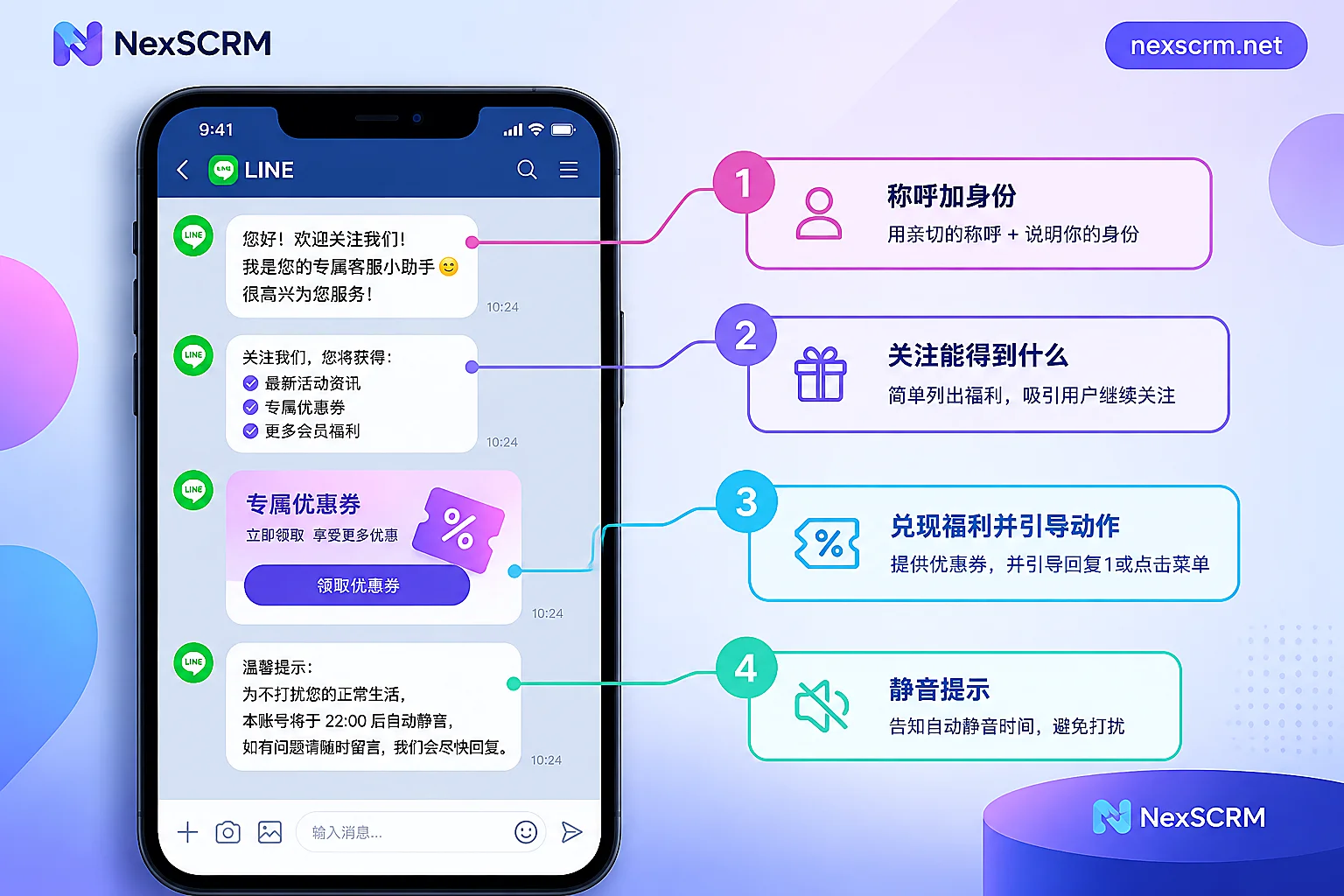
After a new friend joins, the first message is best delivered in 1 to 3 chat bubbles covering four things:
- Who you are.
- What they get from following this account.
- What to do right now, such as claiming a coupon, replying with a number, or tapping the menu below.
- If they find the messages too frequent, they can mute notifications instead of blocking.
This message is the "Greeting message" in the backend. It doesn't count against your monthly broadcast quota, so there's no need to shorten it to save quota. But it also shouldn't be long—its only job is to get the customer to reply with their first sentence or tap once.
First, understand a few rules for the greeting message
- Not counted against broadcast quota: LINE's official help center lists the add-friend greeting message and one-on-one chats in the backend as messages not counted toward broadcasts; sending them doesn't incur extra push charges.
- Up to 5 chat bubbles, 1 to 3 recommended: Five bubbles popping up at once looks like spam to a new friend.
- Available formats: Text, image, sticker, video, audio, plus backend preset coupons, rich messages, surveys, multi-page messages, and more—10 types in total, which can be combined.
- Variables can be inserted: Text can include the "friend display name" (the other party's LINE nickname) and "account name," and emojis can be added too.
There's one exception to confirm first. The free part mentioned above refers to native greeting messages set up in the official backend. If you use a third-party system to proactively push the first message via the Messaging API after a customer adds you, these messages are usually counted as pushes and may count against quota. It depends on the integration method—verify with your provider before going live.
The four-part structure of the first message
1. Greeting plus identity
Use the "friend display name" variable to address them directly, then state which brand or service team this is. They may have added you via a QR code, an ad, or in-store; they'll forget who they added within seconds, so the first line must make them recognize you immediately.
2. What they get from following
Use one or two sentences to list what this account is for, such as asking about product specs, checking order progress, or getting member pricing. Be as specific as possible—lines like "we provide quality service" carry no information for customers.
3. Deliver the promise, give only one action
If your add-friend entry point promised a new-customer coupon or resource pack, the first message must deliver it. Promising but not delivering is one of the common triggers for new friends to block immediately.
After delivering, give one clear next step, such as "Reply 1 to reach customer service" or "Tap the menu below for the product catalog." Giving three or four options at once often results in the customer tapping none.
4. Mute tip
Add one line at the end: if they're worried about interruptions, they can turn off notifications at the top right of the chat room. Many people block an account simply because they don't want reminders. Telling them there's a mute option can reduce some of the add-then-block cases.
A template you can edit directly
Here's an example for an account handling overseas retail or foreign trade customer service, using two chat bubbles; curly braces indicate backend variables.
Bubble 1 (text)
Hello {friend display name}, this is the {account name} customer service team 👋
Here you can directly ask about product specs and check order progress, and we send member-exclusive prices once a month.
Your new-friend gift coupon is in the next message—just show it when ordering.
Want to ask directly? Reply "1" and customer service will respond during business hours.
Worried about too many messages? You can turn off notifications at the top right of the chat room, and you can always reach us anytime.
Bubble 2 (coupon): New-friend gift coupon.
Optional Bubble 3 (rich message): If your entry point didn't promise a benefit, don't force a coupon in. Replace this spot with a rich message pointing to the content customers ask about most, such as the product catalog, pricing details, or shipping times.
A common recommendation is to keep the text to around 120 characters or less. The template above is close to that length; anything more should probably move elsewhere.
If your customers are in Japan, Taiwan, Thailand, and so on, write the welcome message in their language. After translation, it's best to have a native speaker review the tone—Japanese in particular requires proper honorifics.
Fine-tune by add-friend entry point
The same account often has several add-friend entry points, and customers arrive with different expectations, so the second and third parts should adjust accordingly:
- In-store or trade show QR code: The person just met you in person, so focus on in-store service, sample inquiries, and who to contact.
- Ad or landing page: Whatever the ad promised, deliver in the first message. Don't swap in a different benefit.
- Referred by an existing customer: Focus on order lookup and dedicated contact; promotional info can come later.
The native greeting message is shared across the whole account and can't be automatically differentiated by entry point. If the entry points differ greatly, put the common content in the greeting message and let subsequent replies or the rich menu handle entry-specific content. For how to design the add-friend entry point itself, see How to increase LINE official account friends.
Things easily missed during setup
- "Reply 1" needs a responder: If you write a number reply, set up the keyword auto-reply at the same time, or make sure customer service is online. A customer who replies and gets no response is worse than no guidance at all.
- Put other entry points in the rich menu: The welcome message should contain only one main action. Long-term navigation like product categories, store info, and FAQs belongs in the fixed bottom rich menu, while the welcome message directs the customer's attention there. Menu click data can be viewed in the backend; for the method, see How to track LINE rich menu click-through rate.
- State your service hours: If customer service isn't available 24/7, make the reply window clear in the first message so customers don't feel ignored after asking late at night.
- Actually test with a test account: Confirm the nickname variable displays correctly, the coupon and links open, and the bubble order matches the preview.
After the customer replies: catch that first sentence
The welcome message only breaks the ice; what really determines conversion is the reception after the customer replies. For overseas customers, the reply may come in Japanese, Thai, or Traditional Chinese, and the team needs to understand it, answer consistently, and record the customer's source and needs for easy handoff.
If you use NexSCRM for reception, the customer's foreign-language replies are translated in real time in the chat window, with both the original and translation preserved, and replies you write in Chinese can also be translated into the other party's language before sending. The most common questions after "Reply 1" can be saved in advance as quick-reply templates so different agents give consistent answers. Tag customers with source and needs, and the colleague taking over can see the prior context. For supported languages and routing, see Translation feature. For how to connect a LINE account and supported account types, refer to the LINE plan page.
How to judge whether this message is well written
After going live, watch two signals: blocks shortly after new friends join, and new friends' first replies and clicks.
- If blocks cluster among people who just added you, check the welcome message first: is it too long, did it fail to deliver the entry-point promise? For troubleshooting, see Why is your LINE follower block rate high.
- If no one blocks but no one speaks either, the problem is usually that the third part's action isn't clear enough, or no one responds after the reply. See What to do when LINE friends don't interact to adjust the first message and follow-up rhythm.


Comments(0)