 NexScrm官方博客
How to prevent overseas customer service ghost orders and client asset loss boils down to two executable actions: enforce permission control at four points (account ownership, session logging, field visibility, and export tracking), then regularly review anomalous data within the system. Starting in the second half of 2026, WhatsApp's billing policy will change, adding urgency to these management measures—details below.
First, Clarify Two Things: Ghost Orders Are a Behavioral Issue, Client Asset Loss Is a Structural Issue
Effective methods to prevent overseas customer service ghost orders and client asset loss fall into two categories: structurally tightening account, session, field, and export controls so that client contact information never resides on personal devices or accounts, and making anomaly signals observable data—such as mismatched message counts and order volumes or concentrated export records—for timely review. Moral suasion and confidentiality agreements are excluded, as they don't alter the fact that client contact information is stored on personal devices.
In practice, the four points should be tightened in order: accounts first, then sessions, then fields, and finally exports and handovers. Unclear account ownership makes the other three moot; unlogged sessions lead to both cost and evidence loss; ungranular field permissions give agents excessive access; and untracked exports turn offboarding into an accounting mess.
First Control Point: Account and Runtime Environment Ownership—Define Whether It Belongs to Company or Individual
Whether a WhatsApp or LINE account belongs to the company or an individual can be judged based on three criteria: who holds the registered phone number or SIM card; who controls the linked payment and verification methods; and whether the login environment is company-issued. If an agent registers with a personal number and logs in on a personal device, even if it was "for work convenience," the account's ownership is ambiguous, and there's no verifiable evidence for handover.
Many teams currently scatter multiple overseas social media accounts across individual agents' phones, making it impossible for the company to even count the total accounts, let alone hand them over. To centralize accounts, consider using a multi-account customer service management tool, where the company assigns isolated environments as the sole login entry, granting agents usage rights rather than ownership. NexSCRM offers multi-platform (WhatsApp/Telegram/LINE/Zalo) multi-account aggregation management with isolated environments, ideal for this scenario. This way, even if an agent leaves, the company can immediately reclaim the account, preventing client contacts from leaving with them.
Second Control Point: Unlogged Sessions Mean Both Uncounted Costs and Missing Evidence
As of the second half of 2026, WhatsApp's billing policy is changing significantly, making "sessions must be logged" a cost necessity rather than merely a technical recommendation. Meta has announced that starting August 1, 2026, AI auto-replies generated by Meta Business Agents will be billed per token. Starting October 1, 2026, service messages and utility template messages within the 24-hour customer service window will revert to per-message billing, and merchants must bind a valid payment method by September 30, 2026, or risk suspension of service message delivery.
This means the company now pays for every message, and cost measurement and client asset accounting are unified for the first time: any message sent from a personal number outside the system not only bypasses company billing but also cannot be retrieved in disputes—effectively, it never occurred. Regarding specific rates, Meta has indicated that country-specific rate tables will be published on September 1, 2026; for cost estimation, please refer to the official final list; this article will not provide figures. But management actions can proceed now: all sessions must reside within the system, archived through cross-border customer service software. NexSCRM's message backup capability ensures automatic archiving with the platform.
Second Control Point (Continued): Edit-Message Evidence Only Goes to the Side That Integrated the Webhook
Let's examine a specific dispute scenario. LINE Developers launched the messageEdited Webhook event on August 12, 2026: when a user edits a sent text message in a group chat with an official account, the system pushes an edit event with a unique replyToken, supporting bots or SCRMs to respond to the modified content. This event currently applies only to group chats, not to 1-on-1 private chats or multi-person chats; be aware of this scope and don't overstate its applicability.
Its management implication is direct: if a customer edits an order specification in a group, the edit evidence is pushed only to the system side that integrated the Webhook. An agent operating through a personal number or personal client won't receive that record. If goods are shipped incorrectly, responsibility cannot be reconstructed. Therefore, message backup and session archiving must be system-level actions, not left to agents' discretion.
Third Control Point: What Level of Client Contact Info, Tags, and Transaction Records Should Agents See?
Can customer data be restricted so that agents only see certain fields? Yes, and it's advisable. On the system side, you can implement field-level classification for customer profiles, showing different roles different content.
| Field Type | Customer Service (Frontline) | Customer Service Supervisor | Sales Director |
|---|---|---|---|
| Client Name/Nickname | Visible | Visible | Visible |
| Contact Info (Phone/Email) | Hidden or Masked | Visible | Visible |
| Historical Transaction Amount | Visible as Range | Visible as Details | Visible as Details |
| Source Channel | Visible | Visible | Visible |
| Internal Notes/Tags | Visible Only to Their Group | Visible to All | Visible to All |
Achieving this level of granularity requires configuring field visibility in a foreign trade customer management system, not relying on verbal agreements. If you're using a foreign trade customer management system, confirm whether it supports field-level permissions; otherwise, manual permission management is needed. Note that narrowing visibility comes at a cost to response efficiency: if agents can't see complete information, they may need to ask clients more questions. A balanced approach: frontline agents see only essential fields, while supervisors and managers retain full visibility. For high-value fields like contact info, configure them to display temporarily on click and log the action, preserving efficiency without exposing the full dataset.
Fourth Control Point: How to Hand Over WhatsApp Chat Records After an Agent Leaves—Action Sequence on Departure Day
The key when an agent leaves is the order: "freeze first, then export," not the reverse. If you export first and freeze later, the agent can continue operating during the handover period and might delete records or export more data.
Follow this sequence on the departure day:
- First, freeze the agent's login environment and account usage rights, immediately revoking system login access.
- Export all sessions and client lists under their name; the supervisor verifies completeness.
- Change the verification methods bound to the account, including phone, email, and backup codes, ensuring the former agent cannot recover access.
- Reassign clients currently in negotiation to other agents, and inform the clients of the contact person change.
- Retain session archives for at least one business cycle for future dispute retrieval.
This sequence minimizes the risk of "the client contact leaves with the person." If the agent added clients via a personal number before leaving, the company cannot force deletion of personal device contacts, but the first three control points reduce the likelihood of this happening.
Anomaly Signal Identification: How to Detect Ghost Orders in Foreign Trade Customer Service
How to detect ghost orders? How to check if an agent exported client contact info? These questions can be converted into monitoring for anomaly signals within the system. The following signals warrant review:
- Sharp drop in sessions per client but the client still converts: possible use of communication channels outside the system.
- Persistent mismatch between in-system message count and order volume: orders exist but chat records are missing; check alongside foreign trade team WhatsApp customer service KPI metrics.
- Anomalous concentration of export or client detail view frequency: an agent exporting large volumes in a short period.
- Edit events in group chats but no corresponding reply in the system: suggests the agent may have bypassed the system.
These signals are only triggers for review, not conclusions; manual verification is required. It's important to acknowledge the capability boundary: any system cannot monitor agents' personal devices or private communications. Only in-system behavior and data gaps are observable. These signals are aggregated in NexSCRM's messaging and marketing analytics, facilitating manager oversight.
Permission Configuration Comparison and Self-Check Checklist for Three Team Sizes
Minimum viable configurations vary by team size; here's a comparison table:
| Configuration Item | Teams up to 3 | Teams 3-10 | Teams 10+ |
|---|---|---|---|
| Account Ownership | Company-registered, personal numbers prohibited | Company-registered, isolated environment login | Company-registered, isolated environment + device management |
| Session Logging | All sessions archived in system | System archive + periodic backups | System archive + off-site backups + retention period and audit logs |
| Field Hierarchy | Contact info hidden or masked | Frontline hidden, supervisors visible | Role-based groups, real-time adjustments upon role changes |
| Export Approval | Manual approval, post-hoc logging | System approval, automatic logging | System approval + export requires second-person digital sign-off |
Use this checklist to self-diagnose gaps in your current team:
- [ ] Are all overseas social media accounts registered under the company?
- [ ] Can agents only log in via company-assigned isolated environments?
- [ ] Are all sessions (WhatsApp, LINE, etc.) automatically archived to the system?
- [ ] Are client contact details masked or hidden from frontline agents?
- [ ] Does exporting client details require approval, with all actions logged?
- [ ] Does offboarding follow the "freeze first, then export" sequence?
If any answer is "no," there's a risk of client asset loss; prioritize filling the corresponding gap. Preventing overseas customer service ghost orders and client asset loss boils down, at the execution level, to the four rows of configuration in this table.
FAQ
What are the risks of customer service adding clients on personal numbers?
The biggest risk is that client contact info leaves the company system, making it impossible for the company to manage client assets, and chat records on personal numbers cannot be retrieved by the company. Starting October 2026, WhatsApp will bill per service message; messages sent from personal numbers are not included in company bills and leave no evidence. In case of disputes or agent departure, client resources are directly lost.
What to do if an agent leaves and takes clients?
If accounts are centrally managed, following the "freeze, export, then hand over" sequence at departure minimizes the chance of client removal. If clients have already been taken, the company cannot force deletion of contacts on personal devices. Further actions involve contractual and labor law, which is a professional legal matter; it's advisable to consult company counsel or an external lawyer.
How to hand over WhatsApp chat records when an agent leaves?
Prerequisite: chat records are backed up in the system. On the departure day, first freeze the agent's account permissions, then export all sessions under their name from the system, assign them to other agents, and change account binding details. If records were not previously logged, you can only attempt to export from personal devices, which is both incomplete and non-compliant.
How to check if an agent exported client contact info?
Check the system-side logs for exports and detail views, focusing on abnormally high export frequencies. If export requires approval, retrieve approval records. If the system lacks logging, tracing is difficult; consider upgrading to an SCRM or customer management system that supports audit trails.
Can customer data be restricted so agents see only certain fields?
Yes. Configure field-level visibility in the system—e.g., hide phone numbers or show only transaction amount ranges. But note that narrowing fields reduces response efficiency, so configure by role.
After WhatsApp's October billing change, should we reduce auto-reply volume?
Yes. Starting October 1, 2026, service messages within the 24-hour window are billed per message, and AI auto-replies are billed per token. If you still use high-frequency auto-replies, bills may inflate. Set more precise trigger rules: route low-value inquiries to auto-replies and escalate high-value conversations to human agents. Also ensure you bind a valid payment method by September 30.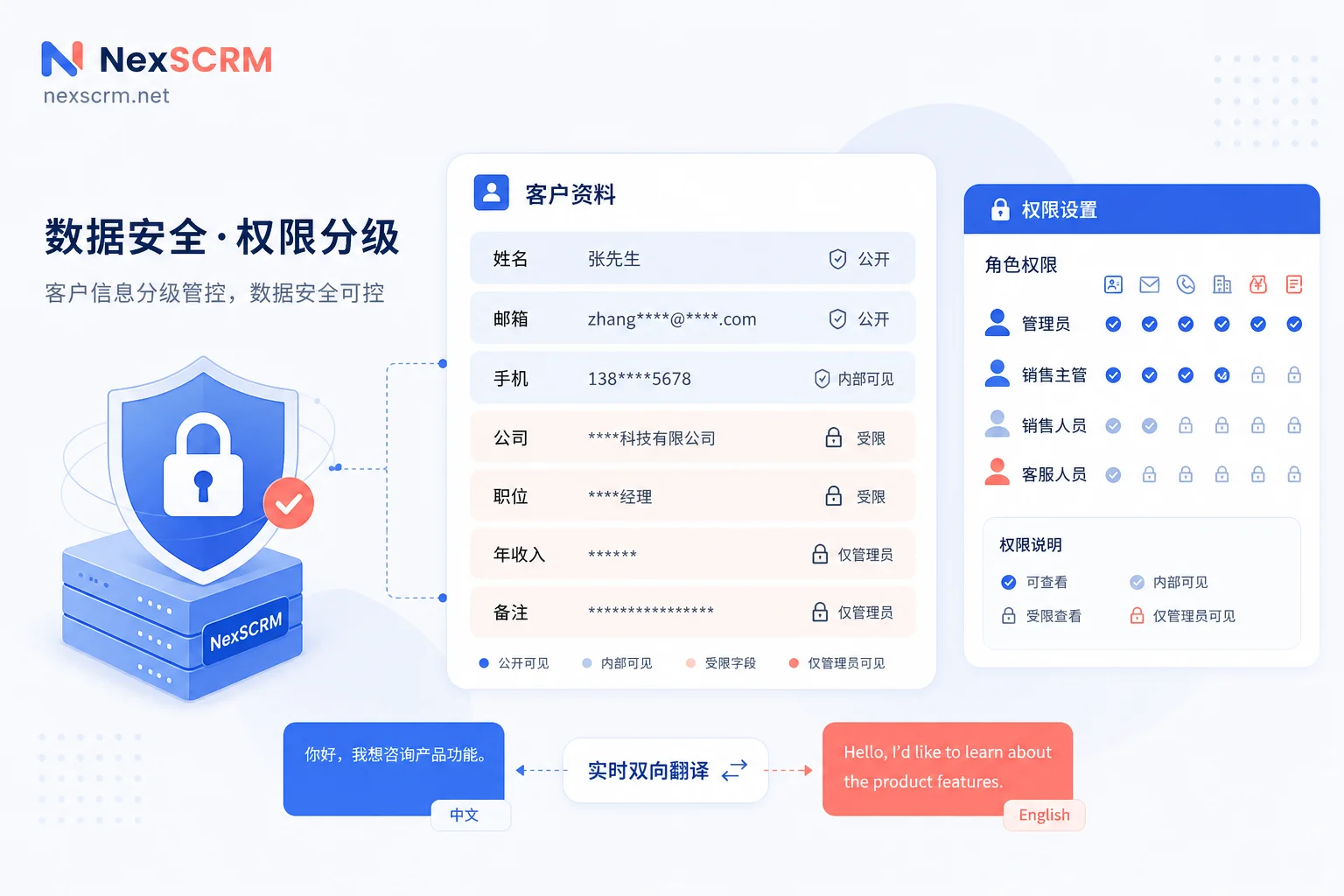


Comments(0)