 NexScrm官方博客
A practical overseas social media team multi-account permission divide and customer service collaboration scheme can be broken down into four layers: account ownership, conversation visibility, action permissions, and data export. By dissecting each layer and considering platform-native capabilities, you can avoid reply collisions and prevent departing employees from taking customer assets.
First Distinguish the Four Permission Layers: Account Ownership, Conversation Visibility, Action Permissions, Data Export
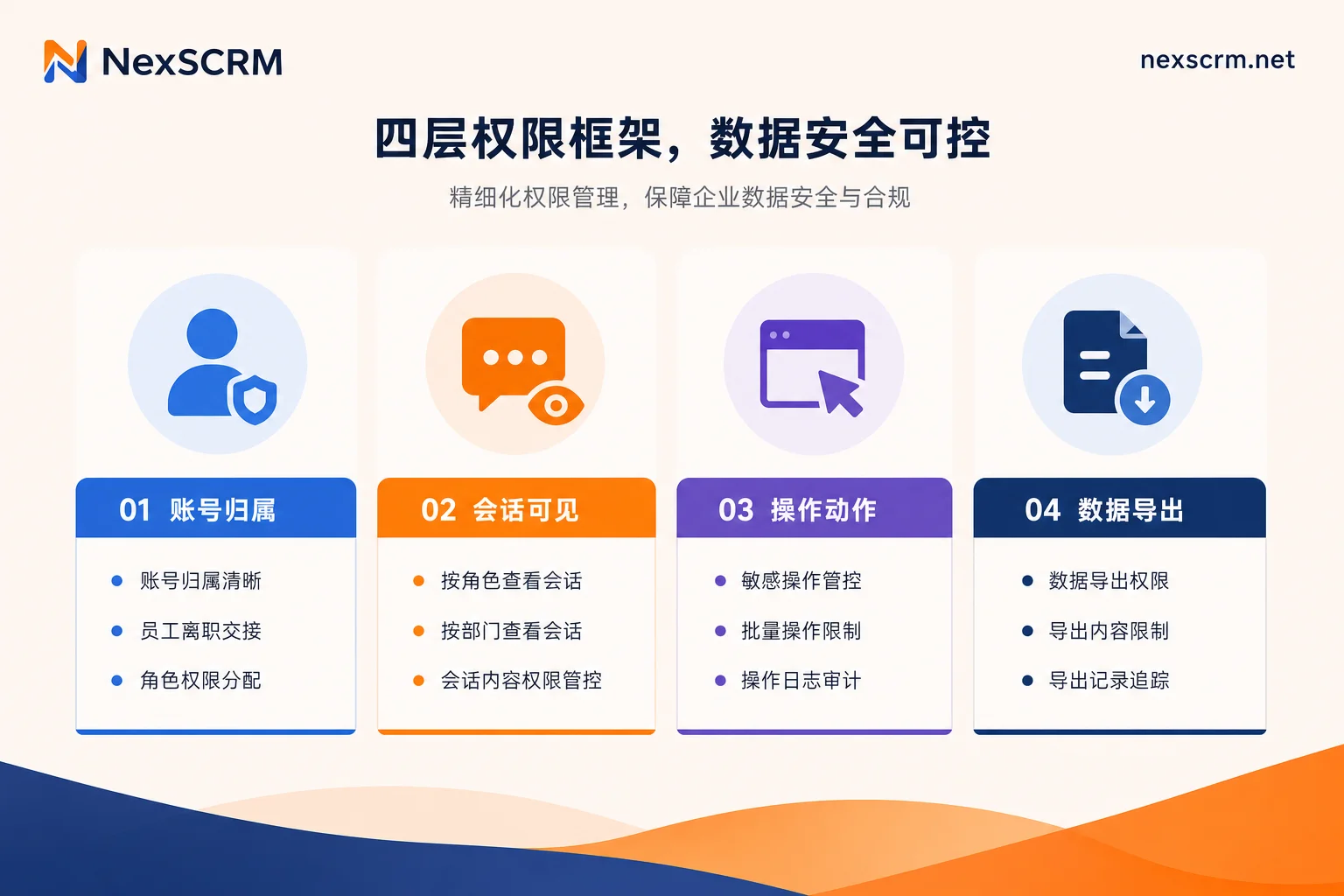
Many managers simplify permissions into two levels—"admin" and "agent"—but that's often insufficient in real operations. The four-layer framework breaks permissions into four independent dimensions, each controlling different risks:
| Permission Layer | Controls | Typical Risk |
|---|---|---|
| Account Ownership | Number, entity, registered email, login devices belong to whom? | Account bound to employee personally, can't be taken back on offboarding |
| Conversation Visibility | Which conversations can an agent see? | Information leakage, collisions, inconsistent experience |
| Action Permissions | Reply, broadcast, create groups, edit tags, etc. | Mis-deletion, abuse, damaging customer relationships |
| Data Export | Can contacts and chat logs be exported? | Customer data taken privately |
Why split by layer? Because platform-native capabilities only cover parts of these layers. For example, WhatsApp supports multi-device connection and conversation assignment but cannot restrict the visibility scope of connected devices or block exports; Telegram's group/channel admin permissions can be granular for actions, but private chats cannot be assigned across employees for viewing. Therefore, you must determine each layer—which can rely on the platform, which needs an external system.
Layer 1 Account Ownership: Under Whose Name Are Numbers and Entities Registered?
Account ownership is the premise for the other three layers. The principle is simple: numbers, registered emails, verification phones, and login devices belong to the company, not individuals. Ensure that numbers and entities are registered under the company name, that registered emails and verification codes are controlled by the company, and that devices are uniformly provisioned and managed by the company.
Otherwise, if account ownership is unclear, all subsequent permission settings are in vain. For example, WhatsApp Business natively supports connecting up to 4 companion devices (scalable to 10 with Meta Verified subscription). If these devices are employee personal phones, oversights during offboarding may leave departing employees with ongoing access to chat logs.
Layer 2 Conversation Visibility: Agents See Only Their Own Conversations or All?
This is the most commonly misjudged layer. Many junior managers think that enabling multi-device on WhatsApp achieves permission isolation, but in reality, all companion devices can view the account's complete chat history. According to Telegram's official Channels and Groups FAQ (May 2026), native clients do not provide cross-employee private chat assignment for viewing.
To achieve an exclusive view where agents see only assigned customers, you must rely on external systems. Shared team inboxes support conversation ownership and agent-specific views, limiting agents to conversations assigned to them. Boundary settings can be by customer group, by country, or by shift. For example, Latin America group agents see only Latin American customers; Europe group sees only European. For Telegram's login form and aggregation path, refer to Telegram multi-account aggregation login management solutions.
Layer 3 Action Permissions: Who Gets Reply, Broadcast, Create Group, Edit Tags?
Action permissions can be granular: reply, broadcast, create group, edit tags, delete posts, pin, etc. Telegram's official platform allows configuring administrator-specific actions (post, delete, invite, pin), which is a good reference model. Mainstream collaboration platforms also classify channel configuration and bulk deletion as high-risk permissions.
Suggested switch rules: regular agents only get daily operations like reply and tag editing; supervisors additionally have broadcast and group creation; only owners have channel configuration and bulk deletion. Action permissions should be combined with conversation visibility and data export to prevent low-permission agents from dangerous actions.
Layer 4 Data Export: Why This Permission Should Be the Narrowest
Contact export and chat log export are high-risk permissions. Native apps do not provide an option to block exports; connected companion devices can view and export the account's chat history (according to WhatsApp Help Center, August 2026). For example, Respond.io's public user settings documentation shows that its agent role has data export disabled by default, prohibits deleting customers and changing global integration settings—this is common practice among collaboration platforms.
Data export permissions must be the narrowest; strictly, only owners and necessary supervisors have it. Minimal viable practice: approval before export, trails after export. Keep records of who exported what and when for traceability. Native apps lack such export trails; this requires aggregation systems like NexSCRM with message backup capabilities.
Role Comparison Table for Three Team Sizes: 3, 10, and 30+ People
To ground the overseas social media team multi-account permission divide and customer service collaboration scheme into specific roles, the configuration differences for 3, 10, and 30+ people are as follows.
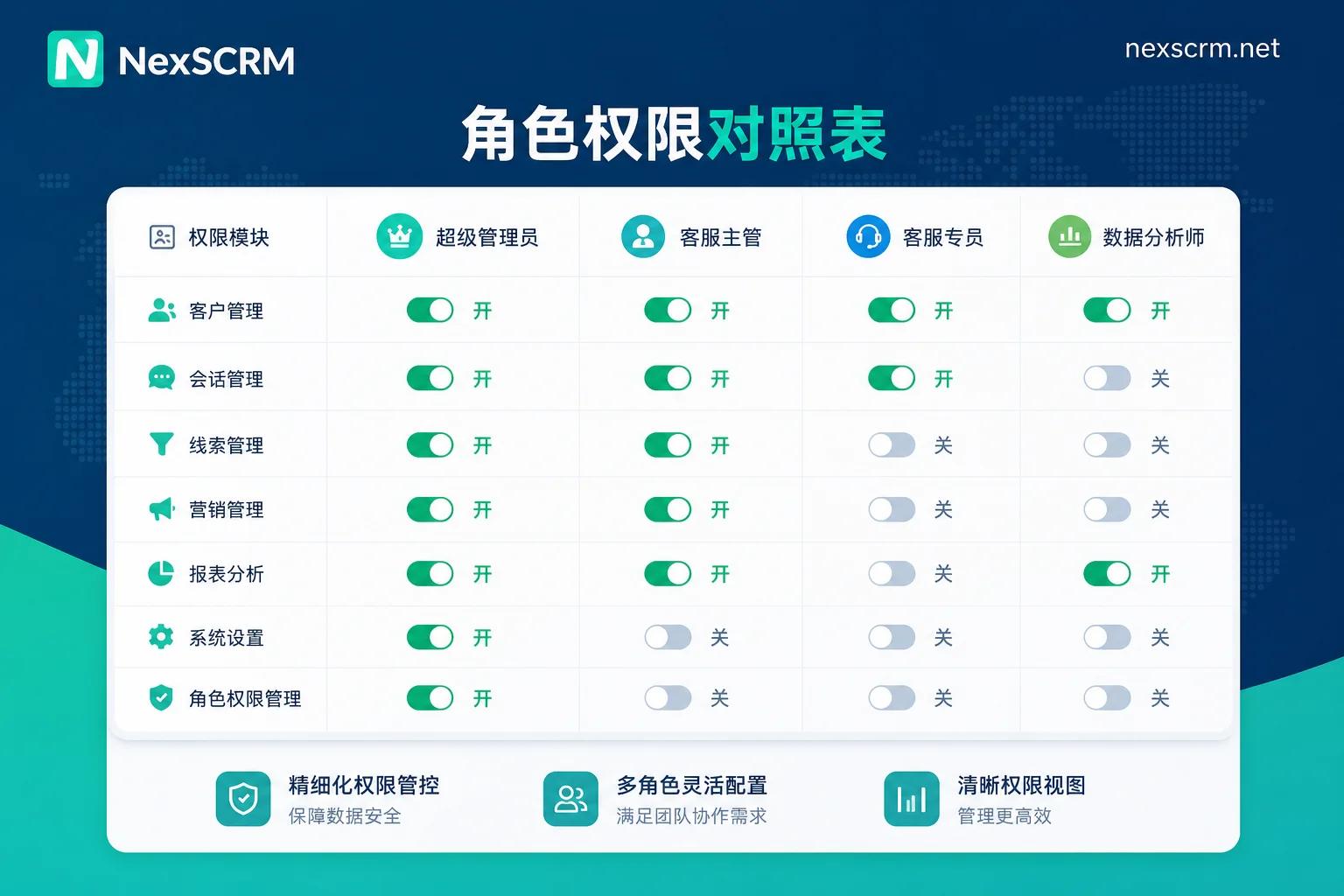
| Team Size | Role | Account Ownership | Conversation Visibility | Action Operations | Data Export |
|---|---|---|---|---|---|
| 3 people | Owner (1) | All accounts | All conversations | All actions | Can export |
| Agent (2) | None | Assigned only | Reply, edit tags | Prohibited | |
| 10 people | Owner (1) | All accounts | All conversations | All actions | Can export |
| Supervisor (1) | None | All conversations | Broadcast, create groups | Can export (with approval) | |
| Agent (8) | None | Assigned only | Reply, edit tags | Prohibited | |
| 30+ people | Owner (1) | All accounts | All conversations | All actions | Can export |
| Supervisor (several) | None | Group conversations | Broadcast, create groups | Prohibited | |
| Team leader (several) | None | Group conversations | Edit tags, assign | Prohibited | |
| Agent (majority) | None | Assigned only | Reply | Prohibited | |
| Read-only analyst (optional) | None | All conversations (read-only) | None | Prohibited |
Number thresholds: below 3 can simplify; above 5 recommend supervisor; above 10 recommend team leaders; above 30 must enable read-only analyst role and strict export approval. For more granular performance metrics, refer to Key performance indicators for WhatsApp customer service in foreign trade teams.
Multi-Agent Simultaneous Replies: Will There Be Collisions? How to Set Ownership and Collision Detection
When multiple agents reply to the same customer at the same time, collisions are likely, leading to inconsistent experiences. Team collaboration inboxes support conversation ownership, agent-specific views, and collision detection to prevent multiple agents from replying simultaneously. Native apps only offer conversation assignment, no collision alerts.
Therefore, manual remedy processes are needed: claiming rules (agents claim a conversation before replying), rotation schedules (shift-based answering), and mandatory claim before reply. At the system level, enable collision detection: when two agents attempt to open the same conversation simultaneously, the system alerts. You can also use multi-account customer service management tools to reinforce routing rules.
Agent Onboarding and Offboarding Permission Switch Sequence Checklist
Onboarding and offboarding permission management must follow a fixed order to leave no gaps.
Onboarding sequence: First enable account ownership (registered under company) → then conversation visibility (assign exclusive view) → then action permissions (reply permission) → last data export (usually not enabled).
Offboarding sequence: First revoke data export (immediately disable) → then action permissions (remove broadcast, group creation) → then conversation visibility (disconnect exclusive view) → last account ownership (unlink companion devices, remove group/channel admin, change login credentials to company-controlled registered email/verification phone).
Items to immediately revoke include: WhatsApp companion device unlinking, Telegram group/channel admin removal, export permission disabling, and conversation reassignment to other agents. After handover, keep records such as chat log backups.
Translating the Permission Table into System Configuration Items: What Must Be Filled by External Systems
The success of the overseas social media team multi-account permission divide and customer service collaboration depends on which layers rely on platform-native and which require external supplementation.
| Permission Layer | Platform Native Capability | External System Fills |
|---|---|---|
| Account Ownership | WhatsApp supports device naming, conversation assignment | Unified registration, environment isolation |
| Conversation Visibility | Telegram only action-level for groups/channels | Shared inbox, exclusive views |
| Action Operations | Telegram admin action granularity | Unified roles, action audits |
| Data Export | Cannot be blocked | Export control, approval and trails |
Systems like NexSCRM, a social media aggregation customer service platform, provide multi-platform multi-account aggregation, isolated environments, message backup, and real-time translation, covering the gaps in conversation visibility and data export layers. You can map the four-layer permission table to account groups, agent views, and backup trails.
FAQ
Multiple customer service agents sharing one WhatsApp account: how to divide permissions?
You can set conversation assignment, but all devices can view the entire chat history. To restrict agents to seeing only their own conversations, use an external shared inbox. Data export permissions should be disabled; only supervisors can perform exports.
What account permissions to revoke when a customer service agent leaves?
Immediately unlink companion devices, remove Telegram group admins, disable export permissions, and reassign conversations. Also check account ownership to ensure numbers and registered emails are under the company.
On Telegram multi-account, who can see chat history of which number?
Telegram natively cannot control private chat visibility; only group/channel admins can set action permissions. To view specific users' chat logs, use an external system with exclusive views.
Cross-border team social media account ownership: company or personal?
Must be company-owned. Registered emails, verification phones, and login devices must be controlled by the company to prevent employees from taking accounts on departure. Recommend unified registration and periodic audits.
Multiple agents replying simultaneously: collision?
Native apps have no collision alerts, leading to collisions. Use claiming rules and rotation schedules, or use a shared inbox with collision detection.


Comments(0)