 NexScrm官方博客
Let's put the conclusion up front: Connecting accounts such as WhatsApp, Telegram, LINE, Zalo, and Instagram into social media aggregated customer service does not itself cause account bans; what actually gets accounts throttled, banned, or even wiped of customer records is usually choosing the wrong underlying access method, or mixing multiple accounts on the same network and device environment.
When many cross-border teams search for "social media aggregated customer service," what they worry about isn't really whether the interface looks good—it's three more practical questions: All my old customers are in these accounts, is it safe to connect them? Can personal accounts and business accounts be managed at the same time? If one account gets restricted, will chat history and customer data disappear along with it?
To sort these questions out once and for all, you can't just look at how many platforms each software claims to "support"—you have to dig one layer deeper and see exactly what technical method they use to pull accounts into the same workspace.
1. How do the "social media aggregated customer service" tools on the market actually connect accounts? 3 methods
Even though they're all called multi-platform aggregation, different tools have completely different underlying pipelines, and stability and suitable scenarios vary widely.
| Comparison Dimension | Official API Channel (e.g., WhatsApp Business API) | Protocol Packet Capture / Modified Add-ons / Web Scripts | Independent-Environment Desktop Client (Container Isolation) |
|---|---|---|---|
| Access Principle | Authorized integration via platform open interfaces or BSP service providers | Reverse-engineering simulated data packets, cracking clients, or injecting scripts into web pages | Creating an independent fingerprint environment for each account on the desktop and maintaining sessions |
| Supported Account Types | Limited to officially verified business accounts, public pages, or bots | Personal accounts, regular accounts (extremely high risk) | Native personal accounts, Business accounts, and multi-platform main accounts can all log in |
| Risk Control & Ban Risk | The channel itself is compliant, but mass-marketing templates are still constrained by quality ratings | Extremely high; platforms explicitly prohibit unofficial clients and script add-ons | Depends on environment isolation and operating rhythm; simulates real independent terminal operations |
| Launch Cycle & Cost | Requires entity review and template filing; usually billed per message or per session | Seemingly low barrier, but account loss costs and redo costs are extremely high | No code development integration needed; subscribe by number of online ports and use the same day |
| Chat History & Records | Saved via API callbacks; usually cannot directly import historical conversations from old accounts | Once banned or disconnected, records are easily lost | Supports native session continuity and enterprise-side cloud automatic backup |
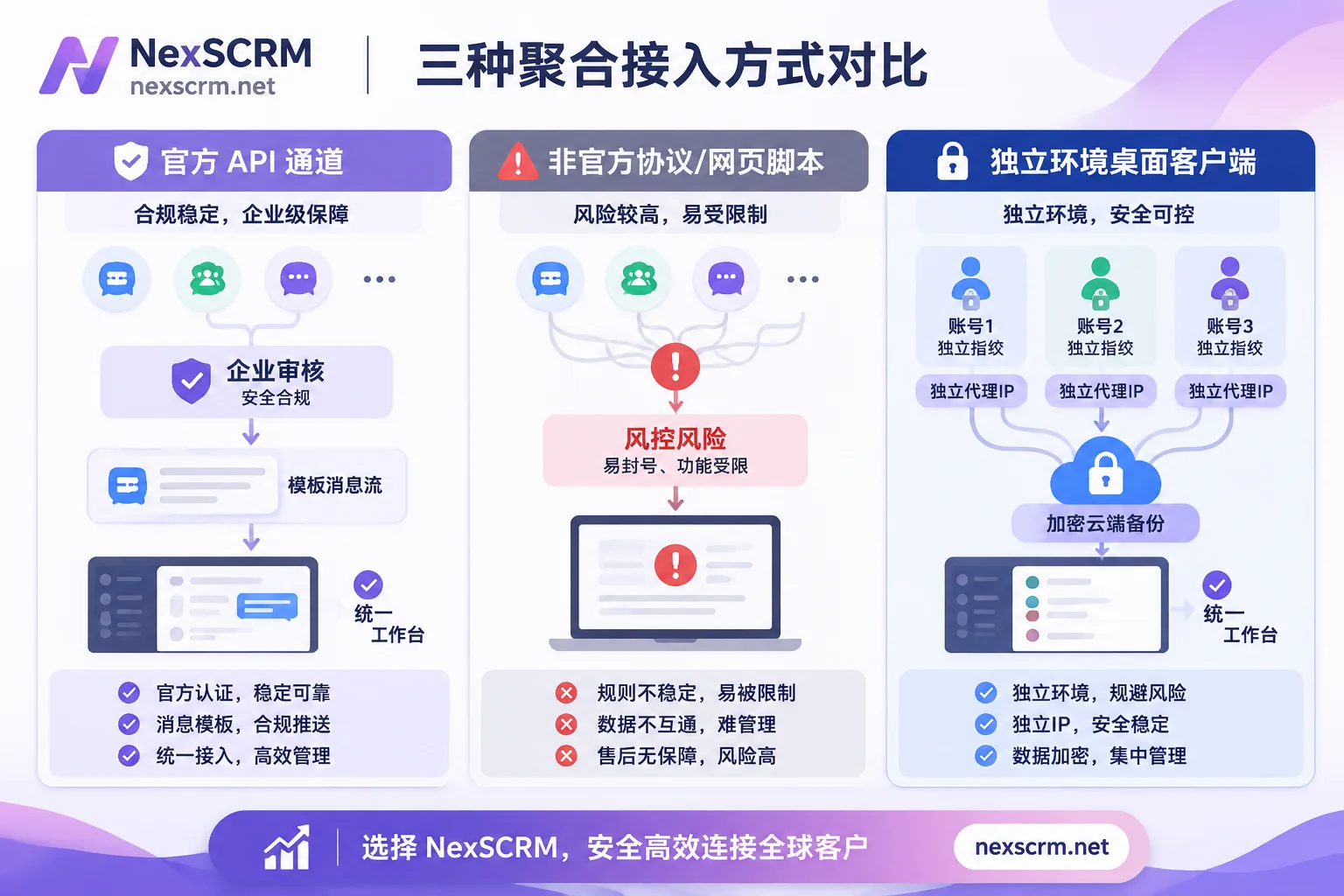
Once you understand this table, many selection dilemmas resolve themselves: Official APIs solve "how the system can compliantly trigger messages at scale," while desktop isolation workspaces solve "how human sales and customer service can safely chat with dozens of accounts simultaneously in one interface."
If you've been confused by some seemingly "all-in-one" web aggregation tools before, you can also check out this site's practical troubleshooting of the "fake aggregation" trap to distinguish true aggregation from simply piling up browser tabs.
2. Why do some teams get banned and lose records as soon as they aggregate? Avoid these 4 real pitfalls
What platform risk-control systems actually target is never "you're using multiple accounts at the same time," but abnormal signals that look like a bot, account theft, or user harassment. When deploying an aggregation workspace, most pitfalls fall into the following four areas:
1. Multiple accounts sharing the same local IP and browser fingerprint
If you stuff a dozen foreign trade or cross-border accounts directly into the same ordinary browser, or have everyone send and receive messages through the same VPN node, the platform backend will see multiple accounts frequently switching under completely identical device fingerprints and IPs. This highly overlapping environment characteristic easily triggers abnormal login verification or even collective risk control. For troubleshooting details on independent proxies per account, see Configuration checks for binding a different proxy IP to each social account.
2. Using protocol add-ons or modified clients for cold-start mass messaging
Some gray-market tools advertise "aggregated customer service + aggressive mass messaging," but their underlying layer relies on unofficial modified applications or pure data-packet protocols. Major overseas platforms explicitly do not support unofficial applications or unauthorized automated clients in their terms of service; once an account sends similar links to a large number of unfamiliar numbers that haven't added it as a contact in a short period, at best it gets reported and throttled, at worst it gets permanently banned.
3. Relying on browser extensions: laggy pages and frequent disconnections
Many teams first try crude aggregation with "multiple browser profiles + web translation extensions," but in daily high-concurrency reception, once the platform's web front end tweaks its code, the translation extension immediately stops working, and multiple profiles often knock each other offline and miss unread notifications. A more reliable approach is to skip the browser extension pipeline and rebuild your workflow by referring to practical methods for setting up a high-concurrency customer service workspace.
4. Chat records stored only locally or in a third-party black box—lost upon ban or employee departure
According to WhatsApp's official documentation, users cannot access their original backups while an account is banned; recovery may only be possible after the associated number is unbanned. If a company leaves all customer conversations on employees' personal phones, or in tools without enterprise-grade data export and retention mechanisms, then a single ban or the departure of a key salesperson can instantly cut off customer contact information, historical quotation commitments, and after-sales evidence.
3. How should your team choose? Match the real business scenario
There's no need to blindly chase the "most expensive" or "fully automated" option—decide the underlying architecture based on what your team mainly chats about every day:
- Pure system-notification business (verification codes, order shipping reminders, billing pushes): Choose official APIs. Content is highly fixed and trigger volume is high, so you must go through enterprise verification and template filing to ensure delivery rates.
- Manual negotiation and multi-channel private-domain reception (foreign trade inquiry follow-up, cross-border e-commerce after-sales, social media lead conversion): Suitable for a desktop social media aggregated customer service with independent environment isolation. Salespeople need to conduct multiple rounds of non-standard communication every day, send product images and voice messages, and follow up with old customers across time zones; official template review cycles and per-message billing often slow down deal closure, while a desktop isolation workspace can directly take over personal and Business accounts, preserve existing chat context, and go live the same day.
- Both high-volume system notifications and deep manual follow-up: Run both tracks in parallel. System notifications are automatically triggered via official APIs, while manual order handling, cross-platform private chats, and old-customer maintenance are handled in a unified desktop workspace.
4. Implementing secure aggregation with NexSCRM: How to balance isolation against bans, multilingual support, and asset retention?
If your team's main base is on overseas social platforms such as WhatsApp, Telegram, LINE, Zalo, Facebook, Messenger, Instagram, TikTok, X, Discord, and Signal, a cross-language social SCRM desktop application like NexSCRM is designed specifically for the "secure aggregation of multiple human-operated accounts" scenario.
It connects several key breakpoints in ban prevention, communication, and team control:
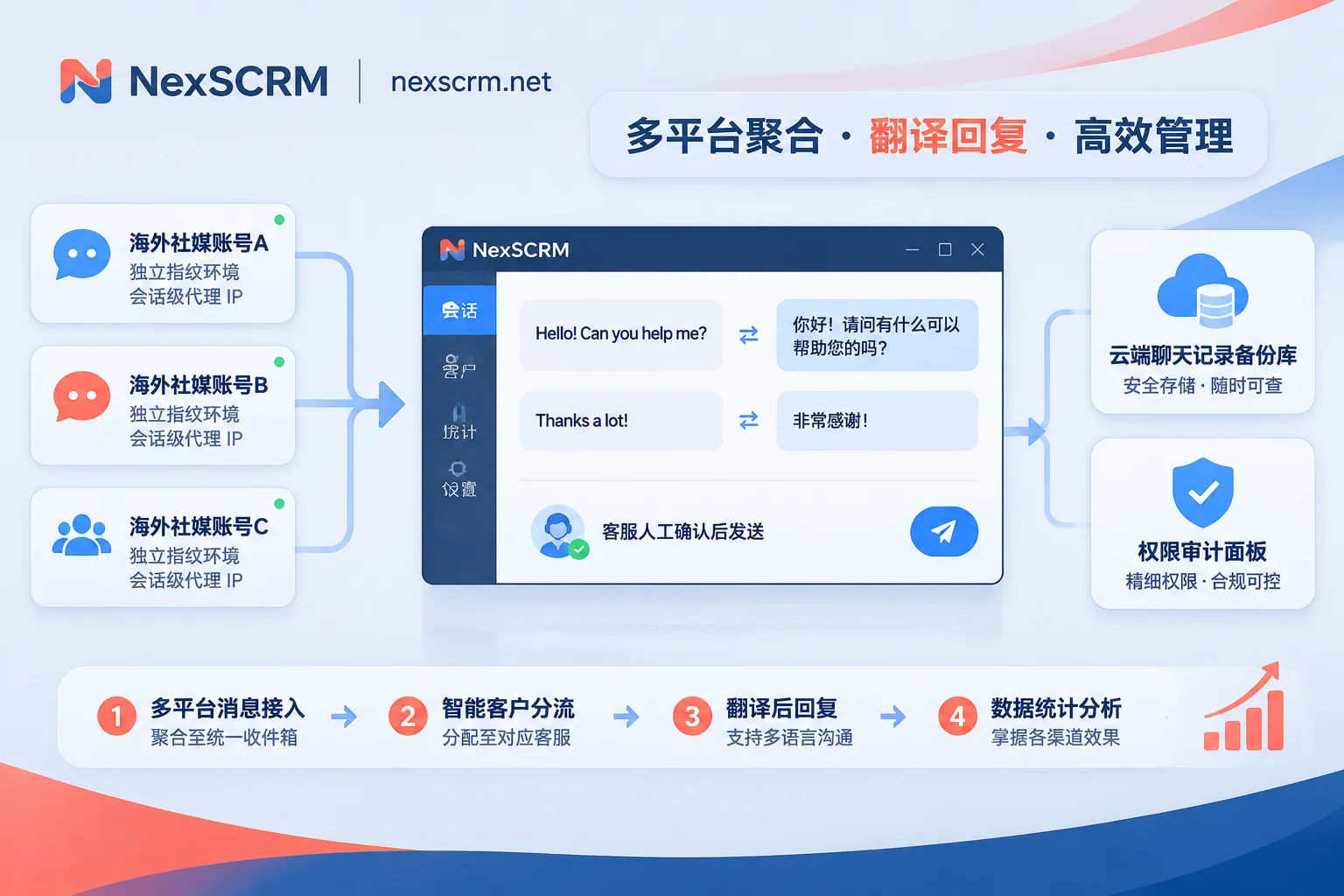
- Independent fingerprint environment per account + session-level proxy IP: When aggregating multiple platforms and accounts in the same workspace, each account runs in an independent fingerprint environment, with support for binding an independent proxy IP per session; login states are automatically saved, so you don't have to repeatedly find the phone to re-scan the QR code after restarting the software. Unread messages are notified in a unified way, and windows can be split, merged, or hidden.
- Translation built into the client—say goodbye to web extensions entirely: Messages are automatically translated in both directions, with the original text and translation kept side by side in the chat window. You can switch between multiple lines including Google, Microsoft, DeepL, and AI large models, and lock languages individually per contact. In addition to text, image and voice translation are available by version (see NexSCRM multilingual translation solution).
- Enterprise-side chat record retention and employee internal control: Chat records and media files are automatically backed up to the cloud, with retrieval by time, contact, or keyword. Even if an employee leaves or an individual account fluctuates, historical quotations and customer profiles remain on the enterprise side. It also provides data masking, sensitive-word monitoring, monitoring of private contact-sharing or private payment collection, and operation log auditing (see data backup and employee internal control features), preventing order diversion and asset loss.
- Decoupling people from accounts and AI-assisted efficiency: The main account is responsible for assigning ports and role permissions (ports are calculated by the number of accounts online simultaneously and can be upgraded or downgraded at any time; see port billing explanation), and sub-accounts support multi-device login. Combined with routing links, lead counters, AI script suggestions (sent after customer service confirms), and automatic welcome messages for new customers, it aligns lead statistics and response efficiency.
Before use, you also need to clearly understand the product's objective boundaries: Currently NexSCRM provides a Windows desktop client (the macOS client is marked "coming soon" on the official download page), supports major overseas social platforms but does not cover WeChat or WeCom. In addition, it provides independent fingerprint containers and proxy binding entry points, but clean proxy IP resources, compliant account-warming cycles, and restrained sending frequency still need to be controlled by the team itself—don't use any tool for indiscriminate mass messaging. If your team wants to verify stability first, you can start a limited-time free trial directly without a credit card; specific version features and port tiers are subject to the official pricing page.
5. A 5-item security acceptance checklist before launching social media aggregated customer service
Before formally migrating your main business accounts into the workspace, it's recommended to first run through the following 5 steps with 1–2 test accounts:
- Verify account environment isolation: Confirm that each test account can be individually bound to a corresponding static/clean proxy IP, and that fingerprint environments don't leak between them.
- Test network disconnection, restart, and session retention: Close the client and reopen it, then check whether it can restore online status and unread notifications without re-scanning the QR code.
- Verify two-way translation and multimodal messages: Send a short sentence containing product model numbers and quotation figures plus an image in your target market's language, and confirm the original text is retained, the translation is accurate, and no browser extension is required.
- Rehearse two-person collaboration and permission masking: Use the main account to assign a test port to a sub-account, and check whether the sub-account can see customer contact information it shouldn't, and whether operation logs are auditable.
- Verify backup export and handover after departure: After sending files and text in the test conversation, verify that cloud history retrieval is complete, ensuring records are retained on the enterprise side rather than on a single local computer.
Once these five steps go smoothly, multi-platform aggregation is no longer gambling with your accounts—it truly lets the team put its energy back into response speed and closing deals.