 NexScrm官方博客
As the cost of offline overseas customer acquisition rises and traditional email response rates decline, WhatsApp has become the core battleground for foreign trade B2B inquiry follow-up, cross-border e-commerce pre-sales and after-sales, and overseas social media traffic conversion. However, in actual operations, many teams find that "adding customers on WhatsApp" is only the first step. The ensuing tightening of account risk controls, chaotic switching between multiple accounts, delays in responding to minor languages, and asset loss are quietly eating away at the expensive front-end advertising and customer acquisition budgets.
Especially as the platform increasingly strictly monitors device environments, high-frequency abnormal operations, and low-interaction accounts, if teams still rely on the extensive model of "multiple phones + web QR code scanning + browser translation plugins + manual Excel registration," any weak link may lead to customer loss. Introducing a set of WhatsApp SCRM tailored for cross-border实战 is essentially not about finding a so-called "violent mass messaging shortcut," but about gathering accounts, conversations, and customer data scattered across various terminals into a secure, efficient, and controllable enterprise-level workbench.
This article will focus on the four most urgent core demands of current foreign trade and cross-border teams and break down how to use WhatsApp SCRM to run through the complete closed loop from secure login to conversion and retention.
I. Platform Risk Controls Are Tightening: First Stabilize the Account Foundation with "Independent Environment + Fixed Session"
When investigating the reasons for WhatsApp account bans, many teams often only focus on "how many messages were sent today," ignoring the underlying device and network environment. When several salespeople log into multiple WhatsApp accounts using the same computer's browser under the same LAN, or frequently scan codes to go online on different devices, it is very easy to trigger the platform's abnormal environment risk controls, and even cause "one account restricted, multiple accounts implicated."
When evaluating WhatsApp dedicated SCRM solutions, the stability of the account foundation is the first threshold (if you are comparing different multi-open methods, you can first refer to this article "How to Do WhatsApp Multi-Open on PC Without Chaos? Comparison and Practice of Three Types of Solutions from 2 to 20 Accounts"):
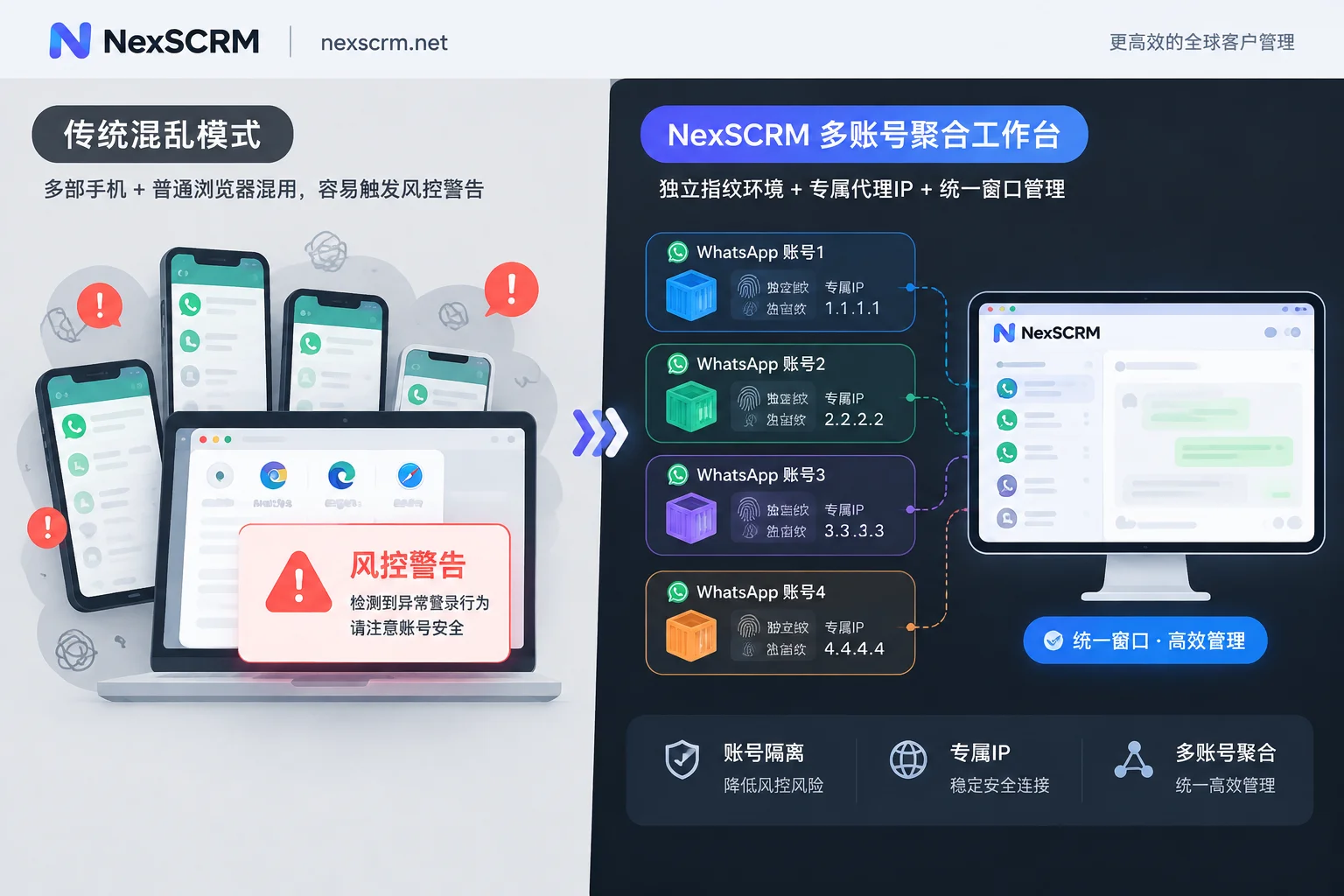
- Single account, single environment, and session-level proxy binding: In NexSCRM's multi-account aggregation workbench, whether it is a regular WhatsApp personal account or a WhatsApp Business account, each account runs in a mutually isolated independent fingerprint environment and supports binding a separate session-level proxy IP. This means that even if the team has a dozen numbers from various countries logged in simultaneously in one client, from the platform's perspective, they are still in their own independent, clean network and device environments.
- No repeated QR code scanning and efficient window scheduling: Traditional web clients often disconnect, and the first thing salespeople do at work every day is to find the supervisor to get the phone for QR code scanning, which is not only time-consuming but frequent reconnections also increase the probability of risk control. NexSCRM supports automatic saving of login status, so restarting the software does not require re-scanning the QR code; it also provides unified reminders for unread messages, and chat windows can be freely split, merged, or hidden, allowing customer service to calmly handle multiple incoming lines on one screen.
II. Say Goodbye to "Account Ban Means Lost Contact, Resignation Means Taking Away": Keep Chats and Profiles on the Enterprise Side
According to WhatsApp's official account management rules, once a number is banned due to triggering risk controls, before a successful appeal and unblocking, the user will not be able to enter the app to view past chat history or contact lists. If the enterprise has not done external retention in advance, an unexpected restriction of an old account means hundreds of prospective customers being followed up are instantly disconnected. In addition, salespeople privately deleting chat records, taking away phones upon resignation, or exporting contacts are also long-standing asset vulnerabilities that trouble foreign trade managers.
To eliminate this passive situation, WhatsApp SCRM must assume the role of an "enterprise digital asset safe":
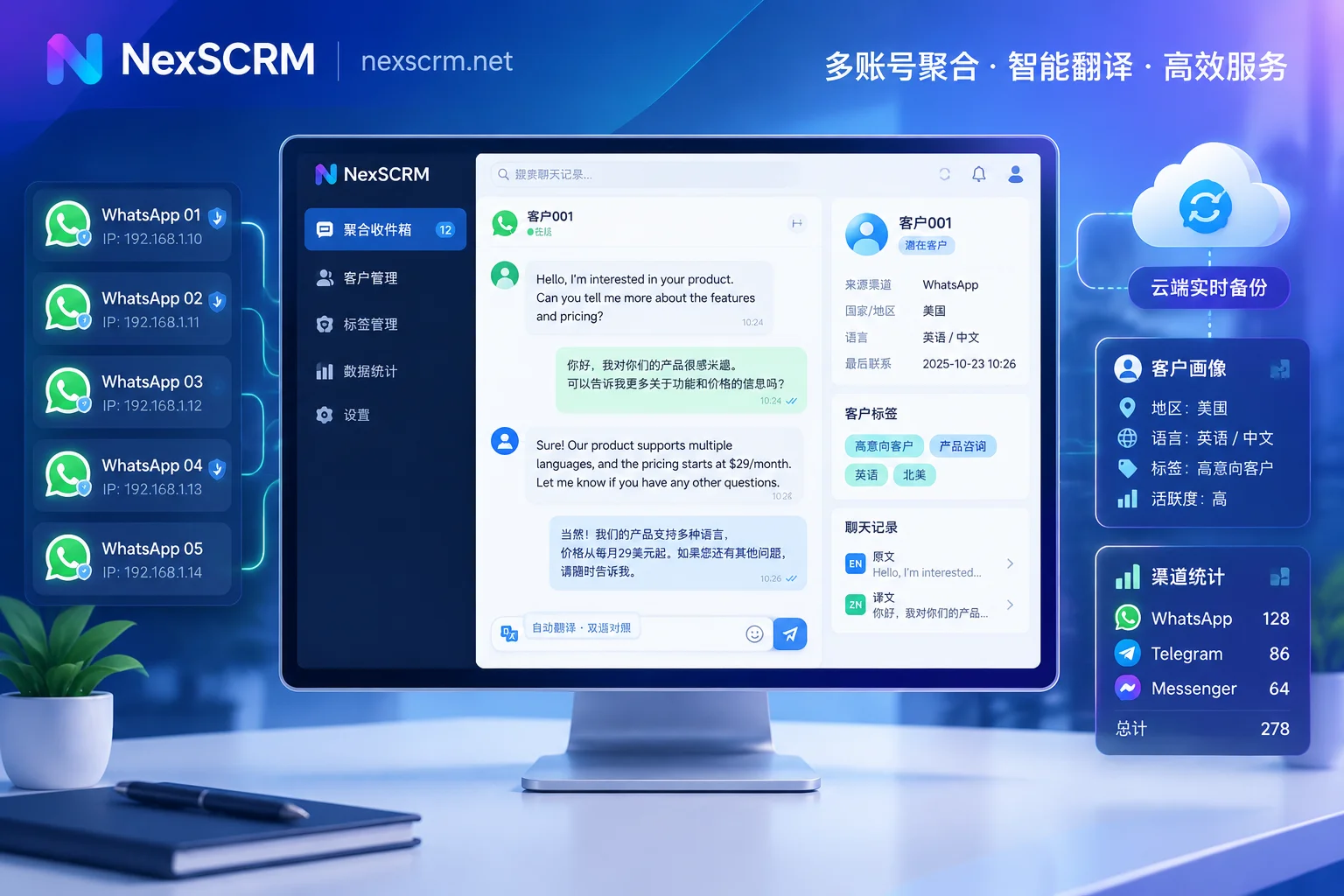
- Automatic cloud backup of chat history and media files: Through NexSCRM's chat history backup and data dashboard function, all text, images, voice messages, and files sent and received by all accounts are automatically synchronized to the cloud in real time. Even if a front-end WhatsApp number suddenly becomes abnormal, supervisors can still fully retrieve historical conversations in the background by time, contact, or keyword, and quickly arrange a backup number to seamlessly continue the follow-up.
- Customer profile accumulation and smooth handover upon resignation: Tags added by customer service during daily communication, notes filled in, recorded source channels, and follow-up history are all stored on the enterprise side rather than on personal phones. With the primary and sub-account permission system and customer number data desensitization, sensitive word and sensitive behavior monitoring (such as privately asking for other contact information or privately collecting payments and triggering alarms), even if personnel turnover occurs, customer profiles and context can be fully retained within the team (for complete settings on preventing order snatching, you can read further "How to Prevent Order Snatching in Foreign Trade? Manage the Four Defense Lines: Account Ownership, Number Desensitization, and Resignation Handover").
III. Focus on the "24-Hour Golden Response Period": Use Built-in Translation and AI Scripts to Increase Interaction Rates
In recent years, WhatsApp has continuously strengthened its message delivery mechanism centered on "user engagement"—if messages sent by enterprises do not receive customer replies for a long time, or if responses are slow and content is stiff, causing customers to ignore or even report them, the overall health of the account will decline. In cross-border scenarios, the number one obstacle slowing down first response speed and communication quality is often the minor language barrier and non-standardized customer service scripts.
Many teams are accustomed to installing translation plugins in their browsers, but plugins are prone to failure due to web page structure updates and cannot handle voice messages and product photos that overseas customers love to send. In NexSCRM, the improvement of communication efficiency is directly embedded in the chat loop:
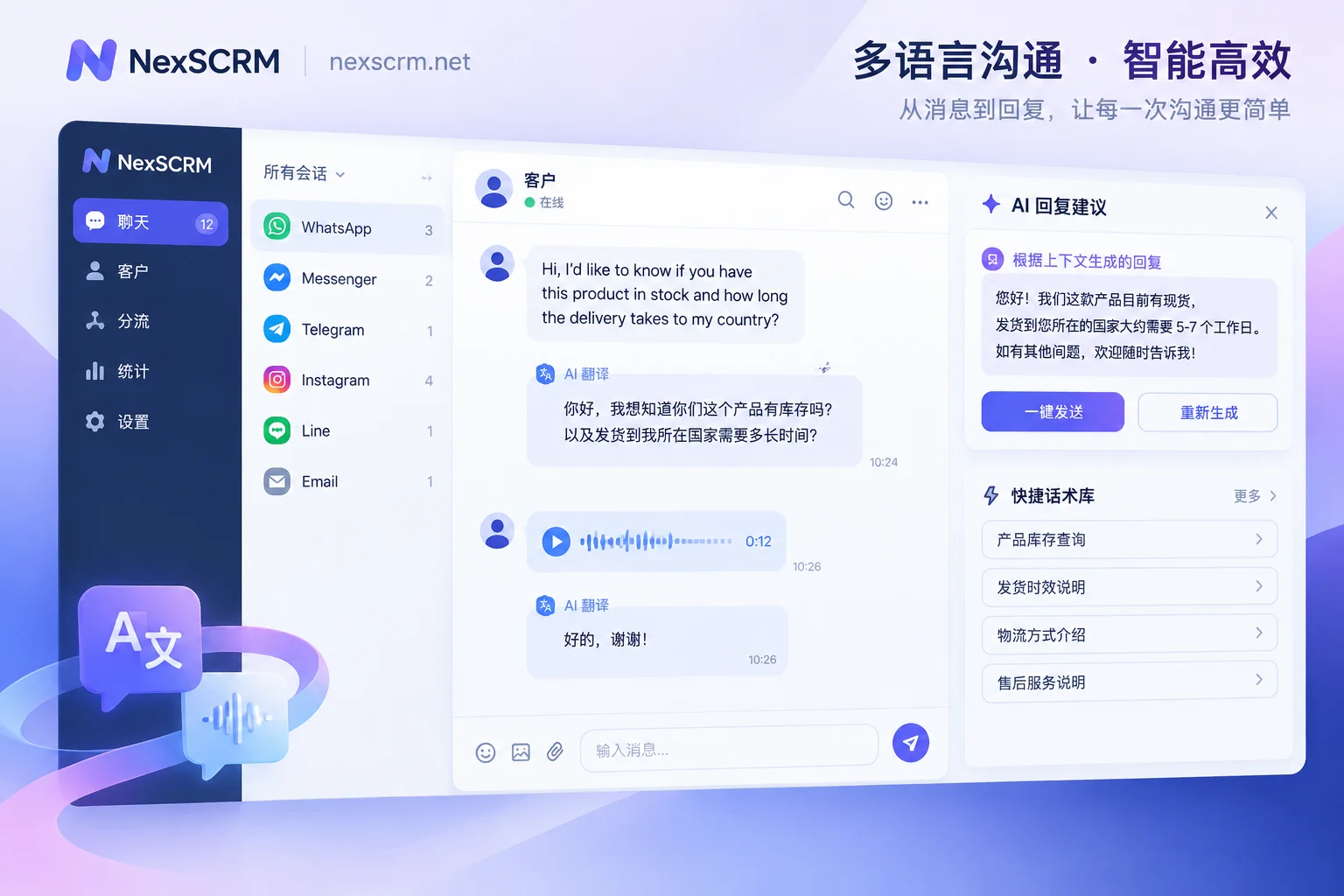
- Native-level multimodal real-time translation: The client has built-in multilingual real-time bidirectional translation, without relying on any browser plugin. The system can automatically identify the other party's language, translate received foreign language messages into Chinese in real time, and automatically translate the Chinese entered by customer service into the target language for sending. The original text and translation are retained simultaneously in the chat window for easy verification at any time. More importantly, it supports translation of text, images, and voice messages (image and voice translation are available by version), and integrates multiple lines including Google, Microsoft, DeepL, and AI large models. You can specify translation languages and optimal lines individually for contacts in different countries.
- AI-assisted replies and intelligent reception: Facing the peak period of new customers coming in concentratedly, NexSCRM's AI scripts and auto-replies support automatically sending a welcome message or AI automatically greeting when a new customer first comes in, first stabilizing the first response timeliness. In the in-depth communication stage, AI can combine the customer's current questions and historical conversation context to generate professional reply suggestions in real time, and customer service only needs to confirm or fine-tune before sending; proven high-conversion expressions can be saved to the public script library with one click, and with quick reply templates with variable replacement, even novice customer service can output negotiation content at the level of experienced salespeople.
IV. Account for Every Cent of Traffic Budget: Full Transparency from Routing and Reception to Ticket Deduplication
When the front end directs traffic to WhatsApp through independent websites, Facebook ads, or TikTok videos, if there is no unified routing and counting mechanism, it is easy to have "Customer Service A is overwhelmed, Customer Service B is idle," or the awkward situation where the same customer adds three accounts of the team and receives repeated quotes from three salespeople.
With NexSCRM's customer operations and lead counting capabilities, teams can turn front-end traffic reception into a set of quantifiable standard actions:
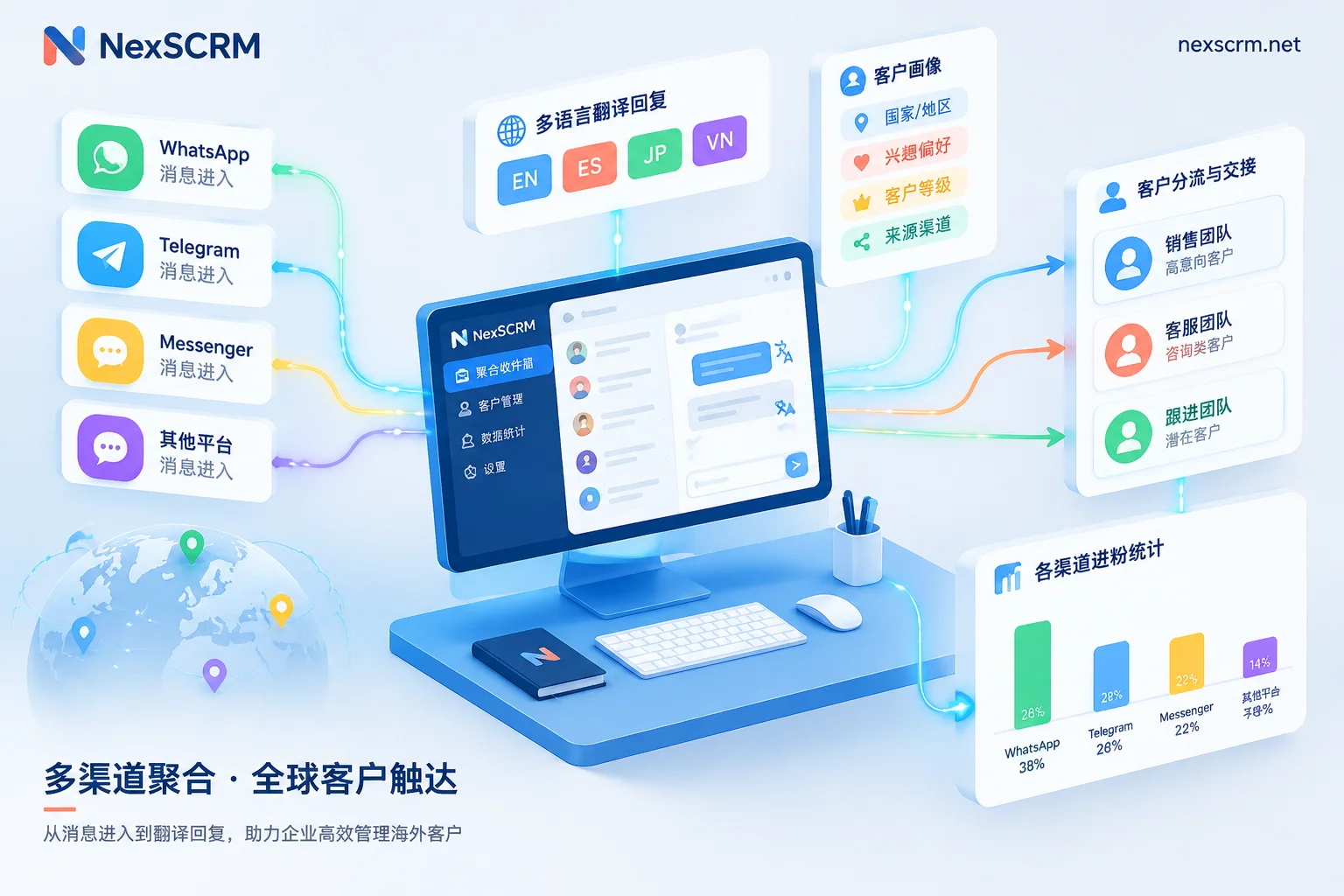
- Smart routing links: Automatically assign reception customer service based on channel source, customer tags, and historical interaction records, ensuring that old customers find their original contact person while achieving balanced distribution of new inquiries.
- Accurate counting and cross-account deduplication: The built-in lead counter (ticket counter) not only counts lead data for main accounts and groups and supports supplementary recording of missed leads, but also provides rigorous ticket deduplication and system deduplication (supporting single or all sub-accounts deduplication). Management can open the data dashboard to intuitively view each account's conversation volume, actual net increase in leads, response timeliness, and customer service performance, and statistics can be exported at any time for review (for details on the counter, please refer to "How to Use the Ticket Counter Accurately? Manage the Four Gates: Deduplication, Group Statistics, and Lead Supplementary Recording").
Conclusion: From "Able to Chat" to "Able to Manage," Start Upgrading Your Workbench Now
As overseas customer acquisition fully shifts to refined operations, a qualified WhatsApp SCRM should not only help salespeople overcome the barriers of language and multi-account switching, but also help enterprises safeguard the bottom line of account security and customer data assets. Moreover, overseas customers often do not stay on just one platform—besides WhatsApp, NexSCRM also supports aggregated management of mainstream overseas social media accounts such as Telegram, LINE, Zalo, Instagram, Messenger, and TikTok within one desktop client (view all supported platforms).
NexSCRM adopts a flexible subscription mechanism based on ports (i.e., the number of simultaneously online accounts), supports upgrades or downgrades at any time, and can be combined with unlimited-time translation character packs (for specific tiers and version differences, please refer to the official pricing page). Now go to the NexSCRM Download Center to get the Windows client, start a limited-time free trial without binding a credit card, and build your team's efficient overseas communication fortress with your own hands.


Comments(0)