 NexScrm官方博客
Foreign trade inquiries often fall through not because of price. More often, the reply is half an hour late and the buyer is already chatting with someone else; or a size unit is translated wrong and three rounds of back-and-forth follow; or two agents give different answers to the same question. A real-time multilingual translation customer service system is most useful in these three places:
- Shorten first response time: no more copying messages to a web translator, then pasting back into the chat window.
- Protect numbers and terms: source text and translation side by side, so model numbers, lead times, and payment methods can be checked item by item.
- Unify response scripts: turn high-frequency questions into multilingual templates so anyone who takes over answers the same way.
Below, following the flow of an inquiry from first contact to quotation, we explain how to do each step—and when translation won't help.
First, Understand Why Native-Language Communication Affects Inquiry Outcomes
In the "Can't Read, Won't Buy" research series, CSA Research found that 76% of consumers prefer to buy in their native language, and 75% are more likely to repurchase when customer service uses their preferred language. That research targeted consumers and can't be directly applied to B2B procurement. But the underlying logic is similar: if buyers can't understand the reply, or have to wait a long time for a decent answer, it's hard for them to build confidence in a supplier. In non-English markets, buyers often request quotes from several suppliers at once; whoever answers clearly first in a language the buyer understands is more likely to move to the next round.
So what the translation system really changes is the segment of "whether an inquiry can smoothly reach a quotation." It can't decide for you whether the deal ultimately closes.
Step 1: Put Translation Inside the Chat Window and Raise First Response Time First
In instant messaging apps like WhatsApp and LINE, buyers usually expect a reply within minutes. With external web translation, every message goes through "copy, switch window, translate, copy, switch back, paste, check." When you have seven or eight conversations going at once, the delays pile up.
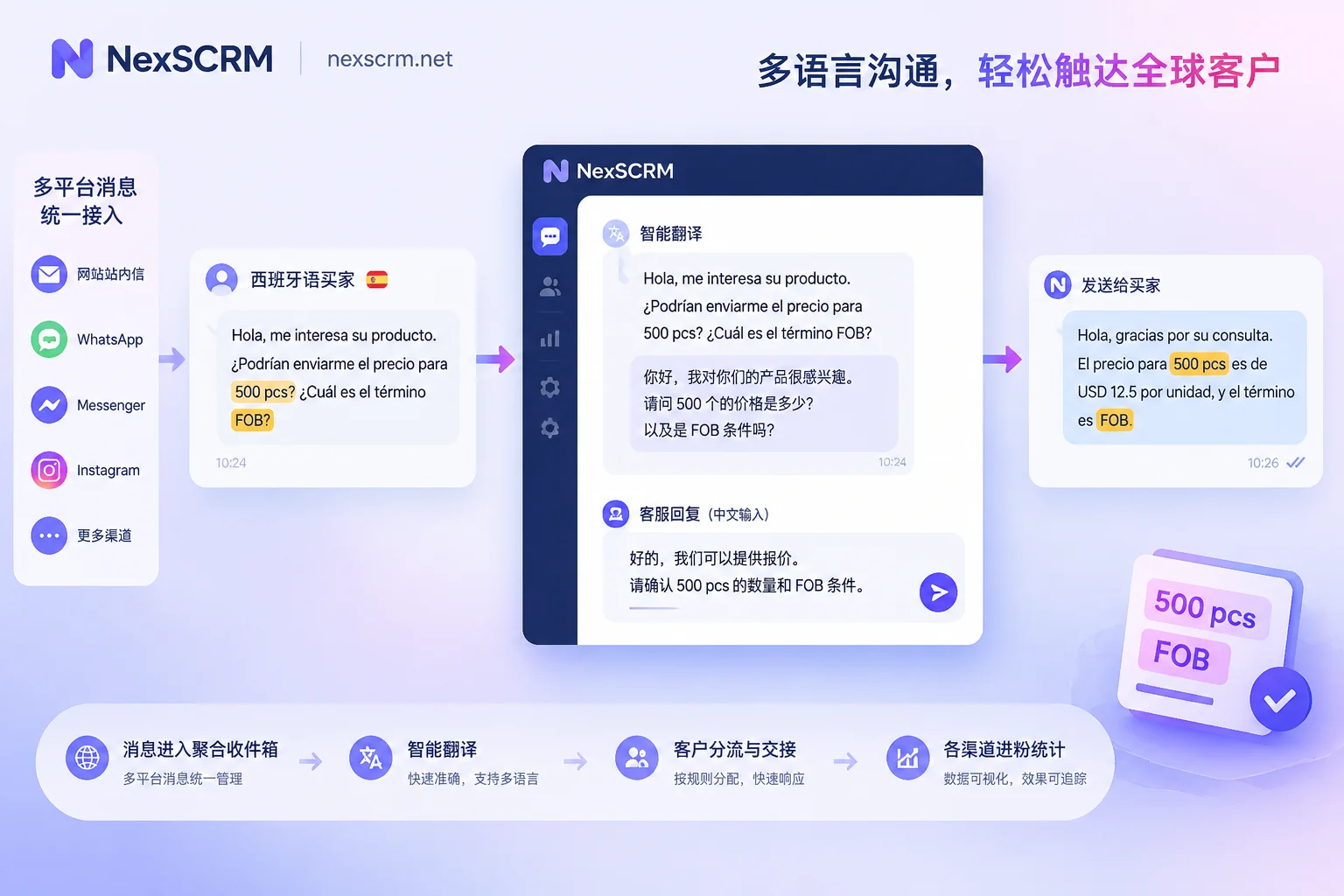
The fix is to switch to two-way real-time translation: incoming buyer messages automatically display in Chinese, you type in Chinese, and the system sends in the buyer's language. This way agents focus on the content of the answer, not on moving text around.
Two prerequisites to set up first:
- Set language per conversation, not per account. When the same account handles Brazilian and Vietnamese customers at the same time, if language follows the account, it's easy to send Portuguese to a Vietnamese client. For specific setup, see How to avoid mixing up languages when one account handles customers from multiple countries.
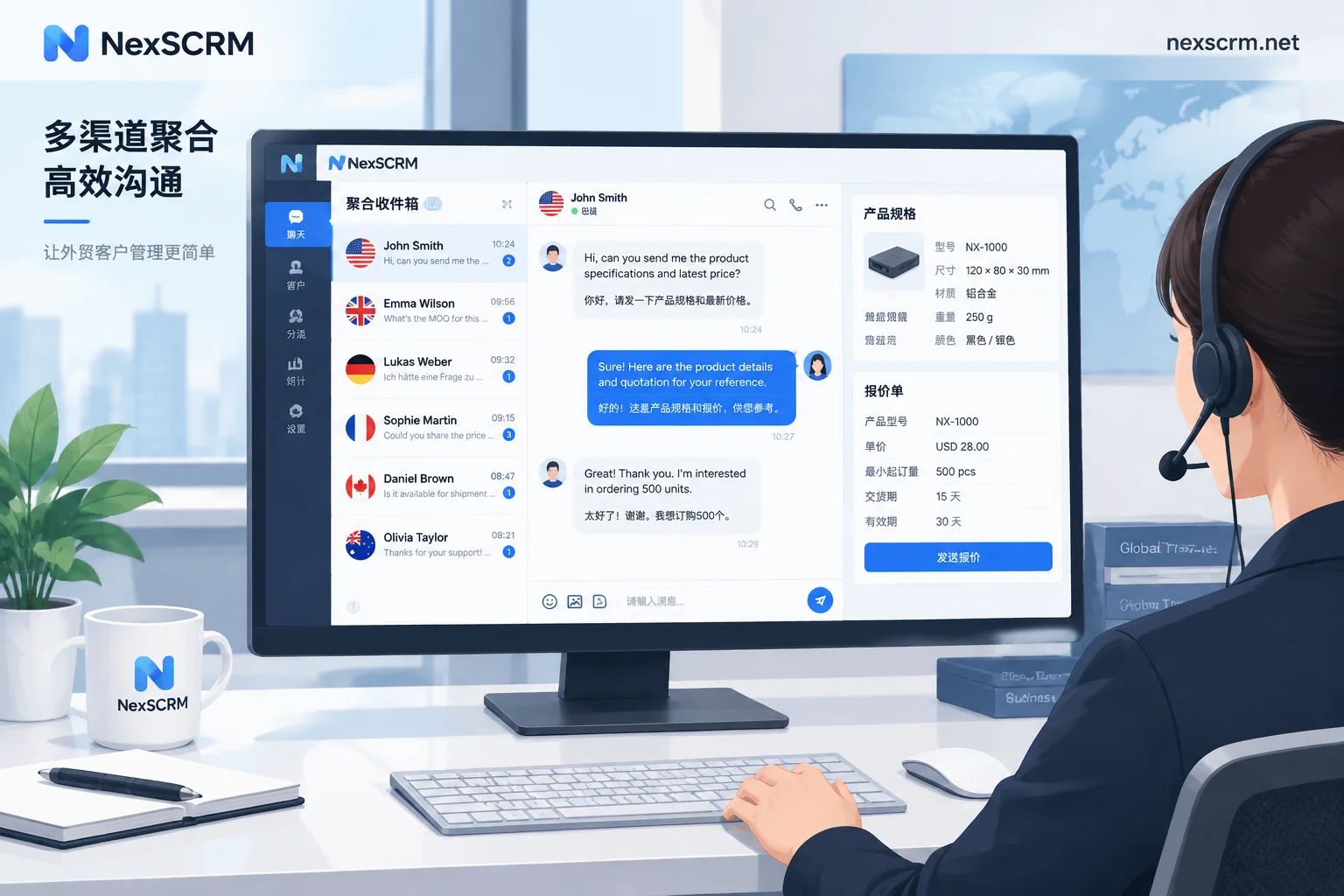
- Put multiple platforms and accounts in one workspace. If inquiries are scattered across multiple WhatsApp, Telegram, and LINE accounts, switching between apps will also slow down first response.
In NexSCRM, messages from multiple platforms and accounts are sent and received in the same workspace. Real-time two-way translation covers text, images, and voice, and each conversation can have its own target language and translation route.
Step 2: Keep the Original Text and Cross-Check Item by Item Before Quoting Numbers
If small talk comes out not quite idiomatic, that's not a big deal. What really causes problems in inquiries is:
- Model numbers, specifications, size units (mm vs. inch, kg vs. lb)
- Minimum order quantity and quantity units (pcs, sets, cartons)
- Lead time ("30 days" counted from order placement or from deposit receipt?)
- Trade terms (FOB, CIF, EXW)
- Payment terms (e.g., 30% deposit, 70% against copy of bill of lading)
Here's what to do:
- Keep source text and translation together in the interface. When a customer asks about a parameter, check the original first to confirm units and numbers, then reply.
- Write short sentences for replies involving numbers. One sentence, one point; use Arabic numerals, keep trade terms as English abbreviations, and don't let the system translate FOB into a string of local-language words.
- Before sending, glance at the numbers in the translation to confirm they match what you wrote in Chinese.
- When a less common language or industry term comes out awkward, switch to another translation route and compare. Daily reception and quotation negotiation have different translation requirements; for when to switch, see Which translation route to use for daily reception vs. quotation negotiation.
Step 3: Images and Voice Messages Also Need Translation
Overseas buyers often send product screenshots, packaging instructions, handwritten specs, or a voice message recorded in their local language. Translation tools that only handle text break down here, and agents are forced to tell customers "please type," which immediately degrades the experience.
- Images: Before translating, first identify which fields shouldn't be translated, such as model numbers, material codes, and barcodes—otherwise errors creep in. See How to translate a quotation image sent by a customer.
- Voice: Transcribe first, then translate. Native platform capabilities usually only cover part of this; for the differences, see Can a customer's voice message be directly translated into Chinese?
- Repeat key parameters in text: After listening to a voice message, reply with "Just to confirm: 500 pcs, blue, arriving at port by end of October, correct?" This one line saves a lot of rework later.
Step 4: Turn High-Frequency Questions into Multilingual Quick Scripts
The first few rounds of an inquiry are highly repetitive: greetings, company introduction, MOQ, sample policy, standard lead time, payment methods. Typing and translating each one from scratch every time is slow, and the answers vary from person to person.
Here's what we recommend:
- Maintain one set of standard templates in Chinese, and when sending, translate and send in the customer's language—no need to write a separate version for each language.
- Distinguish which parts of a template can be edited and which must not be changed at all, such as price validity, payment terms, and warranty scope. See How shared script templates keep the whole team's answers consistent.
- AI reply suggestions can be used as drafts. Anything involving prices, lead times, and commitments must be confirmed by a person before sending.
How to Tell Whether the System Is Working
Don't directly measure it by "how much did deal volume increase after launch." Closing deals is influenced by many factors—price, product, lead time capability—and is hard to attribute to translation. A more reliable approach is to look at process metrics in the first half of the inquiry:
- Has first response time shortened?
- What proportion of inquiries reach the quotation stage?
- How many times do you need to reconfirm because of misunderstandings?
- What proportion of customers stop replying in the first few rounds?
Before launch, record several weeks of data as a baseline; after launch, compare using the same definitions.
In These Cases, Translation Doesn't Help Much
- The customer is fluent in English and communication is already smooth: here the value of translation is mainly in less common language markets and in voice and image messages.
- Formal contracts and technical documents: machine translation can help you grasp the gist, but contract text still requires professional review.
- The product itself doesn't fit, or the price isn't competitive: no matter how smooth the communication, it only helps the customer see that faster.
If your team is struggling with slow replies to foreign language inquiries and parameters that are often misunderstood, start by trialing one or two accounts that receive inquiries in less common languages, compare the four metrics above over a period of time, and then decide how many seats to open. For pricing and trial entry, see here.


Comments(0)