 NexScrm官方博客
For foreign trade salespeople and cross-border customer service reps managing a dozen or even dozens of accounts, the first task every morning is often not replying to inquiries directly, but "fixing the environment": clicking through the dense icons of browser profiles one by one, checking which account lost its login state due to cache clearing and needs a supervisor's phone to rescan, which account's translation plugin has completely failed due to front-end tweaks, or simply sighing at a frozen task manager.
In the past, when discussing comparisons of WhatsApp multi-account solutions on PC, many teams mainly chose tools based on the "number of accounts." But with WhatsApp's desktop architecture migrating to WebView2 containers and risk control systems tightening environment parameter checks, the core contradiction of WhatsApp multi-account has shifted—it's no longer "can I log into multiple accounts on one computer simultaneously," but "after multi-account, does the computer lag, do underlying parameters collide, and do translation plugins crash?"
If your team is being slowed down by the hidden maintenance costs of multi-accounting, check the three recent high-frequency pitfalls below to see where the problem lies.
1. Why is the traditional "browser clone + plugin" multi-account approach increasingly unusable?
Many startup cross-border teams, for convenience, habitually use a combination of "multiple Chrome user profiles + free translation plugins + global proxy switching" for WhatsApp multi-accounting. This approach barely works with two or three accounts, but once scaled to main business volumes, three types of failures erupt:
1. Hardware parameters "naked," environment anomalies triggered even after changing IPs
Many operators wonder: I've configured different proxy extensions for different browser profiles, so why do several accounts still get asked to re-verify their phones on the same day?
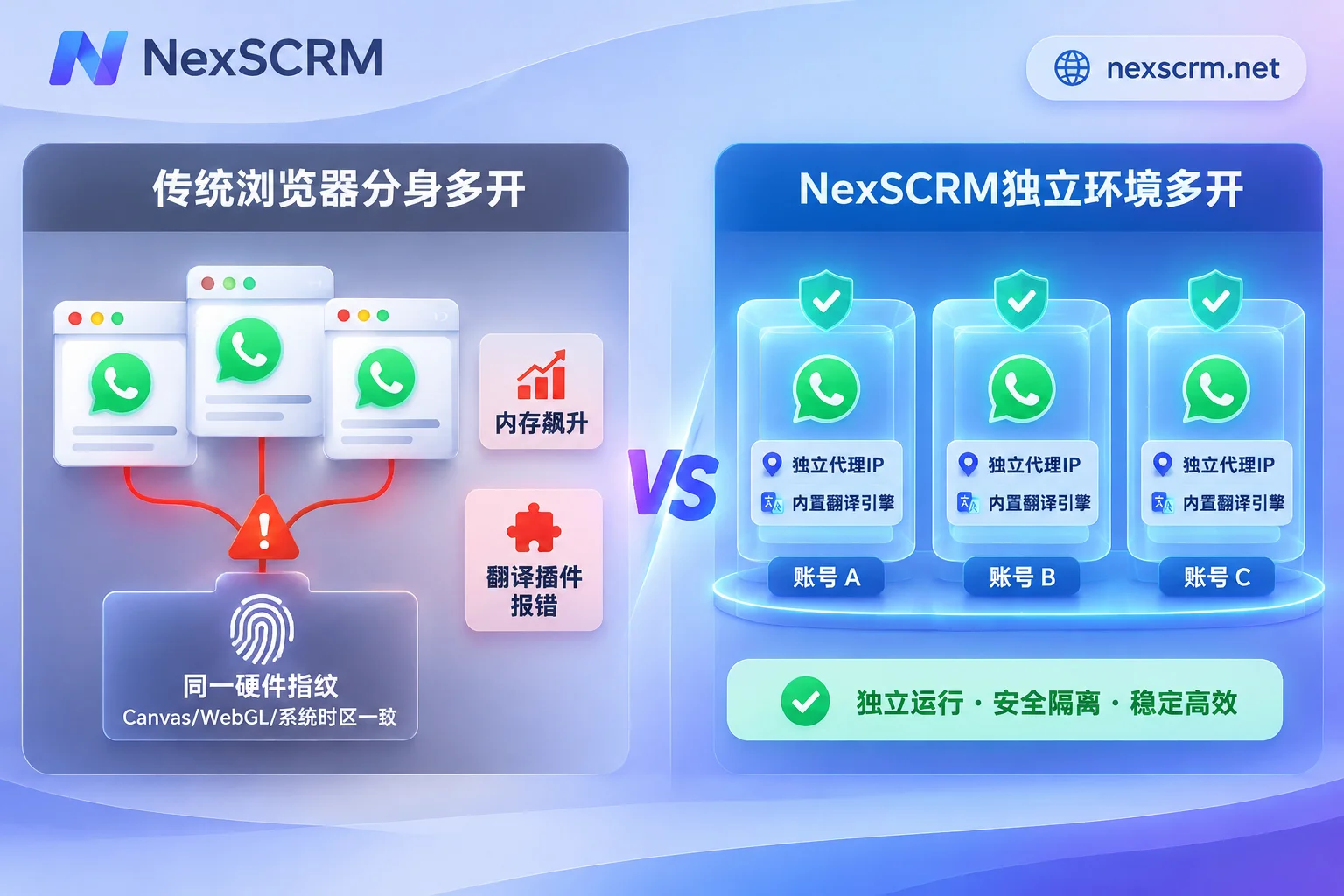
The reason is that ordinary browser "multi-user profiles" only isolate local cookies and history cache, but the underlying Canvas fingerprint, WebGL rendering info, system font list, and local timezone are exactly the same hardware parameters. Under current risk control logic, multiple accounts with IPs from different countries but reporting identical underlying hardware fingerprints and Beijing timezone—this parameter conflict is a high-risk signal that triggers correlation checks.
2. Process stacking eats up memory, missed replies frequent during peak hours
Whether opening a dozen independent browser windows or using the official WebView2-based desktop client, each window runs a full set of rendering processes and script extensions independently. Once third-party translation plugins and script managers are added, a 16GB office computer during the afternoon inquiry peak easily experiences input lag, voice loading spinners, or even window crashes. Customer service reps switch back and forth among a dozen taskbar icons, and missing unread messages becomes routine.
3. Web DOM tweaks cause external translation plugins to fail en masse
Teams relying on browser plugins for translation have all had this nightmare: whenever WhatsApp Web makes a routine style update, the translation plugin that was next to the input box will "fail to send translated text," "overwrite the original text," or even distort the chat interface. Customer service reps have to revert to manually copying and pasting into a web translator, completely disrupting their follow-up rhythm.
2. To stabilize a WhatsApp multi-account workbench, which four things must be integrated?
To completely escape the predicament of "spending half an hour every day messing with environments and plugins," cross-border teams need to consolidate previously patched-together profiles, proxy plugins, translation scripts, and spreadsheets into a native desktop workbench. Through NexSCRM's multi-account aggregation feature, teams can run a highly stable multi-account loop directly within one client:
| Practical dimension | Browser profiles + third-party plugin patchwork | NexSCRM native multi-account workbench |
|---|---|---|
| Account support & aggregation | Need to open a dozen independent windows; regular and Business accounts mixed and hard to distinguish | Single workbench aggregation management; both regular and Business WhatsApp accounts can log in; unified unread message alerts |
| Environment & network isolation | Only isolates cookies; underlying Canvas/WebGL hardware fingerprints identical | Each account runs in an isolated fingerprint environment, supports direct binding to session-level proxy IPs |
| Daily login maintenance | After cache clearing or occasional crashes, frequent trips to the main account's phone for re-scanning | Login state automatically saved; daily software restarts require no re-scanning |
| Cross-language communication | Relies on external browser plugins, susceptible to front-end updates and failures | Multi-language real-time translation built into the client, no browser plugins needed |
1. Isolated fingerprint environment + session-level proxy IP, cutting correlation from the ground up
True secure multi-accounting must be hard isolation of "one account, one environment, one IP." In NexSCRM, each added WhatsApp port runs in a mutually isolated fingerprint environment, and supports binding a separate proxy IP for a single session. This means the US dedicated line for Port 1 and the Southeast Asia node for Port 2 do not interfere with each other, avoiding collective disconnections caused by global node switching, and plugging the loophole of identical hardware fingerprints (for more strategies on account environment stability and asset retention, see SCRM response guide under tightening WhatsApp bans).
2. Freely split and merge windows, say goodbye to taskbar "match-up"
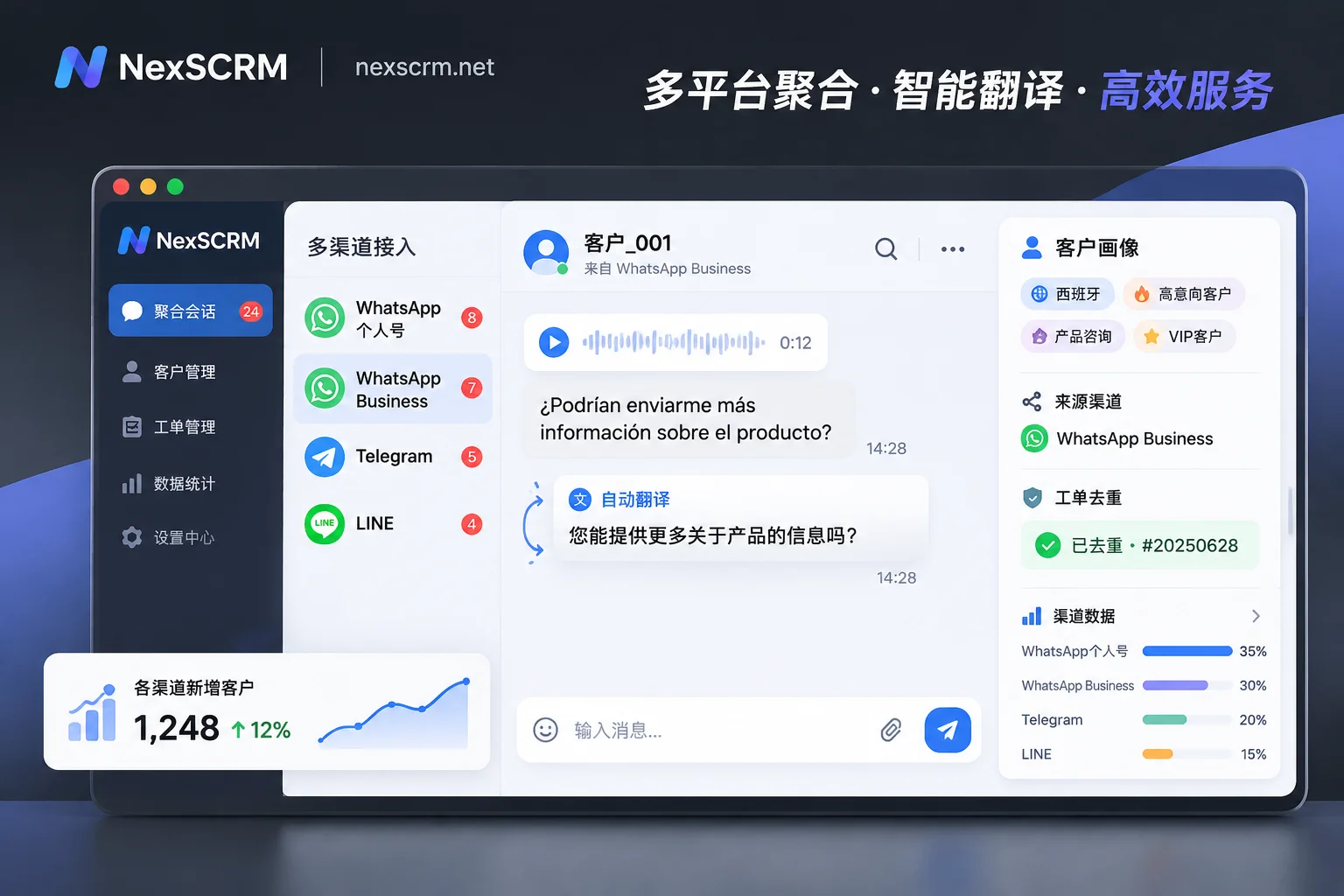
For scenarios with multiple accounts receiving messages simultaneously, NexSCRM gathers all accounts in a left-side list within one workbench, so new messages are clear at a glance. For key VIP customers or high-concurrency periods, customer service reps can split, merge, or hide chat windows according to preference; meanwhile, the software automatically saves the login state of each port, so after shutting down and restarting the next day, they can jump right into work without the tedious process of repeatedly asking admins for QR scans.
3. Native built-in translation, handling voice, images, and minor languages in one step
Completely removing browser plugins from the computer is a direct way to reduce memory usage and troubleshooting rates. NexSCRM embeds multi-language real-time translation directly into the desktop client's core:
- Two-way automatic translation for sending and receiving: Foreign languages from customers are automatically displayed with translations (original and translation kept side-by-side for verification); when customer service types Chinese, it's automatically translated into the target language before sending, and translation language can be locked separately per contact.
- Multi-modal and multi-engine support: Supports not only text but also directly handles voice messages and image translation preferred by overseas customers (available by version); built-in multiple translation engines including Google, Microsoft, DeepL, and AI large models. When encountering professional foreign trade terminology or local slang, switch engines anytime to ensure accuracy.
- AI collaborative efficiency: With AI scripts and auto-replies, welcome messages or AI greetings can be automatically triggered when new customers come in; during daily follow-ups, AI can generate reply suggestions based on context for customer service to confirm and send, and frequently used high-quality expressions can be saved to a public script library with one click.
3. From "personal multi-account" to "team collaboration": managing routing and data retention
When a team's WhatsApp account pool expands to dozens, simply solving "single-machine multi-account" is not enough. Supervisors often face new management challenges: how to evenly distribute leads from ad campaigns to multiple accounts? How to know if the same customer has added three salespeople's accounts and is comparing prices? We've discussed the complete team permission architecture in multi-account customer service management and account-person decoupling practices. At the daily multi-account execution level, focus on these three areas:
1. Routing links and lead deduplication, accounting for every cent of traffic acquisition
When multiple accounts handle ads or social media traffic, the biggest fears are uneven workload and duplicate lead collisions. With NexSCRM's customer operations and lead counter features:
- Teams can generate unified routing links that automatically assign to different customer service accounts based on customer source, tags, or history;
- The system supports main account fan counting, group fan counting, and cross-sub-account ticket deduplication and system duplicate checking. Even if the same overseas buyer simultaneously contacts 3 WhatsApp accounts in the team, the backend can accurately identify and remove duplicate inflation, with one-click export of statistical data.
2. Cross-platform aggregation in one place, beyond WhatsApp
Today's overseas buyers rarely stay in one app. Often, customers come in via TikTok or Instagram DMs, chat a bit, and leave a "Add my WhatsApp" or "Contact me on Telegram."
NexSCRM is not just a WhatsApp multi-account tool; it supports simultaneous aggregation and sending/receiving of messages from mainstream overseas social platforms including WhatsApp, Telegram, LINE, Zalo, Instagram, Facebook, Messenger, TikTok, X (Twitter), Discord, Signal, all within one workbench (see all supported platform solutions). Customer service reps can complete the entire process from public domain DM lead generation to WhatsApp private domain retention without switching between five or six apps.
3. Cloud backup and employee internal control, safeguarding enterprise private domain assets
With multi-account spread across salespeople's computers, the biggest fear is sudden account bans or staff departures causing customer loss. Under NexSCRM's chat record backup and employee internal control system:
- Chat records and media files of all accounts are automatically backed up to the cloud, with quick search by time, contact, or keyword;
- Administrators assign ports and permissions via the main account, and can enable number data masking, sensitive word monitoring, and alerts for sensitive behaviors such as privately adding contact info or private payments;
- Customer profiles (tags, notes, follow-up records) accumulated by customer service are all stored on the enterprise side. Even if an employee leaves or changes computers, the new colleague taking over can log into the sub-account and seamlessly continue follow-ups.
Conclusion: Give time back to high-conversion communication
WhatsApp multi-accounting should be a lever to amplify business reach, not a daily technical troubleshooting chore that drains energy. Rather than struggling with a dozen laggy browser profiles and free plugins that may fail at any time, use a professional workbench with native isolation, built-in translation, and risk control backup to truly free up customer service energy for customer follow-up and closing conversions.
Visit the NexSCRM download page now to get the Windows desktop client (limited-time free trial, no credit card required), or visit the pricing and plans page to flexibly choose port subscriptions based on your team's actual online account count, and build an efficient, stable cross-border multi-account reception center yourself.