 NexScrm官方博客
If your foreign language skills aren't enough, you don't need to take courses before handling inquiries. The more practical approach is: put translation directly into the chat window, glance at the original and translated text side by side before sending, translate the customer's voice messages and images right in the conversation, verify sentences involving price, delivery time, and payment separately, then use AI reply suggestions and team script templates to elevate "understandable" to "sounds like an industry insider."
First, Identify Where Efficiency Is Actually Lost
Many salespeople think they reply slowly because their vocabulary is insufficient. In reality, on instant messaging platforms like WhatsApp and Telegram, time is mostly wasted in three areas:
- Switching windows back and forth: Copying the customer's message to a web translator, translating it, then translating your Chinese into a foreign language and pasting it back. A single message involves several switches, and the customer has already been waiting for minutes.
- Terminology mistranslation: General machine translation encounters specification parameters, delivery times, and trade terms like FOB/CIF, and tends to translate literally—what the customer reads is not what you meant to say.
- Non-text messages: When a customer casually sends a voice message or a screenshot of packaging or parameters, web translators can't handle it, so you can only wait or find a colleague who knows the language.
The five steps below address these three areas.
Step 1: Make Translation Happen Inside the Chat Window
The goal is for salespeople to only type in Chinese and only read in Chinese, while the customer sends and receives in their own language.
In NexSCRM, this step is handled by in-conversation real-time two-way translation: after you type Chinese, it automatically converts to the target language and sends; when the customer sends a foreign language message, it automatically displays in Chinese without leaving the window. If you manage several WhatsApp and Telegram accounts simultaneously, they are aggregated in one workspace, and translation is available in every conversation.
When one account serves customers from multiple countries, it's advisable to set the target language per conversation to avoid sending Spanish to a Brazilian customer. For details, see How to avoid mixing languages when one account serves multiple countries.
Step 2: Check the Bilingual Comparison Before Sending, Focus on Four Types of Content
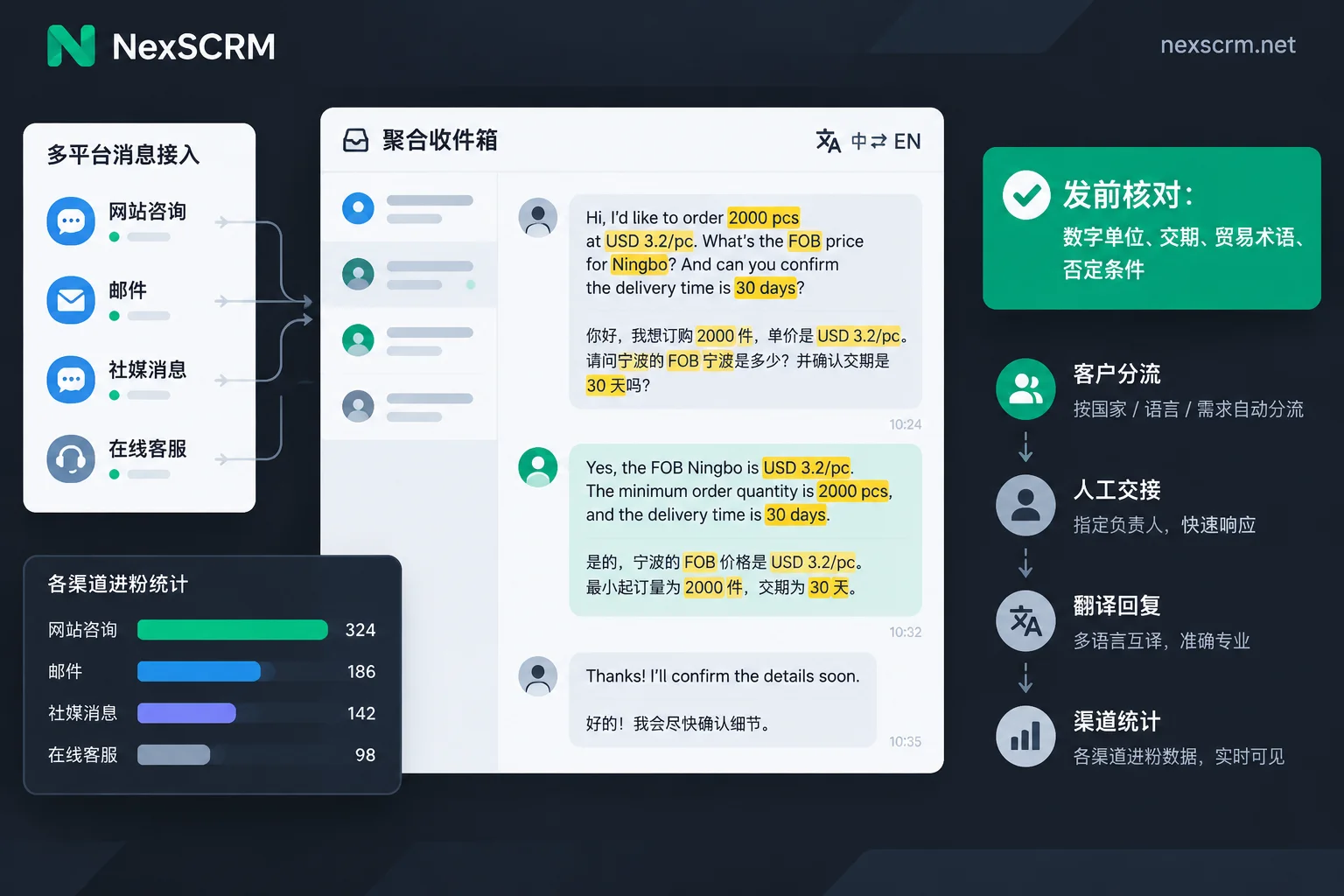
Machine translation handles daily pleasantries fine, but risks concentrate on content that carries binding force. NexSCRM keeps both the original and translated text, so you can scan the foreign language before sending, and when receiving customer messages, you can also compare with the original. Reading every word carefully isn't realistic, so focus on these four types:
- Numbers and units: Unit price, quantity, MOQ, dimensions, weight. Confirm that decimal points, thousands separators, units, and currency haven't been altered.
- Delivery time: Does "30 days" mean production cycle or time to port, counted from order placement or from deposit receipt?
- Trade terms and payment methods: FOB, CIF, EXW, T/T, L/C, etc. should remain as-is, not expanded into lengthy explanations.
- Negations and conditional sentences: Sentences like "freight not included" or "orders over 500 units can..."—translation often drops the negation or turns a condition into a promise.
A few Chinese writing habits to make machine translation more accurate:
- One sentence, one idea; avoid colloquialisms and omissions like "that one" or "handle it."
- Write model numbers, codes, and trade terms directly in English.
- Use Arabic numerals, specify units and currency, e.g., "USD 3.2/pc."
- After key terms are agreed, restate them completely in one message and ask the customer to confirm. For example, write in Chinese: "Please confirm: FOB Ningbo, unit price USD 3.2/pc, quantity 2000 pcs, delivery 30 days after deposit receipt." Translate and check against the foreign language before sending. Final formal terms should still be governed by the PI or contract.
Step 3: Translate Voice and Images Directly in the Conversation
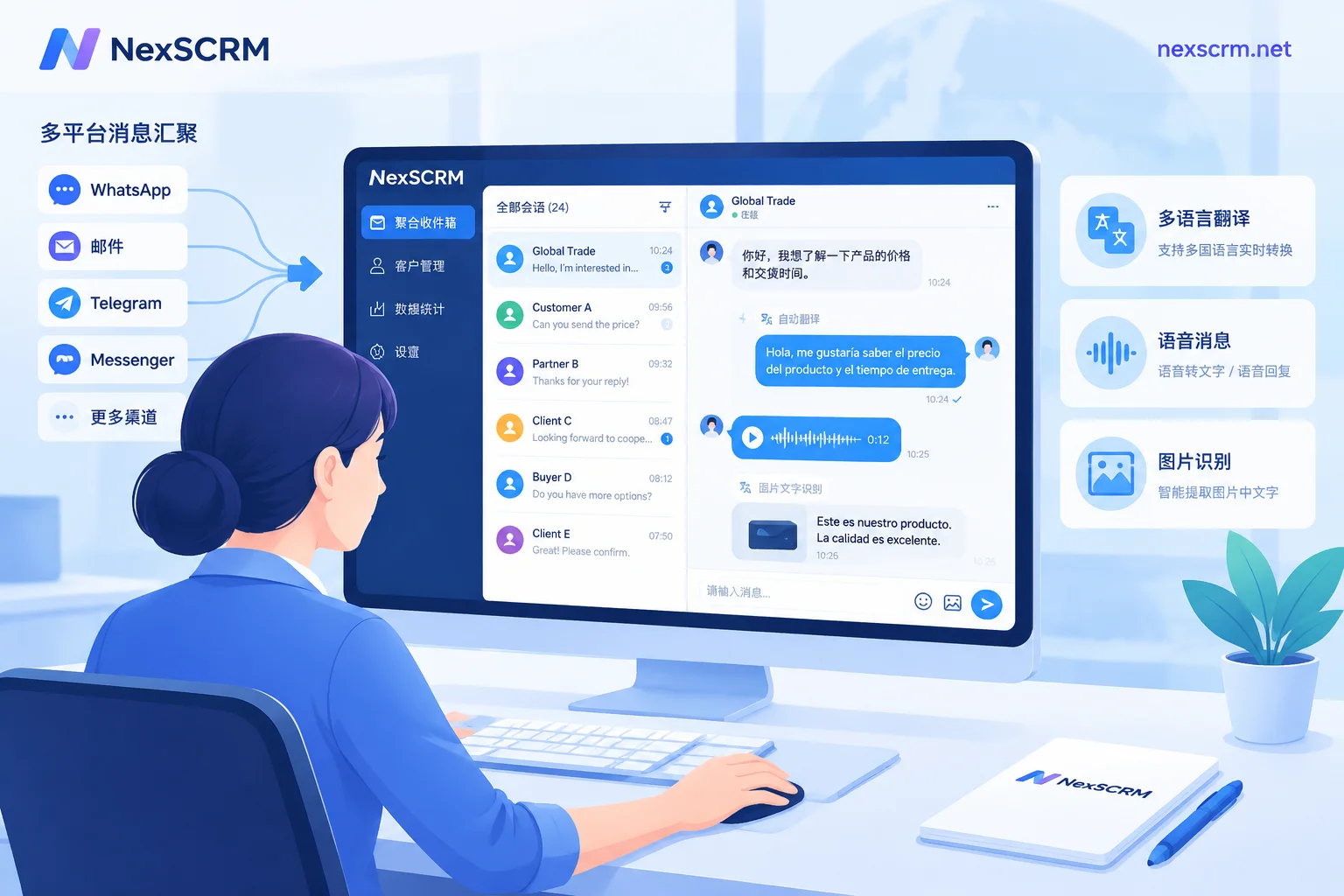
Overseas customers are very used to sending voice messages and screenshots. NexSCRM's translation covers text, images, and voice: voice can be transcribed to text then translated; text in images can be extracted and translated; results stay in the current conversation without saving and uploading to other tools.
Two points to note:
- Voice transcription is affected by accents and background noise. When the transcribed content is unreadable, politely ask the customer to supplement key information in text—this saves time compared to guessing repeatedly.
- In screenshots of quotes and specification tables, columns like model numbers, codes, and prices shouldn't be translated anyway—translating them is more likely to cause errors. For how to circle these columns first, see How to translate a quote image sent by a customer; for how far platform-native features can handle voice, refer to Can customers' voice messages be directly translated into Chinese.
Step 4: Switch Translation Routes for Minor Languages or Key Negotiations
Different translation routes perform differently across languages. For languages like Spanish, Arabic, Vietnamese, and Thai, when one route produces stiff output, switching to another for comparison often yields a smoother version. NexSCRM offers multiple translation routes; the specific routes and which languages they perform better on should be based on the actual configuration in the client and your own testing results.
A practical time to switch: use the convenient route for daily reception; when the customer starts quoting numbers and discussing terms, switch to the one you've verified as more accurate, combined with the bilingual verification from Step 2. For how to judge, see Which translation route to use for daily reception vs. quote negotiation.
Step 5: Use AI Reply Suggestions and Script Templates to Add "Natural" Language
Translation solves "the other party can understand." The more common problem for newcomers is slow replies, stiff wording, or not knowing what to say at a given stage. This can be addressed at two levels:
- AI reply suggestions: Generate foreign language reply drafts based on chat context; the salesperson reads the corresponding Chinese meaning, makes edits, then sends. Suitable for common scenarios like opening greetings, following up on unresponsive customers, and polite declines. Specific information like prices, delivery times, and certifications appearing in drafts must be manually replaced with real data—never send directly.
- Quick script templates: High-frequency content like company introductions, payment method explanations, sample policies, and common product Q&As can be written by someone familiar with the business and verified in foreign languages, then added to team templates. Newcomers can use them directly—fast replies and consistent messaging. For which content can be flexibly modified and which cannot be changed at all, refer to How shared script templates keep the whole team's responses consistent.
The division of labor between the two: routine questions are quickly answered with templates; non-routine questions are drafted by AI with human oversight; salespeople's energy is reserved for the negotiation stages that truly require judgment.
What AI Tools Cannot Replace
- Product and trade knowledge: If you don't understand the division of responsibilities between FOB and CIF, no matter how accurate the translation, you'll still negotiate incorrectly. Tools only handle language conversion.
- Tone and tact: When urging payment or declining a price reduction, AI drafts may be too direct or too polite; adjust according to customer relationship and local customs before sending.
- Written confirmation: Terms agreed in chat should ultimately be documented in PI, contracts, or emails—don't leave them only in instant messaging records.
A Few Things to Confirm Before Implementation
- NexSCRM currently offers a Windows client; teams using Mac need to evaluate first.
- Billing is per port; a port refers to the number of accounts that can be online simultaneously, not the number of users. If one customer service agent manages several accounts, that counts as several ports. See What does port mean, and how many ports does one customer service agent occupy.
- Each account runs in an independent fingerprint environment and can be bound to conversation-level proxies, isolating multiple accounts communicating across languages simultaneously.
- It's recommended to start with a free trial: take one or two of your most common languages and a few real inquiries (remove customer privacy information first), walk through the five steps above, and see if the translation routes, voice, and image recognition are sufficient. For port tiers and feature differences across versions, check the pricing and trial page.


Comments(0)