NexScrm官方博客
When a customer drops a photo of a quotation into the chat window, the safest approach isn't to toss the whole thing into a translation tool and reply with a price after a quick glance. Problems with image quotations almost never come from adjectives or pleasantries—they come from three types of content that 'look like they don't need translation': model numbers, figures, and trade terms.
Follow this order and you'll rarely go wrong: first circle the fields that shouldn't be translated → translate the image but keep the original for comparison → verify numbers and terms item by item → confirm any doubts before quoting. Below, we'll go through what each step does and when you can skip it.
Step 1: First circle the content in the image that shouldn't be translated
A quotation is a highly structured commercial document, and some of its content should never go into a translation engine:
- Product SKUs, model numbers, part numbers
- Specification parameters (dimensions, voltage, material codes)
- Currency codes (USD, EUR, JPY)
- Quantities, unit prices, amounts
- Incoterms (FOB, CIF, EXW, DDP, etc.) and the port or place that follows them
Machine translation has no concept of 'don't touch this.' Abbreviations embedded in model numbers may be translated as ordinary words, and trade terms, once rendered into Chinese and passed along, can easily lead to disputes in subsequent quoting and delivery—for example, translating EXW as 'ex works' isn't wrong in itself, but once it's taken out of context and understood as 'we deliver to the factory,' the division of responsibility is reversed.
The practical move is simple: open the image and copy these columns exactly as they appear into a note or draft—copy the original characters, not the translation. All subsequent verification should be based on this transcription.
Step 2: What you need from translation is comparison, not overlay
Mainstream image translation all follow the same path: OCR performs text detection and layout analysis, identifies text blocks, and sends them to machine translation. The problem lies in how the final result is presented.
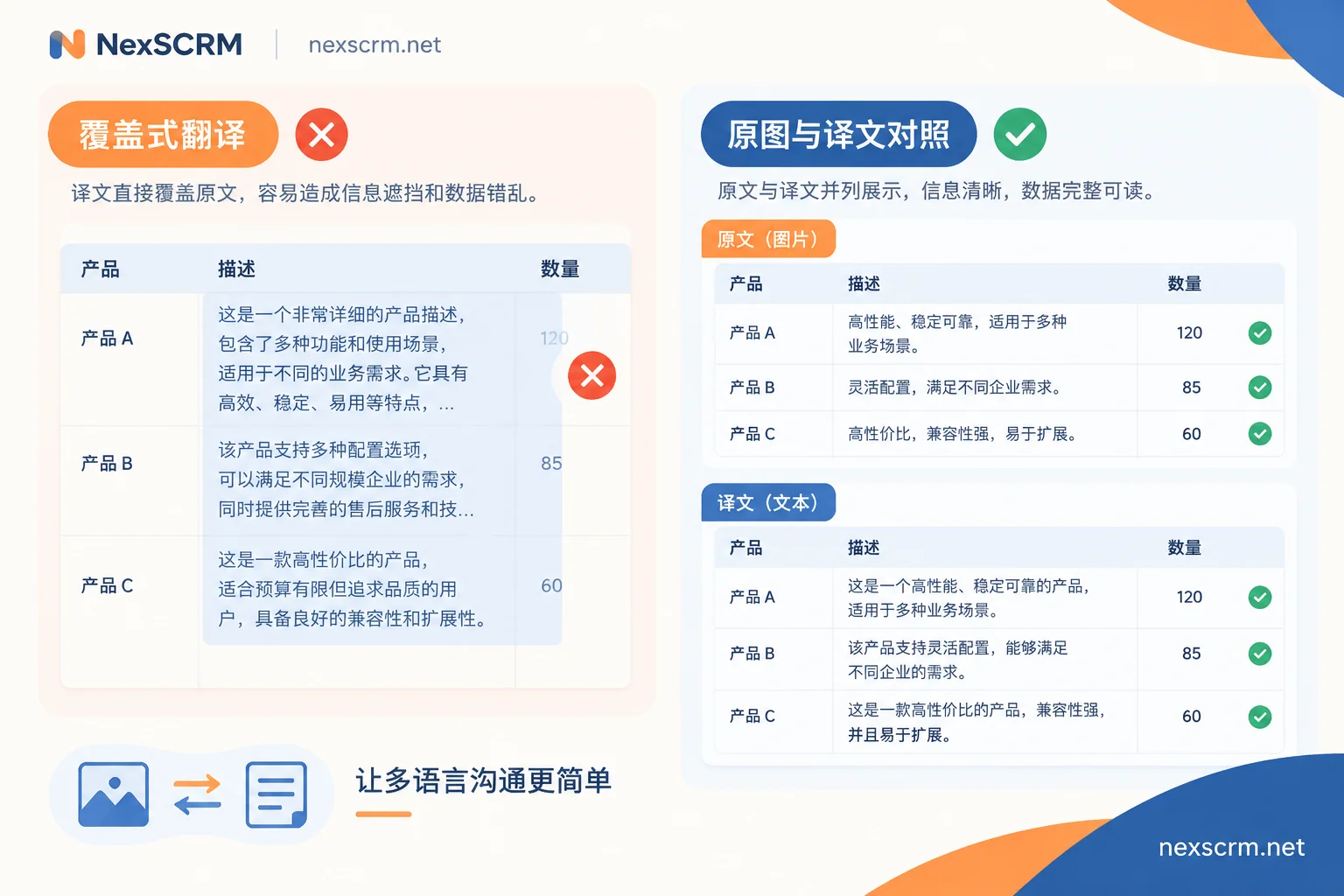
Overlay-style tools paste the translation back into the original position. Character lengths vary greatly between Chinese and English, Chinese and Arabic, Chinese and Thai. When the translation is longer than the original, text in tables overflows cells, pushes adjacent columns out of alignment, and in severe cases directly covers the numbers in the next column. You see a neatly formatted 'translated quotation,' but a unit price may have half a digit hidden.
So there's a hard rule when verifying quotations: the original image must be kept, and the translation and original must be compared bidirectionally. Use the translation to understand the wording of terms, but always take numbers from the original image. Any process that gives you only a translation and no original image is not suitable for calculating amounts.
Step 3: Handle it directly in the chat workspace, don't run an external process
The common inefficient workflow is: download the image locally → open a translation website or design tool → upload → wait for results → screenshot → switch back to the chat window to reply. Besides the time lost switching back and forth, the conversation context is interrupted, and the customer is still waiting. When inquiry volume is high, this action is repeated dozens of times a day.
A smoother way is to complete image translation right in the same interface where you send and receive messages. NexSCRM's real-time two-way translation supports text, images, and voice, keeping both the original and translation without exporting and re-importing the image; multiple translation routes are available, so if one route performs poorly on tables in a certain language, you can switch to another and try again—comparing two versions of the translation actually makes it easier to spot where recognition went wrong. When the customer sends a voice quotation instead of an image, the logic is similar; you can refer to Can a customer's voice message be directly translated into Chinese.
Step 4: Item-by-item verification checklist
After the translation is out, these are the items that truly determine whether you'll quote the wrong price. It's best to go through them in a fixed order:
- Ambiguity of currency symbols. A lone $ could be USD, AUD, CAD, HKD, or SGD. Go back to the original image and look for the three-letter currency code; if you can't find it, you must ask.
- Decimal points and thousands separators.
1.000,50in most European notations means one thousand point five, not one point zero zero zero five;1,000.50is the Anglo-American notation. This item is the most likely to multiply your quote by a thousand. - Date formats. Whether
03/04/2026is March 4 or April 3 depends on the customer's local convention. For dates related to validity and delivery, it's better to reconfirm using an unambiguous format like '4 April 2026'. - Units of measurement. kg vs. lb, pcs vs. ctn, set vs. piece—if the unit changes, the meaning of the unit price changes completely.
- Run the calculator yourself. Does unit price × quantity equal the subtotal? Do the subtotals add up to the total? If they don't match, either OCR misread a number or the original quotation includes unlisted fees.
- The place after Incoterms. FOB Shanghai and FOB Ningbo are two different quotes. If the term is right but the place is missing, it's as if you haven't verified it.
- Easily overlooked additional terms: MOQ, tax inclusive or not, whether shipping and packaging are included, payment terms, quotation validity. These are often in fine print below the table, have low OCR priority, and are most likely to be squeezed out by overlay translations.
Which images you shouldn't trust OCR on
For a few types of images, unreliable recognition is the norm, not an accident:
- Handwritten or semi-handwritten quotations, especially handwritten numbers
- Scans with stamps over numbers, creases, or reflections
- Phone photos taken at an angle with low resolution
- Handwriting in less common languages—different OCR engines vary widely on such content, and there's a lack of reliable public accuracy references
When you encounter these, the right move isn't to try another translation tool, but to verify each item manually or simply ask the customer to resend a copyable version. The practical test is: would you dare use the numbers on this image directly as the basis for a quote?
How to talk to the customer about uncertain parts
Don't guess on the translation. One sentence of confirmation is far cheaper than rework, for example:
Thanks for the quotation. To avoid any misunderstanding, could you confirm the currency code and the Incoterms with the named port? If possible, please also send an editable version (Excel or PDF) — the figures in the photo are not fully clear on my side.
Asking the customer to send copyable text, Excel, or PDF is the highest-value step here: text translation doesn't have layout misalignment issues, and numbers can be copied directly for calculation. Most customers won't mind sending another copy.
If everyone writes their own version of this confirmation, the messaging will drift. It's best to fix it as a template within the team so anyone who takes over uses the same wording. For details, see How public script templates keep the whole team's answers consistent.
Keep the original image and translation on file
Quotation disputes often happen weeks later, and by then the person handling it may have changed. Keeping the original image, the translation, and the confirmation message you sent in the same conversation record allows you to retrieve historical messages later by customer name or model number, so you don't have to ask the customer again during handover.
When you can skip this process
Not every image is worth all four steps. If the customer sends a clear screenshot with just one or two lines in plain English, reading the original is faster than translating, and you only use translation to confirm specific terms. The ones that truly need full verification are: large amounts, many terms, a language you can't read, or when the image will directly become the basis for your quote.
There's only one criterion—will the content of this image go into the quote you send out? If yes, go through the checklist; if not, just understand the meaning.
If what you handle every day is exactly this kind of multilingual inquiry and image documents, you can open a port and try it for a while, using real customer messages to see how image translation and original-text comparison work in your languages—it's more accurate than judging from a feature list.