NexScrm官方博客
A customer holds the mic and speaks Indonesian for thirty seconds. You open it and hear a string of incomprehensible sounds — can it be turned into Chinese with one click?
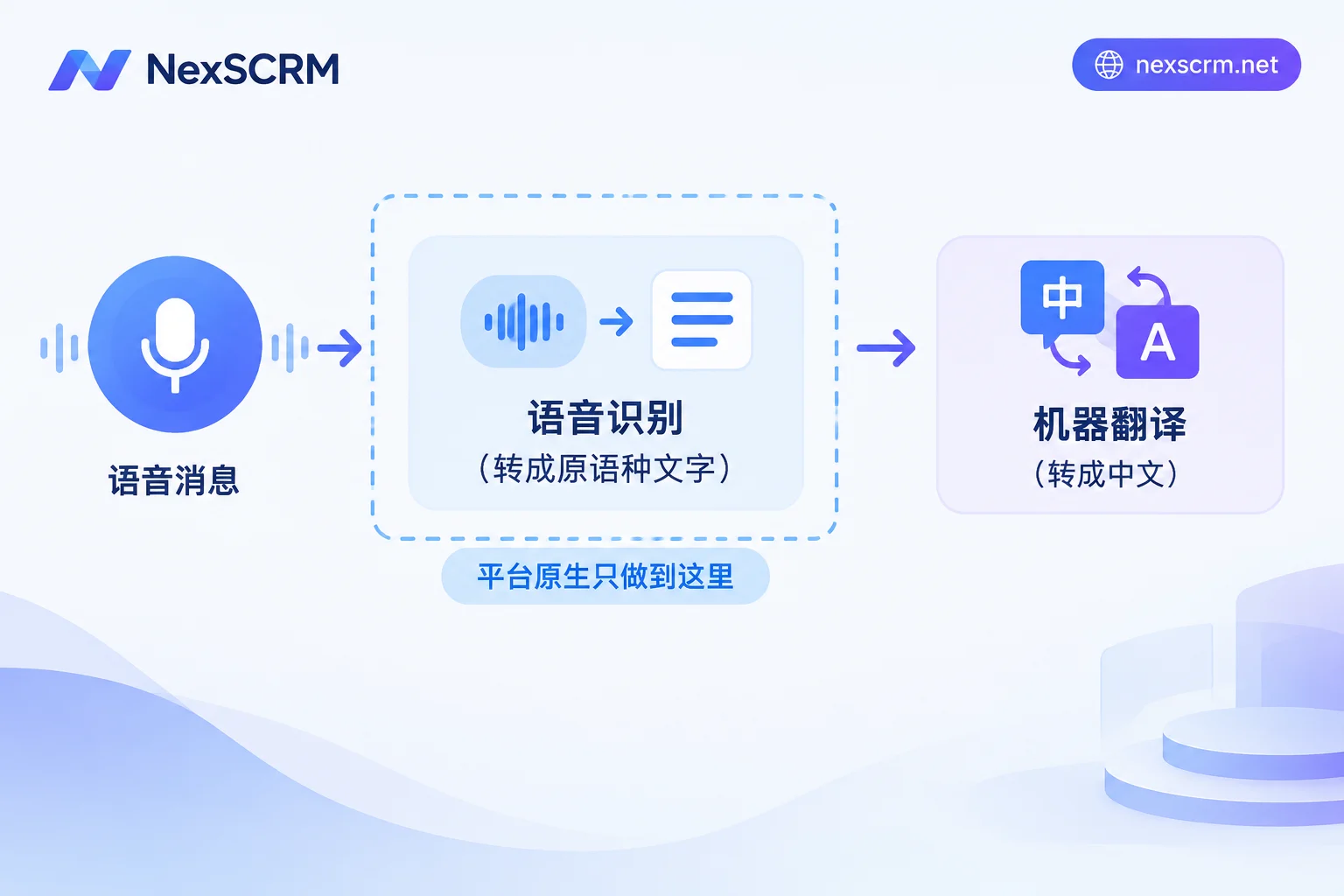
Direct answer: Native platform features can't do it. Tools like WhatsApp and Telegram offer "voice-to-text," which transcribes into the language the customer spoke, not Chinese. To see Chinese in the conversation, you need an additional translation step. The difference is whether you manually combine these two steps or have them automatically connected in a workspace.
How Far Native Capabilities Go on Each Platform
WhatsApp has Voice Message Transcripts. Transcription is done locally on the device, requires downloading the language pack, and the supported languages differ between Android and iOS. This brings two practical limits: if the customer's language has no corresponding language pack, even transcription won't work; and transcription is mainly a mobile feature — when you're on a computer using the web or desktop version, you usually can't access this chain.
Telegram natively supports voice-to-text. Free accounts have a weekly usage limit, while Premium accounts have unlimited use. But the logic is the same as WhatsApp — it transcribes into the original spoken language, not Chinese in one step.
For LINE and Zalo, I haven't found official documentation about voice transcription or translation APIs for desktop or business versions. So when planning team workflows, don't assume they have native capabilities. It's safer to assume they don't; if the platforms announce something later, follow their own documentation.
In other words, understanding a voice message across languages always involves two technical steps: speech recognition to text → text translation to Chinese. No platform merges these two steps for you in the chat interface.
When Manual Two-Step Is Sufficient
If you only get one or two voice messages a day, the customer's language is consistent, and you don't need to keep records, manual methods are perfectly fine: use the platform's transcription to get the original text, copy it to any translation tool, and read it.
What it can't handle:
- Monitoring conversations across multiple accounts, switching windows and copy-pasting back and forth while the customer has already sent three more messages;
- Dozens of voice messages a day, transcription quota exhausted or language pack not covered;
- Translations don't enter the chat history. This is the most easily overlooked point — you understood it at the time, but three weeks later when you want to search for "that packaging requirement the customer mentioned," the record only has an audio file with no searchable text.
Getting Chinese Directly from Voice in a Workspace
Professional aggregated customer service tools connect ASR (speech recognition) and machine translation in the same interface. NexSCRM's real-time bidirectional translation covers text, images, and voice. Voice messages from customers appear directly in Chinese in the conversation, with both original and translation preserved. Multiple translation routes are available; if a route performs poorly for a certain language or accent, you can switch and try another. When you reply in Chinese, it goes out in the customer's language — no need to juggle between two apps. For specific supported languages and routes, refer to the translation feature page.
Why You Must Keep the Original
Voice translation is more error-prone than text translation, and the error is in the first step, not the second: if the recognition mishears, even a perfect translation accurately translates the wrong content. Common triggers are accents, background noise, industry jargon and abbreviations, and numbers.
The most dangerous is misheard numbers. "MOQ 500" recognized as "MOQ 15," "Jakarta" heard as another place name, delivery date "the 15th" becoming "the 50th" — the translation reads perfectly normal, and you quote and schedule production accordingly. With the original kept alongside, at least you can see that the English itself is awkward and become suspicious.
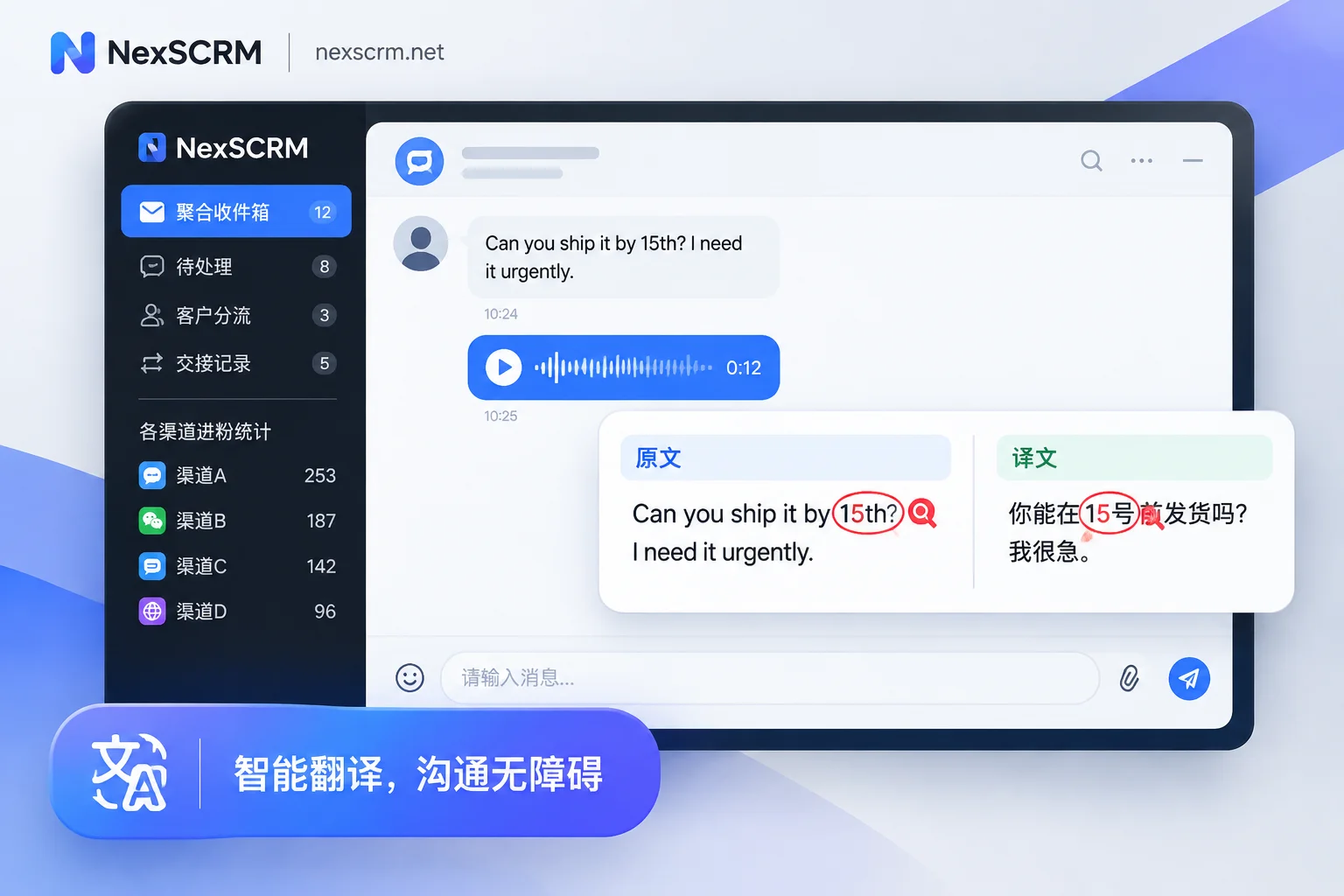
So here's a hard operational rule: for any voice content involving quantities, prices, models, shipping addresses, or delivery dates, repeat it in text and ask the customer to confirm. For example, reply: "Just to confirm: 500 pcs, model A-203, ship to Jakarta, correct?" This takes ten seconds and is far more useful than repeatedly tweaking the translation engine. And the customer's "Yes" reply is text, providing a record for the future.
Should You Reply with Voice Too?
Being able to translate doesn't mean you should use it. Just because customers prefer voice doesn't mean you have to reply in voice. Text replies have three practical advantages: customers can directly copy tracking numbers and model numbers; content becomes searchable in chat history; and if disputes arise later, it's clear text.
The compromise: customers send voice, you reply in text, and always write key numbers in text. If customers clearly prefer voice (in some regions they do), you can use voice for greetings and explanations, but send quotes, specifications, and addresses separately in a text message.
One Thing to Confirm at the Team Level
One person understanding isn't completion. What really affects handovers is: where the translation result lands.
If the translation is only rendered on your screen and not written into records, then when customer service changes or the customer follows up later, the colleague taking over opens the history and sees only a bunch of audio files. To turn voice information into a team asset, both original and translation must enter cloud chat records and be searchable. For more on this trade-off, see How to Choose a Multilingual SCRM System; for how to search historical messages, see How to Search Chat History by Keywords.
Implementation Order
- First, count which languages customers mainly speak. Concentrated languages are easier; if they're spread across seven or eight, factor in the cost of selecting and testing translation routes.
- Run real voice messages for a period, focusing on recording what type of content causes recognition errors — accents, terminology, or numbers. This determines whether you need to switch routes or just add read-back confirmation to the process.
- Write read-back confirmation into your script templates, don't expect every agent to remember. For methods, see How Public Script Templates Keep the Whole Team Consistent.
- Estimate ports based on how many accounts need to be online simultaneously. NexSCRM charges per port; one port corresponds to one account that can be online at the same time. For specific tiers and feature differences, see the pricing and trial page. You can start with a free trial and test with your own customers' real voice messages — more accurate than reading a spec sheet.
Back to the original question: can voice be directly translated into Chinese? — Not in the platform's own chat interface. Yes in a workspace that connects recognition and translation. What really takes effort isn't "can it be done," but whether you can detect recognition errors and whether the information is retained for the next colleague.