 NexScrm官方博客
At 3 p.m., support reported: "We clearly added over twenty people today, but the counter only shows fourteen." The right move here isn't to immediately go into the backend and add numbers by hand—it's to first figure out whether the missing portion was genuinely not recorded by the system, or whether it should never have been counted at all. The former needs backfill; backfilling the latter just inflates the numbers.
What follower backfill actually is
Follower backfill (also called offline backfill or disconnection backfill) is a compensation mechanism of the counter: when a contact-acquisition account has new customers come in that weren't counted into new-contact statistics in real time because the client was closed, the connection dropped, or the network or proxy was interrupted, the system—once the account is back online or a manual verification is triggered—goes back and scans the new sessions and contacts from that period, adds the genuinely missed new customers into tickets and reports, and fills in basic info such as nickname, avatar, phone number, or ID.
The key phrase is "genuinely new customers." Backfill recovers facts that actually happened but weren't recorded, not clicks or friend requests padded into the new-contact count. Once that boundary is loosened, every downstream channel cost calculation becomes distorted.
Do this first: decide whether it's a real miss or a definition gap
Before any backfill operation, line up three numbers: click counts on the routing links, the actual number of new sessions in the account that day, and the new-contact count in the counter. These three numbers are naturally unequal, and where the gap falls determines completely different handling.
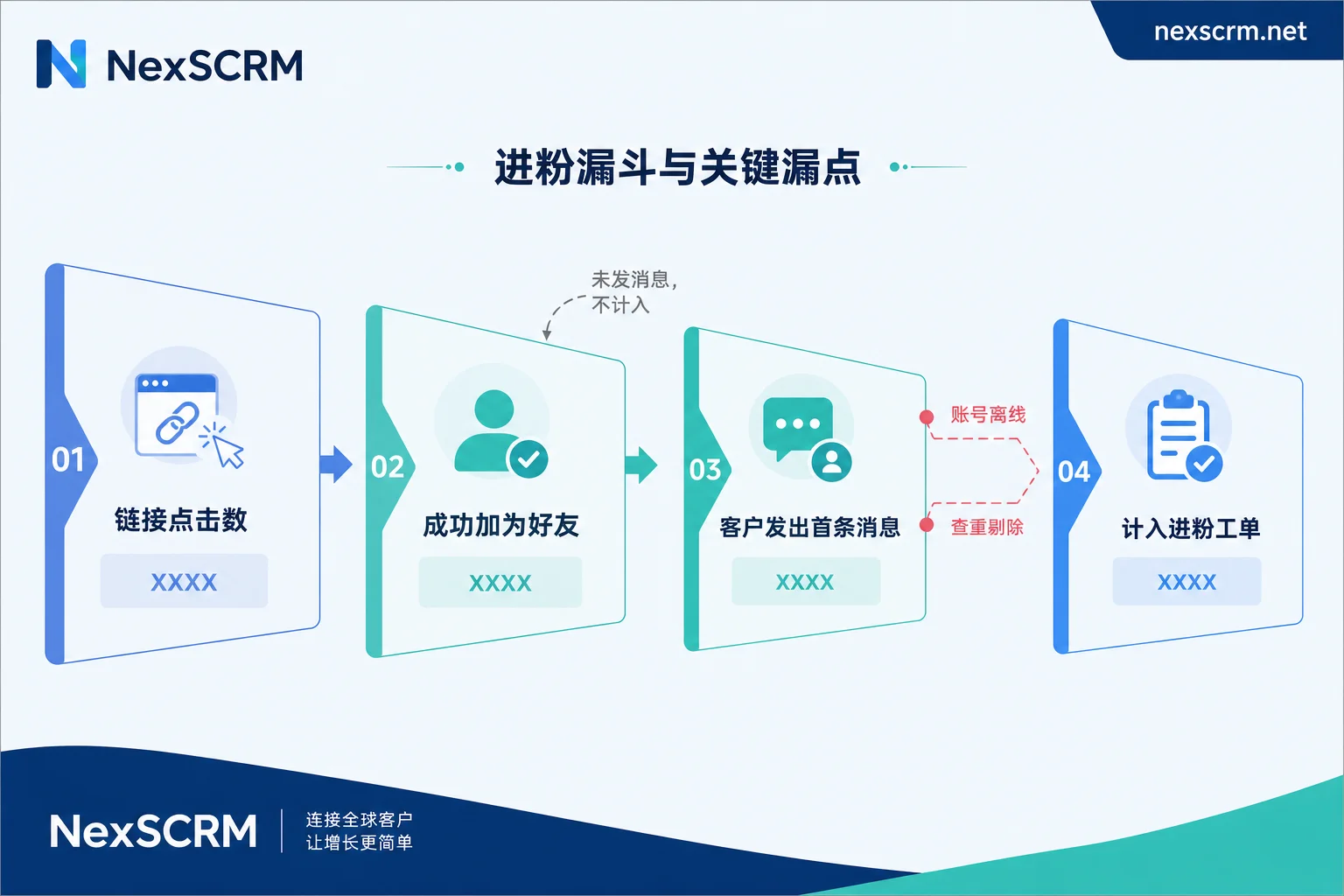
Clicks > friends added: normal. Some people clicked the link but didn't complete the jump, some took one look and left. This gap is a landing-conversion issue, not a missed count—no backfill needed. For a finer breakdown of this, see How to count how many followers each channel brings in via routing links.
Friends added > counter new-contact count: this is what needs real analysis. Most counters default to "the new customer proactively sends the first message" as the trigger for counting a new contact; if a customer clicks the link and becomes a friend but never says a word, it usually isn't counted in real time. That's a setting, not a malfunction. If your team's assessment standard is "added counts," then what needs changing is the counting rule, not daily manual patching.
The same customer shows up under two support agents but is only counted once: this is the deduplication mechanism at work. If the customer already exists in the base-contact pool or historical tickets, they're identified as a duplicate follower and automatically excluded, so the recorded count naturally falls short of channel clicks. This situation shouldn't be backfilled—what needs fixing is the attribution rule: whoever received them first owns them.
Once you've ruled out the three categories above, what remains is a real miss that needs backfill.
Real misses usually come from these four places
The account received messages while offline. During the period when the support agent closed the client, the computer went to sleep, or the account briefly dropped offline, a customer sent the first message. The message itself wasn't lost on the platform server, but the counter didn't receive the callback at the time, leaving a blank.
Proxy IP switching or network interruption. Changing lines mid-session means people who came in during the tens of seconds to a few minutes of disconnection are easily missed. These misses tend to be scattered—two or three a day—and are invisible without reconciliation checks.
The account was risk-flagged or temporarily restricted. When an account has problems, the last few sessions often get cut off before syncing completes. This backfill is the trickiest because the account may already be unrecoverable, leaving only backup records to check against.
Multi-device or multi-endpoint login conflicts. When the same account is kicked offline elsewhere, statistics on the main workstation get cut off.
The four backfill actions, in order
Step 1: Lock down the account and time window
Don't vaguely say "today's data is wrong." Get specific: "Account A, 14:20 to 15:05." The more precise the time window, the smaller the recalculation scope and the lower the chance of over-backfilling. Locating it is simple: look at the last normally synced record time for that account and the time it came back online; the interval between them is the suspect range.
Step 2: Bring the account back online and wait for automatic backfill
In systems that support offline compensation, after the account reconnects or is refreshed, the counter compares the chat records from the offline period and adds qualifying new sessions into tickets. This step usually requires no human intervention, but it needs time—message backfill takes a while right after the account comes online, so don't conclude "automatic backfill doesn't work" before syncing has finished.
Check the counter again after this step. In most cases, most of the gap is already filled.
Step 3: Re-calculate by time period in the ticket backend
For what automatic backfill didn't fully cover, do a manually triggered recalculation: select the abnormal time range in the counter ticket, rescan the seat's or account's contact list and valid sessions, remove duplicates, and merge the missed names back into the statistics.
The value of this step is that it runs deduplication at the same time. Dumping numbers straight into reports is the easiest way to have one customer counted once by two people; recalculation blocks duplicates. The several layers of ticket deduplication logic are broken down in more detail in this article.
Different products handle this layer differently—some compare silently in the backend, some offer an explicit "recalculate" entry point. Refer to the client version you're using.
Step 4: Export for reconciliation and manually backfill the last small batch
If the account is already banned, can't be logged back into, or the numbers still don't match after recalculation, you have to rely on export reconciliation:
- Export the customer list from that period from chat records or contact backups (number/ID, first message time);
- Compare it against the ad channel's click records and landing records to find the entries that are "in the link records but not in the tickets";
- Verify one by one whether a real conversation occurred, then manually enter them in the backend or batch-upload them in the base-contact format.
Manual backfill must carry three pieces of information: customer identifier, the actual time of the first conversation, and the owning support agent. Without a timestamp, the record can't be traced later; without attribution, commissions and follow-up fall into chaos.
For this process to run smoothly, chat records must be retrievable. After an account goes offline or even gets banned, local data may be incomplete, so cloud backup plus searchable historical records form the basis for backfill. NexSCRM places tickets together with the follower counter, routing-link statistics, and cloud chat-record backup in the same module, precisely so that "who's missing from the tickets" and "who's in the chat records" can be matched directly. For configuration, see the counter and backup feature page.
After backfilling, verify three things
Attribution is correct. Who a backfilled customer belongs to determines who follows up. If multiple support agents share one acquisition link, attribution by first-message time is the safest.
Whether it duplicates an existing customer. Backfill is the stage most prone to creating duplicate contacts. After backfilling, run a contact deduplication pass, merge identical numbers and IDs, and confirm whether tags and profiles were overwritten. This can be handled alongside profiles, deduplication, and scripts.
Whether the channel tag was lost. Manually backfilled records often lack a source channel, directly hurting the accuracy of per-channel new-contact details. Tag the channel at the time of backfill—don't leave it to guesswork at month's end.
Set a few backfill rules for the team
Backfill is a permission that can alter data; used loosely, it becomes performance inflation. Three rules are worth writing into policy:
- Time-limited. Backfill should only cover recent days, say within T+2. Last month's numbers stay untouched, and only then do the books add up.
- Evidence-based. Every manual backfill must point to a real conversation record and state the first message time.
- Auditable. Who backfilled, when, and how many entries must be checkable. A seat whose backfill volume suddenly spikes is worth a look.
Rather than backfilling daily, miss less
Backfill is a safety net, not a daily process. What truly saves effort is reducing the sources of misses:
Run each account in an independent fingerprint environment with session-level proxies to reduce interference between multiple accounts and disconnections caused by IP switching; confirm syncing is complete before closing the client at end of day instead of just shutting down the computer; during peak contact-acquisition hours, assign someone to watch account online status and bring dropped accounts back up immediately.
One more often-overlooked thing: write the counting definition clearly and post it on the wall. Once the seven words "based on the customer's first message" are made clear, half of all "the data is wrong" arguments never happen. The remaining half is what backfill should handle.
For teams just starting to sort out new-contact statistics and backfill processes, start with a free trial on one channel and two or three accounts, get the definitions and reconciliation rhythm working smoothly, then scale up.




Comments(0)