 NexScrm官方博客
A work order counter is, in plain terms, a counting tool that creates separate orders for each "promotion task/advertising channel" to track in real-time how many real followers a social media main account or group on WhatsApp, Telegram, LINE, Zalo, etc., has gained. It automatically removes duplicates and generates verifiable reconciliation details.
Many teams still get stuck at the same point after adopting it: when reconciling with agencies, traffic channels, or internal promotions, the numbers on both sides always differ by a chunk—the other side says they brought 500, but you only count 360. Sending screenshots back and forth still leads to endless disputes. To settle the accounts once and for all, the core approach is three things: before launch, create separate orders per task and lock down the existing "base follower" count; agree beforehand whether to use order-level or global "work order deduplication," and list duplicate followers separately without counting them as valid; and finally, don't wait until the task ends to send screenshots—directly send the "work order share" link to the other party for real-time viewing, and export detailed records for item-by-item verification at the end.
1. What's the difference between a work order counter and a regular "follower count"?
If you just want a rough look at how many people joined an account today, the platform's contact list or a simple counting table might suffice. But as soon as the numbers are used both for internal performance evaluation and for reconciliation with external channels, partners, or bosses, you must slice the data granularity down to the "work order" level.
| Comparison Dimension | Relying on Platform Native Backend / Manual Records | Simple Follower Counter | Work Order Counter |
|---|---|---|---|
| Statistical Granularity | Mixed across the whole account; can't tell which traffic source brought whom | Shows total new followers per account; multiple channels still mixed | Creates separate orders per task/channel; main accounts and groups counted separately |
| Update Timeliness | Some platform backends have high latency, or rely on manual screenshots from customer service | Automatically records new contacts | Counts in real-time when account is online; can backfill after reconnection |
| Duplicate Follower Identification | Basically relies on manually scrolling through chat history; prone to double counting | Only checks if a single order number is duplicated | Supports deduplication within a single account or across sub-accounts, plus system-wide duplicate check |
| Reconciliation Basis | Screenshots easily lead to disputes over "Photoshopped images / deducted volume" | Only for internal viewing; lacks task-level sharing perspective | Generates work order share links for real-time reconciliation; exports time-stamped details |
| Subsequent Integration | Counting ends there; customer service follow-up starts from scratch | Focuses on statistics; disconnected from reception process | New followers enter the workbench immediately; conversations and conversion leads are traceable |
In one sentence: A regular counter only tells you "how many people the account gained," while a work order counter solves "who brought this batch of traffic, how many are real new followers, and which number both parties settle on."
2. Why do the numbers always differ? Four common black holes causing missing followers in reconciliation
When channel-reported numbers don't match your backend data, don't rush to suspect the other side of sending fake traffic, and don't rush to blame customer service. In practice, over 90% of discrepancies come from the following four blind spots in definition:
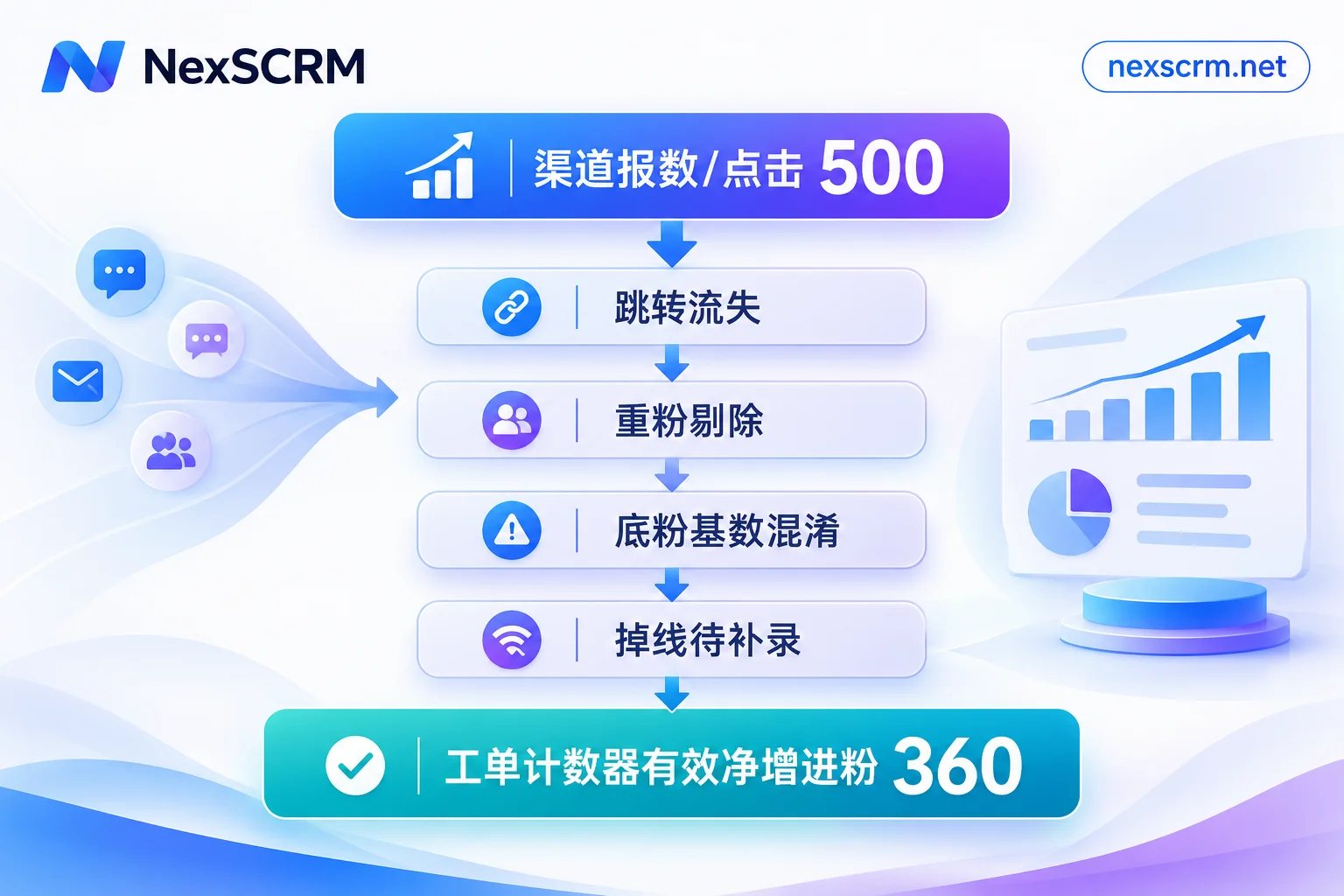
1. Mistaking "link clicks" for "new followers"
Ad backends or short-link platforms count clicks, but overseas users who click through to a landing page or diversion link may not actually add as a friend or join a group due to slow network, unwillingness to switch apps, or hesitation after seeing the default welcome message. This loss occurs at the redirect stage and never reaches the social media reception end. If you haven't yet clarified the gap between clicks and actual new followers, you can refer to the verification method in How to count how many followers each channel brings via diversion links: clicks are not equal to new followers.
2. "Duplicate followers" not defined upfront for removal
The same audience repeatedly sees the ad, or previously added your team's customer service account A and now adds account B, or even adds, deletes, and adds again—without cross-account deduplication, the channel backend counts multiple touches, while on your side it's just one old acquaintance. Worse, some teams only enable "single account deduplication" and not "all sub-accounts/system-wide duplicate check," resulting in the same customer being counted three times for performance across three customer service accounts, only discovered when deals clash (for collision troubleshooting logic, see How to prevent two customer service reps from following the same customer with work order deduplication: four gates set in order).
3. Base follower count not locked before an old account takes on a new task
New accounts starting new work orders are simplest—just count up from zero. But many teams use warmed-up old accounts for new campaigns. If the existing friends in the account are not first marked as base followers when creating the work order, or someone accidentally clicks data reset/clear midway, returning old customers' messages can easily be miscounted as new followers for the day, or the already-settled increment can be wiped out.
4. Followers gained during client disconnection are missed
Overseas social media accounts occasionally experience local network fluctuations, computer sleep, or unexpected disconnections. If the counter only captures real-time online messages, customers who add during that half-hour of disconnection will be missed. If follower backfill is supported, new friends added during offline periods will be automatically restored after the account logs back in. But if you don't understand the backfill mechanism, you might mistakenly think "a chunk is missing" during reconciliation. For specific backfill troubleshooting steps, see What is follower backfill? How to restore missed new followers step by step.
3. From order creation to reconciliation settlement: 5 steps to a "zero-dispute" counting process
To make every promotion campaign transparent from day one, don't wait until it's over to dig through records. It's recommended to fix the process in the following five steps:
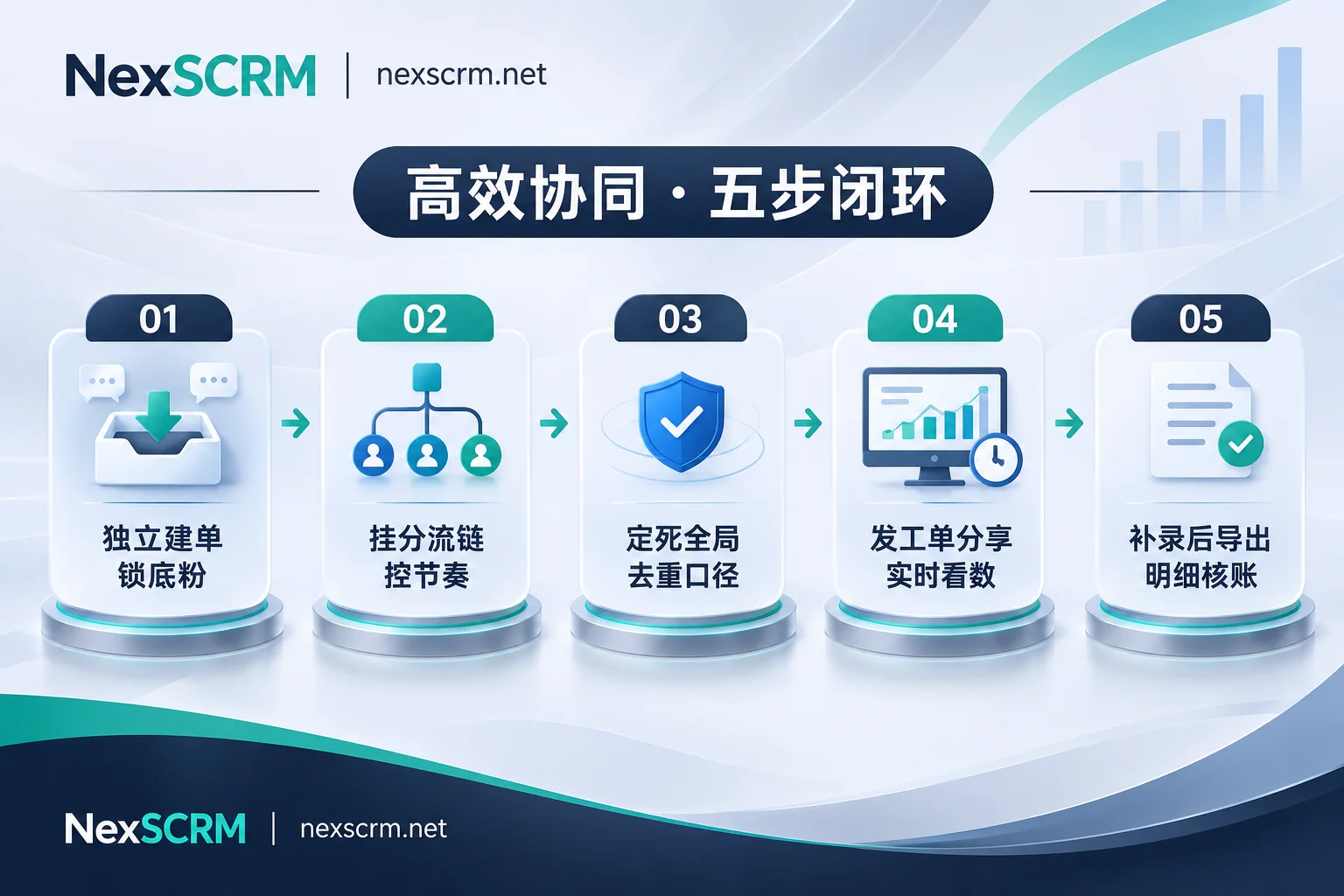
Step 1: Create separate orders per task, distinguishing "main account work orders" and "group work orders"
Don't pour traffic from different channels into the same statistical definition. Create an independent work order for each promotion wave and each channel:
- For diverting to customer service personal/business accounts, use main account follower counting;
- For diverting directly to groups, use group follower counting.
If the same campaign both adds personal accounts and pulls into groups, the two numbers must be presented separately to avoid counting the same person once as a main account new follower and once as a group new follower.
Step 2: Attach diversion links to work orders and control the follower inflow rate per order
Put the receiving accounts into the same diversion pool and expose only one diversion link externally. This has two benefits: first, you can directly count the real new followers brought by each diversion link; second, when an account gains followers too quickly in a short period and is prone to triggering platform risk control, diversion can evenly distribute new incoming traffic to other online accounts, reducing statistical interruptions caused by account anomalies.
Step 3: Define the "deduplication rules" in writing before launch
Align with the promoter or internal operations on two points in advance:
- Whether to count by order number or across all team sub-accounts: For conventional multi-account matrices receiving followers, it's recommended to enable work order deduplication and system-wide duplicate check across all sub-accounts. Duplicate followers are only marked and displayed separately, not counted as valid for settlement.
- Which time zone to use for daily statistics reset: Especially for cross-time-zone campaigns targeting Europe, America, or Southeast Asia, agree on whether to split days by Beijing time or the target market's local time, to avoid disputes over "which day does that batch of followers from 11 PM last night belong to."
Step 4: Send "work order share" links for real-time viewing; don't wait until the end to send screenshots
Screenshots are the most trust-eroding format. After the work order is created and accounts are online receiving followers, directly generate a work order share link and send it to the partner or campaign manager, so both parties can view "current total new followers, today's new followers, duplicate follower markers" in real-time on the same data page. The process is fully transparent; if there's a sudden drop in new followers or a spike in duplicates, you can stop and adjust within an hour of running, rather than disputing after the budget is spent.
Step 5: Verify backfill first, then export details for final reconciliation
When the task ends and you're ready to reconcile, wrap up in this order:
- First confirm that all receiving accounts have maintained a stable online state at least once, and that follower backfill for the offline period has been synchronized;
- Directly export the statistical data report from the system;
- If the other party still has objections about a certain day or time period, don't just focus on the total number—directly spot-check the new follower records and account context for the corresponding time period using the exported details.
For more on how the system further manages duplicate checking, group statistics, and backfill details, you can also read How to use a work order counter accurately? Manage these four gates: duplicate checking, group statistics, and follower backfill.
4. Putting counting, multi-account chatting, and translation into one workbench: How does NexSCRM connect these steps?
Many cross-border teams have fallen into a trap: buying counting tools, multi-open software, and translation plugins separately. The numbers are finally clear, but when customers come in, customer service loses the paid followers because switching windows is slow, they can't understand minority languages, or they can't find historical source tags.
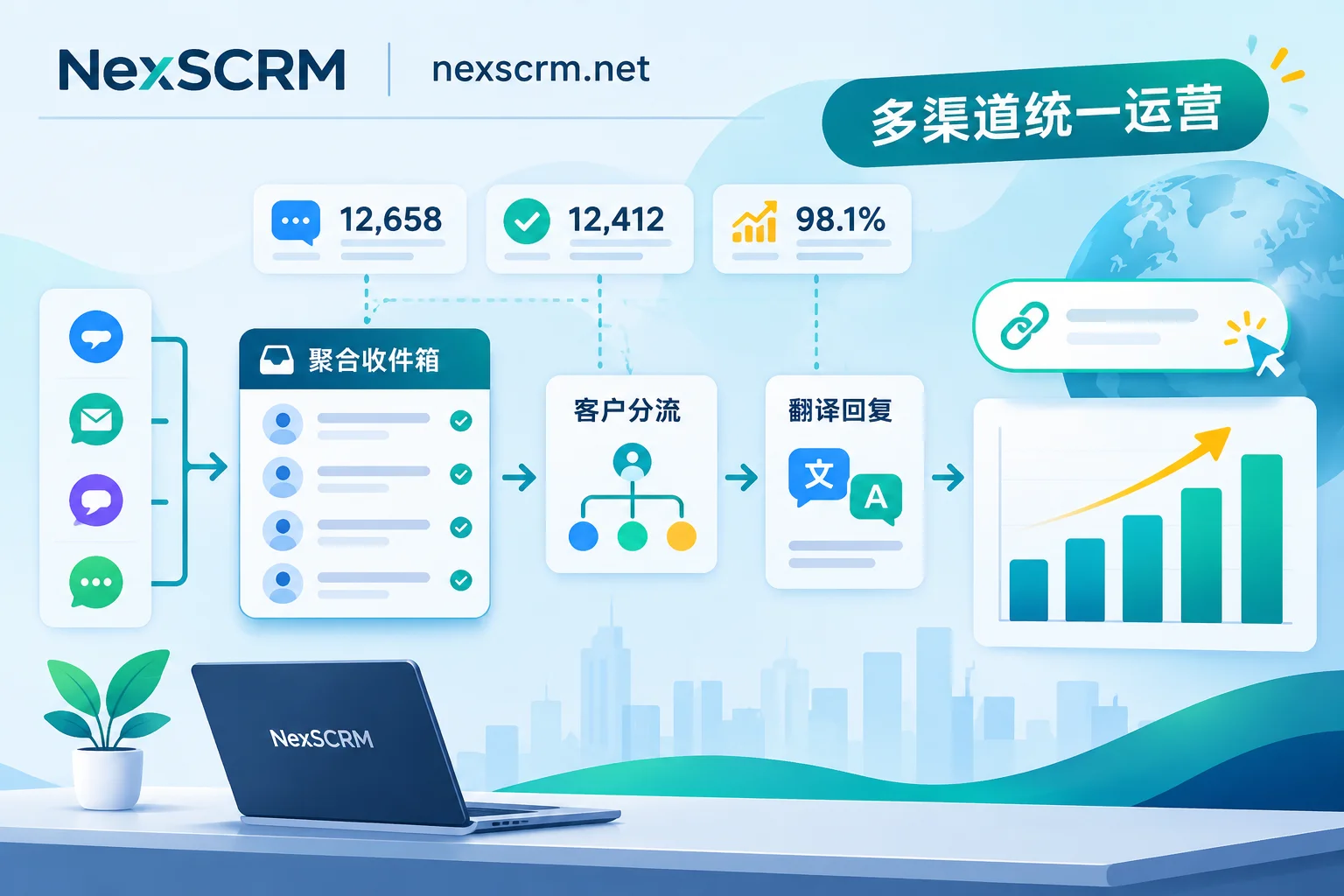
If your team already needs to use WhatsApp, Telegram, LINE, Zalo, and other platforms simultaneously to receive overseas customers, you can consolidate statistics and reception into a single desktop workbench. Take NexSCRM for example: it integrates the work order counter with daily reception in one client:
- Counting and deduplication cover main accounts and groups: Built-in main account follower counting, group follower counting, work order deduplication (supporting individual sub-accounts or all sub-accounts), system-wide duplicate check, diversion link statistics, work order sharing, follower backfill, and statistical data export—the entire data chain needed for reconciliation closes the loop in one backend.
- Diversion assigns by source; no need to switch windows across multiple accounts: After customers enter via diversion links, they can be assigned to the appropriate customer service rep by source, tag, and history. Main accounts and multi-platform accounts are centralized in the same workbench for sending and receiving messages (multi-account aggregation solution), with unified unread reminders, and no need to repeatedly scan QR codes after restarting the software.
- Follow up directly with real-time two-way translation after new followers arrive: Built-in multiple translation routes including Google, Microsoft, DeepL, and AI large models (multilingual real-time translation). Foreign language, image, or voice messages from customers can be understood directly (image and voice translation available by version). Replies are automatically translated into the other party's language, avoiding the disconnect where "the follower count is accurate, but the person is lost in chat."
- Supporting traceability and internal controls to prevent customer loss: Chat records and media files are automatically backed up to the cloud. The data dashboard directly presents conversation volume, new follower count, response time, and customer service performance, combined with sensitive word and behavior monitoring (e.g., privately adding contact info, private payments) and data masking. After a customer service rep leaves, customer information and conversations remain on the enterprise side.
One deployment detail to verify in advance: NexSCRM currently offers a Windows desktop client (the macOS client is marked as "coming soon" on the official download page). Subscription is billed by the number of concurrently online account ports. New teams can first use the limited-time free trial provided on the official website (no credit card required) to actually create a test work order and run through the process. Also, it counts front-end reception data such as new followers, work orders, replies, and conversions. If you need ROI calculations accurate to order amount level, you still need to align the exported new follower and conversion details with your own order system.
5. The "Work Order Reconciliation Confirmation Checklist" you can copy directly before launch
Before starting a new promotion or taking on a new channel next time, send the following 5 items to the coordination group for confirmation—it can save 80% of future disputes:
- Statistical scope: Is this campaign for main account private chats or group new followers? (Create separate orders; do not mix)
- Base follower count: The existing friends in the old receiving account before launch are locked as base followers; billing/performance is based only on the increment.
- Deduplication rule: Use [global deduplication across all sub-accounts] as the standard. Duplicate followers are marked separately but not counted as valid new followers.
- Backfill and time zone: Daily settlement switch time is set to [Beijing Time 00:00] (or target market local midnight). Occasional account disconnections are subject to data after automatic backfill upon reconnection.
- Reconciliation method: Work order share links are open throughout for both parties to view at any time. Final settlement is based on the work order detail report exported from the system.
FAQ
1. Can a work order counter directly calculate how much this ad spent and how much ROI it earned?
It cannot directly calculate profit for you. The core responsibility of a work order counter is to accurately count the segment from "channel click → real new followers on account → valid customer count after deduplication → customer service response and follow-up conversion count." To calculate full ROI, you need to use the data exported from work orders and combine it with your backend completed order amount table for secondary matching.
2. Our team uses WhatsApp, Telegram, and LINE. Can the work order counter track them together?
Yes. Tools that support multi-platform aggregation, such as NexSCRM, can bring accounts from WhatsApp (both regular and Business accounts supported), Telegram, LINE, Zalo, and other platforms into the same workbench for separate order creation, channel-based viewing, and aggregated export. You don't need to find a separate counting plugin for each platform.
3. If I take over an old account that already has hundreds of friends, will a new promotion work order mistakenly count old customers?
As long as you correctly create a new work order before launch, lock the current base follower count, and enable system-wide duplicate check and work order deduplication, old customers already in the account will not be counted as new followers in the new work order even if they message again. If you're not sure before reconciliation, you can first run 10 test traffic through a small account to verify the increment and deduplication markers, and then scale up after confirming accuracy.