 NexScrm官方博客
To achieve WhatsApp chat log team sharing and customer asset retention, the right approach is not to share the account with colleagues, but to split the assets into four layers: device login, conversation visibility, field retention, and handover audit—determining ownership at each layer. Do what the native app can do, and externalize what it cannot. Many foreign trade teams think that by sharing the same WhatsApp account's verification code or linked device QR code among several colleagues, the customer chat logs are now team-owned. But this violates official rules and creates risks of collisions, lost customers, and data loss upon departure. By 2026, more and more overseas teams are realizing the risks of managing customers on personal phones and are shifting to layered control, moving customer assets from personal devices to the enterprise side.
First, distinguish two things: account ownership and conversation ownership are not the same problem
Who owns the account and which devices can see the chat logs are two separate issues. WhatsApp's official rules state that the native WhatsApp Business free app supports up to 1 primary device plus 4 linked devices, totaling 5 terminals online simultaneously, and all linked devices share the same conversation list (source: WhatsApp Official Help Center, January 2026). This means that as long as account access is granted, operators on all linked devices can see all conversations—unable to assign per agent or restrict someone to only their own customers.
Therefore, the first step in team sharing and asset retention is to distinguish these two issues: account ownership determines who can send and receive messages, while conversation ownership determines who can view history within what scope. Mixing them up leads to the misconception of "sharing accounts / spreading linked devices."
Layer 1: Device and Login: At most how many devices can the native app have online simultaneously
Answering the high-frequency question from search intent: "How many devices can WhatsApp Business connect?" The official limit is 5 terminals, not 5 agent accounts; if one person has multiple devices (phone + computer), the actual number of people covered will be even fewer. Therefore, when online terminals approach 5, or when you need to isolate visibility scope by agent, it's time to consider externalizing.
| Dimension | Native App (≤5 devices) | External SCRM Advantage |
|---|---|---|
| Device limit | 5 terminals | Number of agents not constrained by the 5-terminal limit (depends on selected solution) |
| Permission isolation | None, all visible to account | Can authorize by agent group |
| Collision prevention | None | Has assignment and detection |
| History retention | Depends on device | Centralized on server |
The left column is the official WhatsApp rule, the right column is a general capability description of industry shared inbox solutions, not an official conclusion.
Layer 2: Conversation Visibility: If history resides only on a device, can the new person see it?
The core risk is that historical messages are attached to the device and account. When the colleague responsible for a customer leaves or the device goes offline, the new person often cannot get the full context. To make history visible to multiple agents, conversations must be centralized on the server and support customer-centric retrieval, not just forwarded screenshots.
It is recommended to set conversation visibility levels based on sensitivity:
| Visibility Level | Applicable Scenario | Criteria |
|---|---|---|
| All visible | Unified inquiry handling | Customer has no assigned contact |
| Group visible | Regional/product line teams | Group has separate KPIs |
| Owner only | Key accounts/customized | Involves quotation privacy |
The native app cannot achieve tiered visibility; this layer is the boundary where most teams must externalize. NexSCRM's multi-platform, multi-account aggregation management can centralize the same batch of customer conversations on the enterprise side rather than on personal devices, and with agent permission settings, achieve group-based conversation visibility. For unified management across platforms, refer to Telegram multi-account aggregation login management solution.
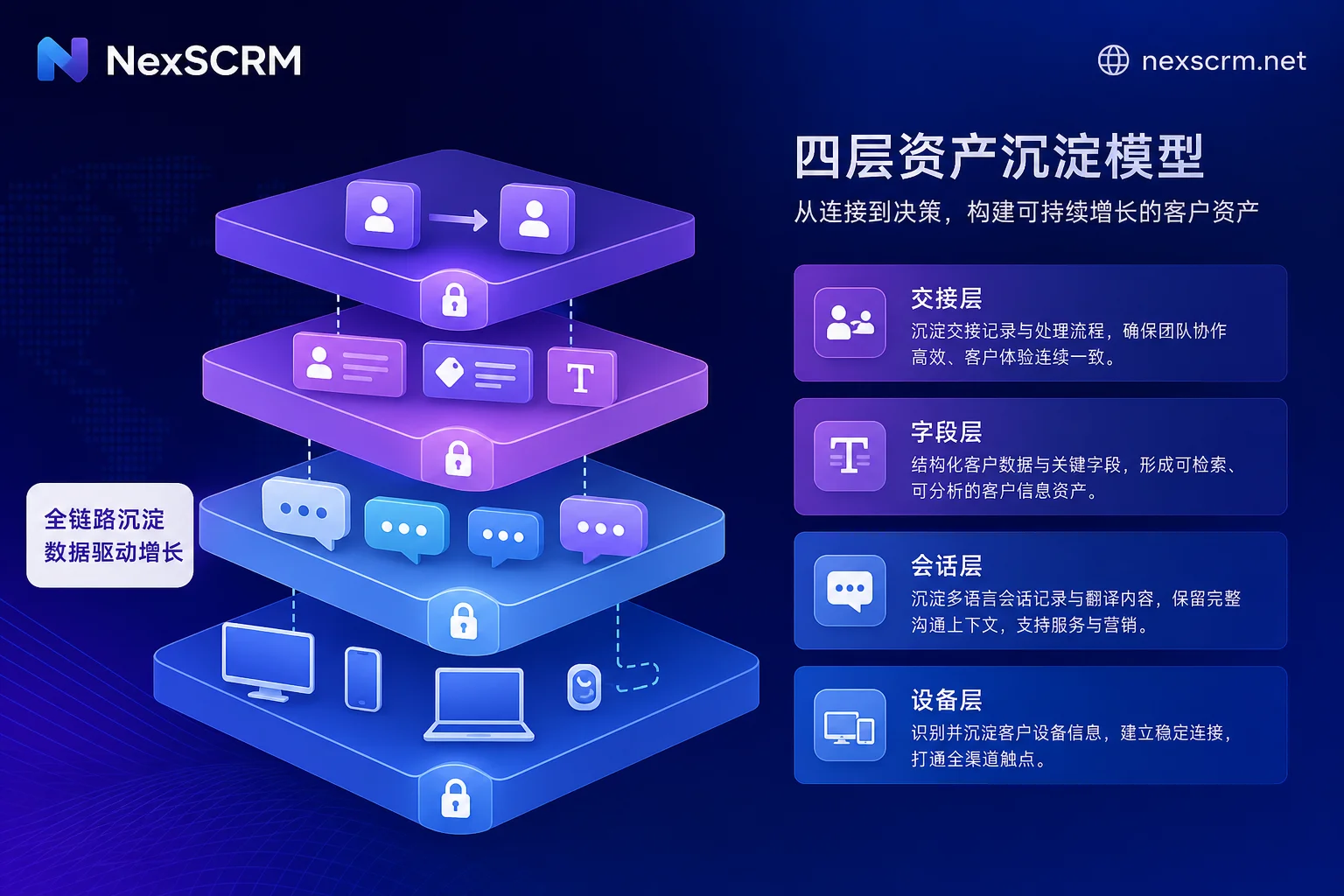
Layer 3: Field Retention: Why exporting a txt file does not equal customer assets
Answering "Can WhatsApp chat logs be exported and backed up?": Officially, export is supported, but it only generates a plain text .txt or a ZIP with media attachments, and the official rule is clear that it cannot be re-imported to restore the native chat history, nor does it include structured fields like labels or stage attributes (source: WhatsApp Official Help Center, March 2026).
Therefore, exporting a txt is just a read-only record, not customer assets. To retain customer assets, the following fields must be structured and stored in a database:
| Field | Capturing Time | Capturer |
|---|---|---|
| Customer attributes (industry/size) | First communication | Handling agent |
| Source channel (exhibition/social/referral) | Day of establishment | Handling agent |
| Communication language | After first conversation | Handling agent |
| Quotation and sample milestones | After each business action | Responsible agent |
| Next follow-up time | After each communication | Responsible agent |
For further standardizing customer information management, refer to WhatsApp foreign trade customer tagging and classification management method. NexSCRM's real-time two-way translation allows both the translation and the original text to be archived along with the conversation, solving the pain point of "unintelligible original text" during field capture in multilingual communication.
Layer 4: Handover and Audit Trail: What needs to be handed over on the departure day, and how to verify the handover is complete
The final gate for WhatsApp chat log team sharing and customer asset retention is the handover audit: unbind accounts and devices, transfer conversation ownership, verify field capture completion, and check backups and audit trails. Submitting only an exported txt does not constitute a valid handover, as it cannot be restored or parsed into structured fields.
The criteria for a completed handover are "retrievable, continuable, and traceable": retrievable means the new owner can view the complete history; continuable means they can continue the conversation from the original context; traceable means key business commitments can be verified from the original text. NexSCRM's message backup function provides verifiable evidence for offboarding acceptance, ensuring customer assets remain on the enterprise side.
Collision Prevention: Assignment Rules and Occupancy Status
Answering "How to avoid two agents replying to the same customer." Modern team shared inbox and SCRM solutions commonly introduce three types of mechanisms (source: Spur 2026 guide): agent assignment, collision detection (typing/viewing), and internal private notes. Translating these mechanisms into actionable team rules:
| Rule | Specific Practice |
|---|---|
| Default owner | First conversation assigned to a specific agent |
| Takeover condition | Only if the original owner is timeout or on leave |
| Timeout release | Auto-release to public pool after no reply for 2 hours |
| Shift reset | Occupancy status reset at shift change |
Assignment, collision detection, and private notes mechanisms come from industry shared inbox common practices (Spur 2026 guide); timeout duration and takeover conditions are examples of team-defined rules and can be adjusted based on response time requirements.
Additional Requirements for Multilingual Scenarios: Should Translations and Originals Be Stored Together?
In multilingual foreign trade communication, storing only translations loses details like prices, specs, and terms in the customer's original words; storing only originals makes it hard for new colleagues to understand. It is recommended to archive both: store the original and translation in pairs, annotate the language, and verify key commitments against the original during handover. If the system supports two-way translation archiving, confirm that the translation and original are stored in pairs rather than overwriting the original.
Configuration Comparison for Three Team Sizes and Handover Inspection Checklist
Different team sizes have different starting points for externalizing WhatsApp chat log team sharing and customer asset retention. Refer to the table below.
| Team Size | Native App Sufficient Layer | Must Externalize Layer | Boundary Basis |
|---|---|---|---|
| 1-2 people | Device + conversation | Handover audit | Within 5 devices, but offboarding risk high |
| 3-5 people | Device + conversation | Field retention + handover | Conversation visibility lacks tiering |
| 5+ people | Device | Conversation + field + handover | One person with multiple devices can easily exceed 5 terminals, and no agent-level permissions |
When deciding whether to externalize, refer to How to choose a foreign trade customer management system.
Offboarding handover inspection checklist:
| Inspection Object | Inspection Method | Pass Criteria |
|---|---|---|
| 3 random active customers | New owner retrieves history | Full history + key fields available |
| Account and devices | Check unbinding records in backend | Former employee cannot log in |
| Field capture | Compare with CRM required fields | Missing rate ≤5% |
| Backup verification | Compare export records | Backup in the last 7 days |
FAQ
Is it safe for multiple people to share one WhatsApp account?
No, it's not safe. Sharing the same phone number account and verification code, or casually distributing linked device QR codes, causes all linked devices to share the same conversation list, making it impossible to restrict visibility per person. Moreover, abnormal operations may trigger platform risk control, posing security risks and unauthorized access risks. It is recommended that the enterprise hold the primary account, and use official multi-device linking or external system agent accounts to grant usage rights, avoiding arbitrary forwarding of login codes and linked device QR codes.
What if a salesperson adds customers to their personal phone?
This is a typical asset loss risk. Agree at onboarding that customers belong to the company, and require unbinding devices and transferring conversations upon departure. Using an enterprise-grade SCRM centralizes customer conversations on the system side, reducing reliance on personal devices.
How to reclaim WhatsApp customers after an agent leaves?
If customer conversations are on the enterprise side, transfer ownership directly; if on a personal phone, export the txt and capture fields, but note that it cannot be restored to native chat history. It is recommended to proactively use the system for retention, and during offboarding handover, verify "retrievable, continuable, traceable." Through the four-layer control described in this article, WhatsApp chat log team sharing and customer asset retention can remain effective in offboarding scenarios.
Can WhatsApp chat logs be exported and backed up?
Yes, but the official export only provides plain text .txt or ZIP with media, cannot be restored, and lacks structured fields. Backup should primarily rely on server-side centralized storage, with export only for archiving.


Comments(0)