 NexScrm官方博客
Many foreign trade bosses or team leaders searching for 'foreign trade customer management system' are actually most troubled not by a lack of tools on the market, but by the fear of repeating the mistakes of peers: after spending money on a system and holding training sessions, within three months the system is empty, and salespeople are still holding Excel sheets and personal phones to chat with customers.
Let's get straight to the conclusion: Salespeople not using a foreign trade customer management system is rarely due to 'bad attitude'; 90% of the time it's because the system splits 'chatting with customers' and 'customer record management' into two separate tasks. When salespeople are高频 responding to inquiries on WhatsApp, Telegram, LINE, Zalo, or social DMs every day, switching tools to translate minor languages, and sending quotation images, traditional systems require them to switch back to the backend after chatting to manually copy follow-up records and fill in a dozen required fields—for frontline staff, this is only administrative burden with no efficiency return, so the system naturally gets sidelined.
To get the system truly used, the approach must be reversed: Don't rely on fines to force salespeople to fill out forms; instead, embed translation, scripts, and customer profiles directly into the daily chat entry point, so that 'normally receiving customers' incidentally completes 'company-side data accumulation', while clearly defining account ownership, duplicate checking, and performance metrics to alleviate frontline concerns about 'losing out by entering data'.
Diagnose First: Is Your Foreign Trade Customer Management System Stuck in These 4 Places?
Before changing policies or tools, check against the following 4 high-frequency sticking points to see where the team is actually stuck:
1. Double Entry: Chatting on Phone/Web, Records Must Be Manually Copied into the System
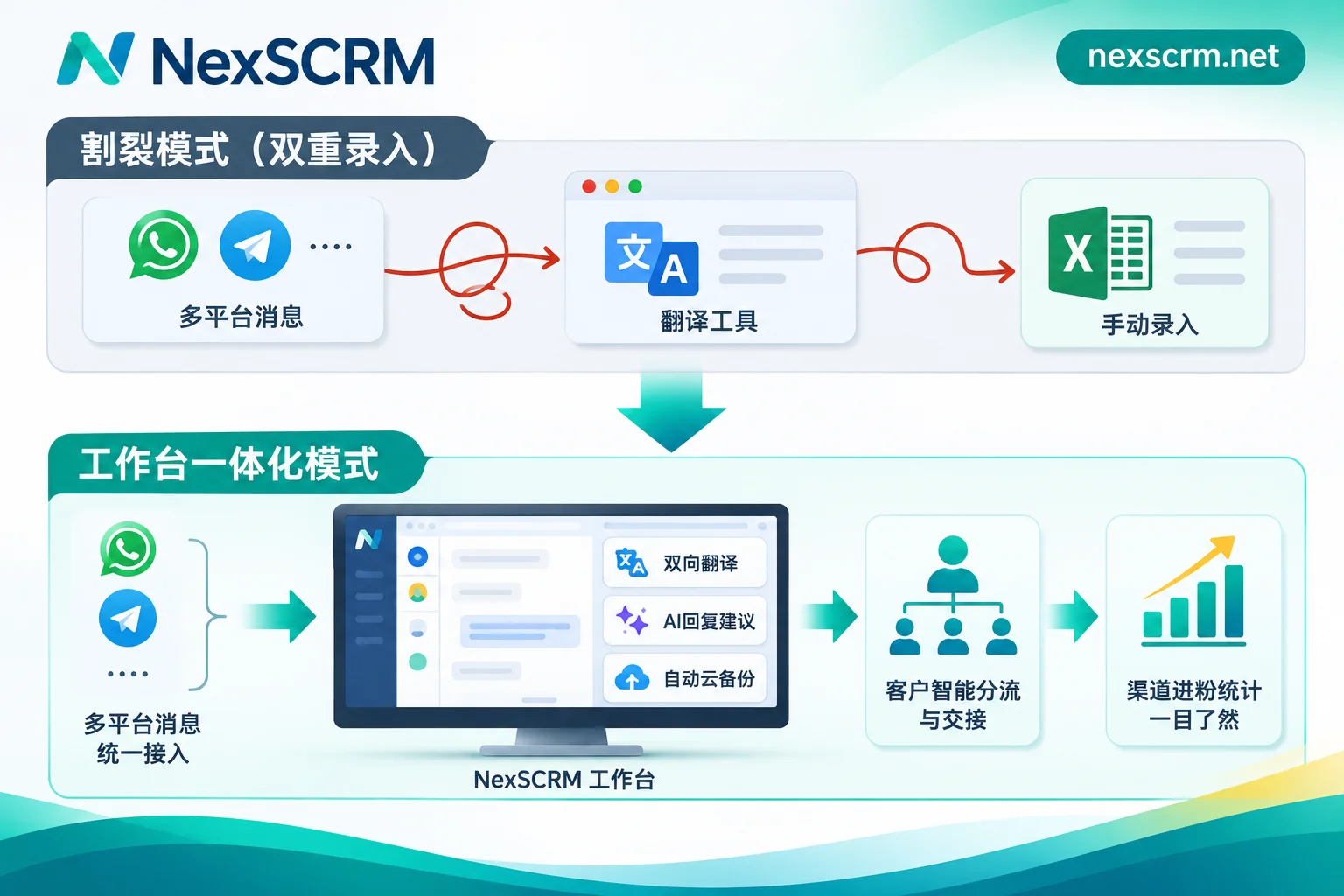
If most customer communication happens on overseas social media like WhatsApp, Telegram, LINE, Zalo, and the company uses a traditional system centered on forms and email approvals, the typical 'double entry' occurs: after sending messages, salespeople must take screenshots, copy key points, and open another system to create records. During peak season, salespeople will inevitably prioritize replying to customers, and the backfilling action always comes last, eventually being abandoned.
2. Tools Only Serve Management, Not Helping Salespeople 'Reply Faster'
For managers, the system can show reports and prevent customer loss; but for salespeople, if opening the system neither saves them the trouble of switching translation software nor helps them quickly access historical quotes and reply templates, then the system is purely 'clock-in supervision'. When frontline staff face multilingual customers from Europe, Southeast Asia, Latin America, etc., they will bypass the system if there's a smoother way.
3. Vague Duplicate Checking and Public Pool Rules, Salespeople Instinctively 'Hide Customers'
Many teams rush to set strict public pool recycling mechanisms upon launch, or lack cross-account duplicate checking. The result: before old customers close, salespeople dare not enter them for fear of being taken away by rules; new and old staff accidentally clash and argue. To keep their followed customers, salespeople simply keep high-intent buyers on personal phones and only enter a few low-intent inquiries to cope with inspections.
4. Accounts Tied to Individuals, Handover and Anti-Leakage Rely on Post-Mortem Checks
If WhatsApp, LINE, Zalo accounts used to receive customers are always logged in on salespeople's personal phones, management cannot see real interactions normally, and once an employee leaves, handover relies on exporting compressed files, or even the account and customers disappear together. No matter how strict the rules, if the leverage is not in the company's hands, it won't be implemented.
How to Break Through? 4 Steps to Turn the Foreign Trade Customer Management System into a 'Handy Workspace'
To overcome the hurdle of 'bought but not used', the key is to transform the system from an 'after-the-fact form-filling tool' into a 'real-time efficiency tool during conversations'. Specifically, reorganize the process in the following 4 steps:
Step 1: First Bring High-Frequency Social Media Communication into a Unified Workspace, Eliminate Double Entry
Before starting the transformation, distinguish two types of business scenarios: backend contract approval, production scheduling, shipping documents, and financial tax rebates are suitable to remain in dedicated ERP or email systems; while frontline high-frequency social media inquiry reception, daily price negotiations, and customer relationship maintenance must achieve 'record automatically wherever you chat'.
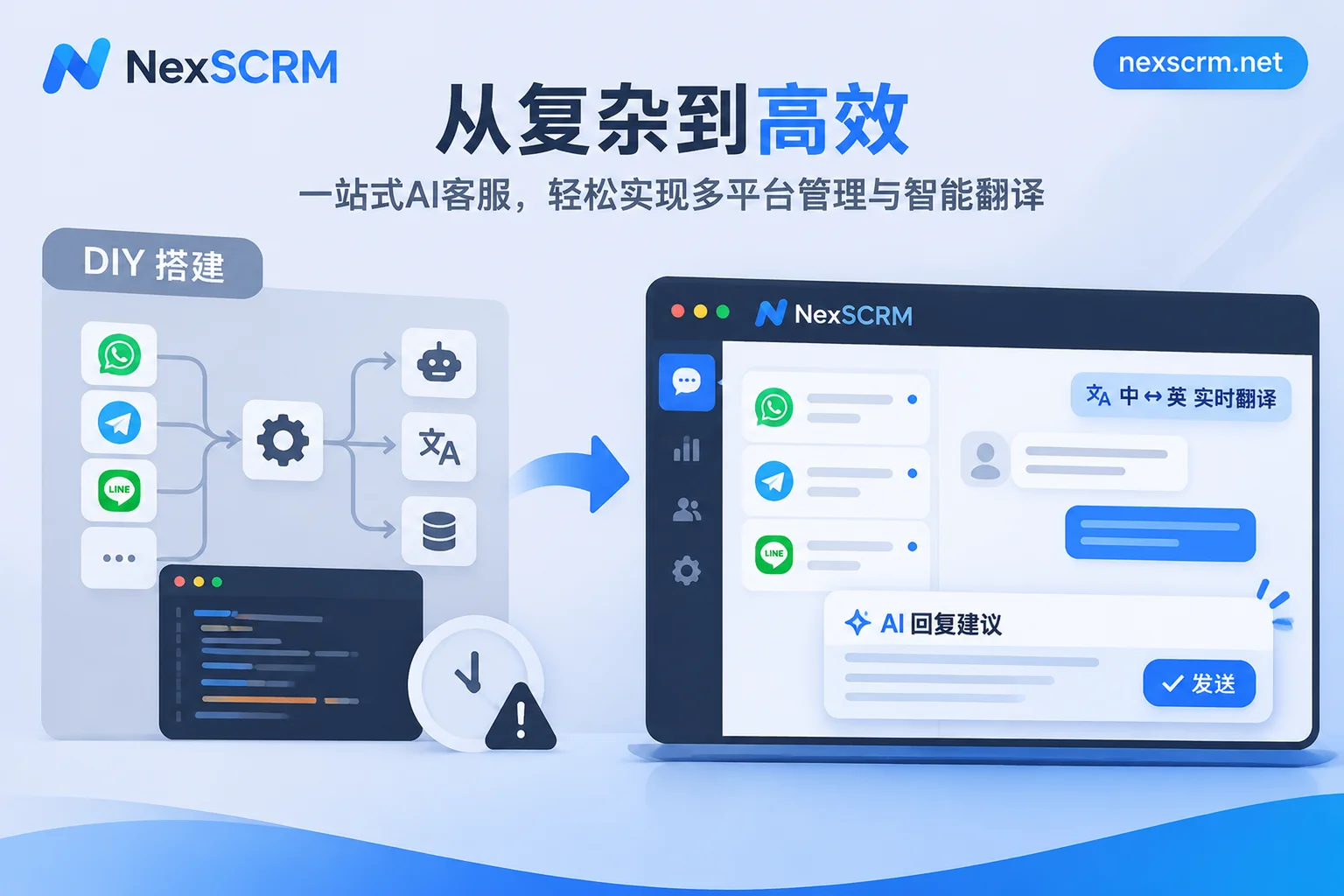
If the team's main customer acquisition and follow-up are concentrated on overseas social media, you can directly use a social SCRM desktop workspace for this link. Take NexSCRM as an example: its Windows desktop client, through a multi-account aggregation workspace, unifies multiple accounts from platforms like WhatsApp (both regular and Business accounts can log in), Telegram, LINE, Zalo, Facebook, Messenger, Instagram, TikTok, etc., into one interface:
- No back-and-forth switching: unified reminders for unread messages across all platforms, chat windows support splitting, merging, and hiding, login status is automatically saved, and no re-scanning is needed after restarting the software;
- Chat as backup: chat records and media files are automatically backed up to the cloud, supervisors or colleagues taking over can directly search historical context by time, contact, or keyword, completely eliminating the repetitive labor of 'manually copying into the system after chatting'.
If your team is still struggling with the applicable boundaries of traditional form-based CRM and social SCRM, you can first refer to this How to Choose a Foreign Trade Customer Management System? From 'Static Record Creation' to 'High-Frequency Social Follow-Up' Selection Guide to clarify the division of labor.
Step 2: Embed Real-Time Translation and AI Scripts into the Window, Making Frontline 'Faster with It Than Without'
To get salespeople to proactively open the system, the most effective way is not to send notifications urging them, but to let the system save them the most annoying repetitive actions every day—such as cross-language communication.
Traditional methods involve opening social web versions and installing third-party browser plugins, which are not only prone to failure but also require back-and-forth screenshots and phone translation for short slang, image quotations, or voice messages. In the NexSCRM workspace:
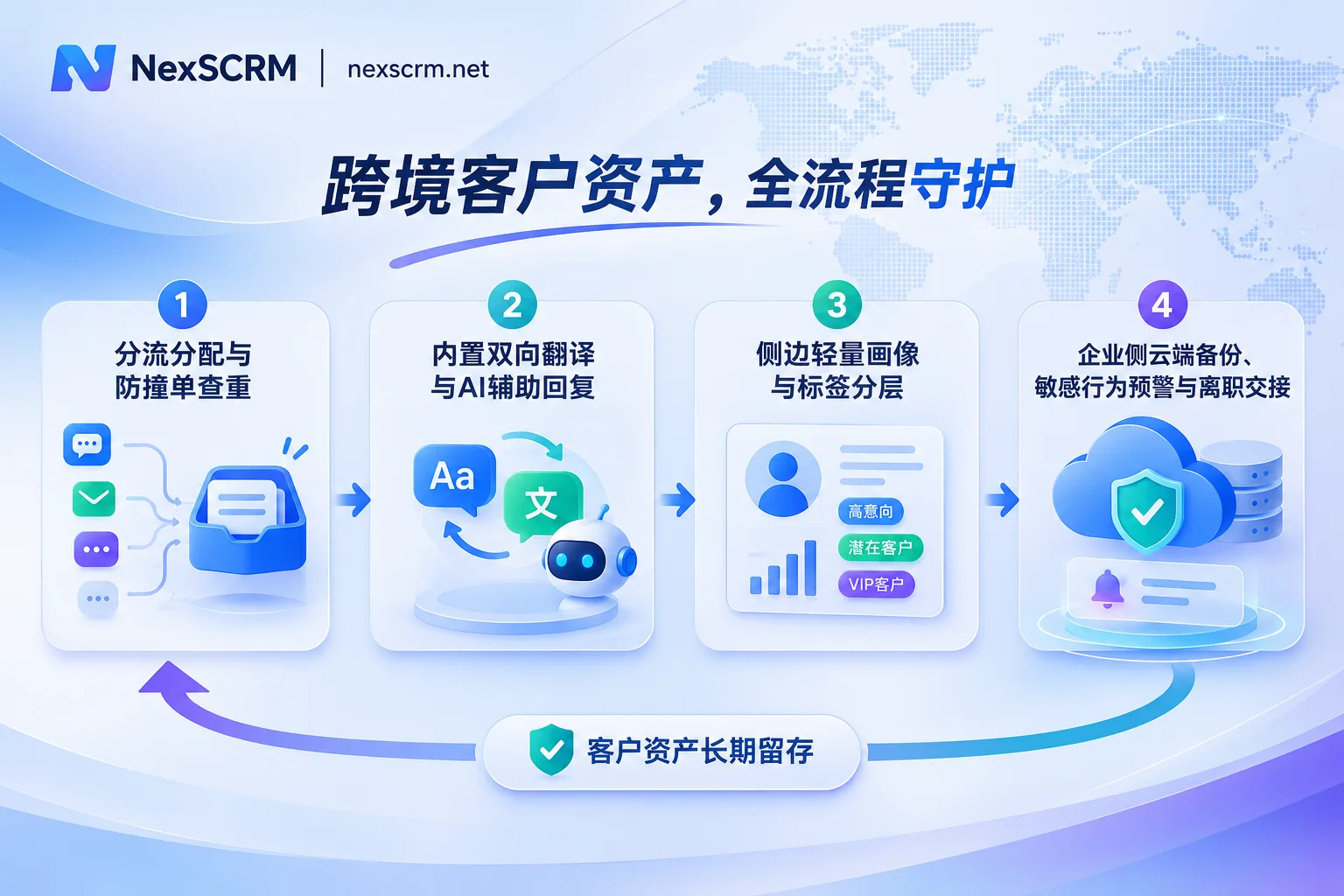
- Built-in two-way real-time translation: multilingual real-time translation is directly built into the desktop client, no browser plugin needed. Foreign languages sent by customers are automatically translated into Chinese, and Chinese typed by salespeople is automatically translated into the customer's language, with both original and translated text retained, and translation language can be set individually per contact, avoiding language mix-ups when one account chats with customers from multiple countries; it also supports switching between Google, Microsoft, DeepL, and AI large model routes, and some versions also support image and voice message translation.
- AI reply suggestions + quick templates: AI scripts and auto-replies generate reply suggestions based on the customer's current question and historical conversation. Salespeople can confirm and send after verifying quotes and delivery dates, retaining human accuracy while greatly reducing typing and organizing foreign language time; combined with personal/public quick reply templates supporting variable replacement and a media asset library, new employees can quickly keep up.
For how to smoothly integrate translation, clause verification, and replies into daily conversation flow, you can also refer to Not Enough Foreign Language? How to Use AI Tools to Keep Up with Overseas Customer Communication.
Step 3: Use 'Lightweight Profiles + Duplicate Checking and Routing' to Clarify Ownership, Eliminate Order Grabbing and Customer Hiding
Once frontline communication is smooth, clear and transparent rules are needed to stabilize team morale:
- Streamline customer fields: In the first two weeks of launch, don't set dozens of required fields; keep only information that truly affects the next round of communication, such as 'source channel, country/language, requested product, follow-up stage';
- Use system duplicate checking to prevent clashes: When customers come in from different platforms or different salesperson accounts, duplicate checking must be done first to avoid two colleagues quoting two different prices to the same buyer;
- Transparent routing rules: New fans from ads, independent sites, or social media are automatically assigned based on predefined tags, sources, and history, and the number of fans and response time are visible and calculable.
In this collaboration, a pragmatic foreign trade customer management system places routing link assignment, contact deduplication, customer tag notes, interaction history, and activity statistics directly on the conversation sidebar, so salespeople can tag while chatting. If the team runs multiple traffic channels simultaneously, you can also combine NexSCRM's fan counter and data dashboard for ticket deduplication and system duplicate checking, avoiding the same customer being counted as a fan or followed up multiple times. For how to set specific gates, see How to Prevent Two Customer Service Reps from Following the Same Customer with Ticket Deduplication.
Step 4: Achieve 'Person-Account Decoupling' and In-Process Internal Control, Keeping Customer Assets on the Company Side
Solving 'customer loss when people leave' by reviewing chat records after the fact is often too late; the key is to achieve 'accounts belong to the company, permissions by role, operations leave traces' in the account architecture.
In NexSCRM's permission design, the main account is responsible for centrally managing platform accounts and allocating online ports; sub-accounts can log in on multiple devices and have visible scopes divided by role; each account runs in an independent fingerprint environment and supports binding session-level proxy IPs, reducing association risks of multiple accounts logging in from the same environment. More importantly:
- No interruption upon resignation: Chat records, customer profiles, and follow-up records are uniformly stored on the enterprise side. After a salesperson transfers or leaves, port permissions are reclaimed or reassigned, and the next colleague can directly see the complete historical context;
- In-process internal control alerts: The system supports data desensitization, sensitive word monitoring, sensitive behavior monitoring (e.g., privately adding contact info, private payments), payment control, operation log auditing, and custom alerts. Without daily manual spot checks, order-leakage risks can be blocked at the moment they occur.
For more details on account ownership, desensitization, and handover, you can read How to Prevent Order Leakage in Foreign Trade? Control the Four Defense Lines: Account Ownership, Number Desensitization, and Resignation Handover.
Pre-Launch 'Anti-Dust' Self-Check List: Verify These 4 Items Before Rolling Out to Everyone
Regardless of which tool you ultimately choose, before officially promoting to the whole team, it is recommended to spend 3 days running a small-scale verification according to the following self-check list:
| Self-Check Item | Passing Line for Implementation | Common Pitfall Practices |
|---|---|---|
| Main Battlefield Alignment | First check whether 70%+ of team communication happens in 'email/ERP' or 'WhatsApp and other social media' | The team chats daily on social media but buys a heavy system only for email and production documents |
| Frontline Efficiency | Have 2 salespeople test-run with desensitized real conversations for 3 days; average reply time significantly decreases | Decide based only on sales demo PPTs without letting frontline test daily operation steps |
| Field Restraint | Initially set only 3–4 core tags and notes; the rest is automatically recorded via chat history | Set 20+ required fields upfront; chat for 3 minutes, fill forms for 5 minutes |
| Trial-and-Error Cost | Start with a small-scale trial based on current main online accounts; expand after it works | Buy dozens of idle seats at once, ending up in a dilemma |
Selection Boundary Tip: If your core needs are production scheduling, procurement inventory, full set of documents, and tax rebate calculation, such heavy backend processes should be handled by professional foreign trade ERP; if your pain points are scattered multi-platform social media accounts, slow minor-language communication, chat records that cannot be retained, and anti-order-leakage, NexSCRM subscribes by number of simultaneous online accounts (ports), supports upgrade or downgrade at any time, and offers a limited-time free trial without a credit card. You can first visit the NexSCRM Pricing and Port Explanation Page or the Windows Client Download Page for details, get the closed loop working with your main reception accounts first, then gradually expand to the whole team (for how ports are calculated, see What Does Port Mean).
Frequently Asked Questions (FAQ)
1. The company already has an email CRM or ERP; do we still need to add social SCRM?
No need to overturn everything; the two can divide labor. Keep formal quotation flow, contract approval, production shipping, and financial reconciliation in the existing email CRM/ERP; connect high-frequency WhatsApp, Telegram, LINE, Zalo conversations to the social SCRM workspace for multilingual reception, automatic backup, and sensitive behavior monitoring. Once the frontend communication is thorough and reaches the sampling or signing stage, then go through the backend document process—this is actually easiest for frontline staff.
2. For a small foreign trade team of only 3–5 people, is it too heavy to implement a system now?
If only one person uses one account to receive a few old customers, a spreadsheet is indeed enough. But as soon as the team starts to have 'two or more people collaboratively following up', 'operating multiple overseas accounts on multiple platforms simultaneously', 'minor-language messages slowing response due to copy-paste', or 'worry about key staff leaving and taking old customers', it's time to adopt a lightweight system. Connecting chat record-keeping and account permissions earlier is much easier than waiting until you have thousands of scattered contacts to import.